Category Archives: Marketing

How to name your SaaS pricing plans? A primer from 89 examples

There are over 7500 SaaS companies according to angel List. Over the last few weeks I had a chance to review 89 of the companies to understand their free to paid conversion and also a chance to talk to 13 companies. What I learned was that time spent on the pricing page was a key indicator of conversion and you can A/B test your pricing page for colors, position of your highest and lowest prices, number of plans showed, feature listing and your call to action.

I did notice that of the 89 companies, 82 of them gave their pricing plans “names”. Each plan had a name so their customers could associate the name with the plan. Most (over 80%) used standard and conventional names but it was interesting to see the spread. Here is the data from 89 companies and 251 plans.
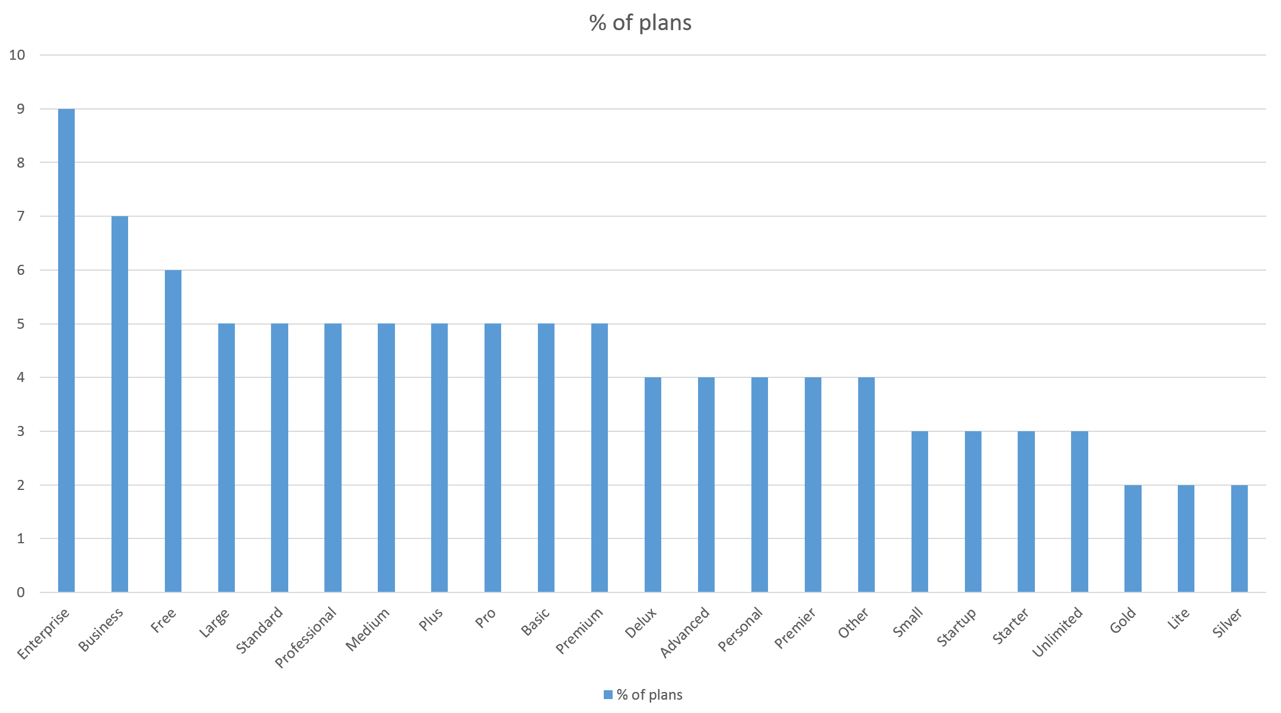
Names of SaaS Pricing Plans

The most important points you want to take away are the following:

1. Even though SMB and SOHO (Small Office, Home Office) users are the first few to sign up for a SaaS service, 3 of the top 5 names were named Enterprise and Business and Large. I would imagine this has to do more with the inside out naming (the plan is large or enterprise, not the company buying it).

2. The plans named “Small or equivalent” were largely in the bottom quartile of the distribution. Even though over 70% of companies had 3 plans, only 35% of them named the smallest plan as “Startup”, “Starter” or “Lite”. The most common starting plan was named “Standard”.

3. Of the 20% of companies that used “custom” names like Boutique, Tyrannosaurs, or Garden named all their plans uniquely. The surprising element of the companies that used custom names was that most of them had images to convey the “size” of the plan.

There were some other surprising things I learned as well in my discussions.

1. In naming plans, understanding the end customer’s billing and invoicing was key. Most customers got an email invoice (a few sent PDF invoices) and they would either file them or expense those invoices (if < $50) or would send the invoices to an accounting team.

Ensuring that the “accounting” team did not ask any questions was the consistent mention among 3 of the startups with custom names for plans.

2. Naming the plans to support your payment gateway is also critical. Getting too cute with names means the payment gateway will support a higher refund request that were marginal.

3. Many of the companies had to setup standard names so their marketing and product management teams could do better analytics and research on the backend, consistent with their reporting. Surprisingly, if the names were “standard” the companies found it easier to have a conversation to understand conversion rates, pricing options and changes with their finance teams, design teams and other outsourced companies as well.

Time spent on pricing page is the #1 early indicator of your SaaS freemium conversion rate

When I looked at 89 companies to learn how to convert freemium customers to paid, I also reached out to 13 of them to understand what drives the conversion.

Any early indicator to better conversion from viewing the pricing page to signing up for a plan was time spent on the pricing page.

If customers spent very little time (less than any other page) on your pricing page, then they would either not sign up or sign up for the “free plan”.

If customers spent too much time (more than any other page) then they would not sign up at all.

If customers spent time in the “middle zone” of your other pages, they conversion rate to a paid plan was most likely.

This was even if you had a free option prominently featured on your pricing page.

So how do you figure that out. I am assuming most people start out using Google analytics.

Google analytics: Time spent on pages

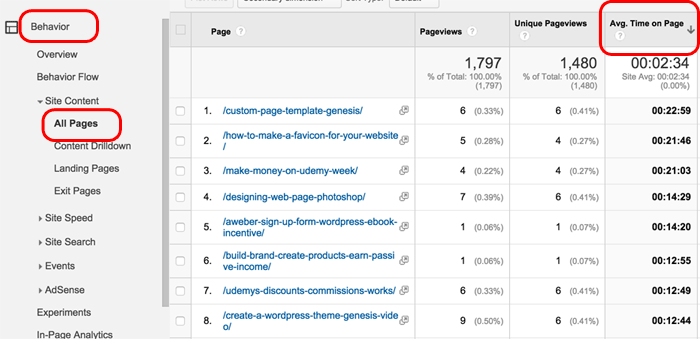
On your Google analytics page you can navigate to All pages and look at the average time spent on page. (see below).

Navigating to Time spent on page in Google Analytics

So why is this the case? There are 3 major reasons I learned:

1. More time spent usually meant more options and more confusion for customers. When customers were given 3 pricing options (one of them being free) the conversions were higher, than when there were 5 pricing options. Not surprisingly even when the “free plan” was displayed “under the fold”, the conversions were the same. See below for what “Below the Fold” means.

Free plan as an option
Free plan below the fold as an option

2. More time spent on the page also indicated customers were reviewing other competitive options on other tabs. While less time meant customers had already made up their mind, so they were more likely to just “sign up and try”, it also meant the customer liked the options enough to try.

3. If the pricing option was the place where customers spent the least amount of time, than other pages, that was an indication that the customers were not ready to sign up and were “window shopping” alone. Either they did not have the pain point that your product addressed, or they were not in as much pain to even try the solution.

There were 2 exceptions that I found consistently among all the marketers I spoke with.

Not surprisingly, if the “referral source” of the customer was a search marketing campaign, and the time spent was the least, then the conversion rates were much higher than the referral sources.

If the referral source, was social and the time spent was more than other pages, then the conversion rates were much higher as well.

You can find referral source on Google analytics and correlate that to the time spent on pages.

Referral Source Google Analytics

Startups as a target market – a framework for thinking about #entrepreneurs as customers

In the last 5 years, I had the chance to look at many products which are targeted at others startups. Unless your product is an absolute utility (MailChimp, AWS, Google Analytics, Launch Rock or Survey Monkey), I’d say avoid this market with products that cost money.

1. Startups tend not to have a lot of have no money.

2. Startup founders believe they can “build your product themselves” and it will cost them much less and only need 10% of your features.

3. If they end up paying your churn rate (number of customers who wont renew) will be large since many will shut down.

That said, if you still believe you want to do this, then I put a framework together for you to think about your pricing and business model.

Business models for targeting Startups as a customer

The two main criteria for thinking about this is time and money.

Your customers either have lots of them or none at all.

What I have found is that if your customer has no time and no money (typical of engineering teams or hackers at startups), then the only solution that works will be a “free” or open source. Some times you might want collaboration features (Slack) for which people might pay, but it is rare.

When your customer has money, but not time (Customer acquisition and User Growth hacking teams) they will tend to pay, and freemium models work very well here. E.g. Mailchimp or Intercom.

When your customer has lots of time but not money, they will likely do it themselves, so only ad supported models work. Most products aimed at founders end up in this bracket. The sales cycle is very unpredictable and it is likely the customer is not going to pay.

Finally when the customer has both time and money (I dont know any startup that does), the sales cycles are extremely long. The deals will be large, but you will be expected to hand hold the customer and hire a sales person to “sell” them the product.

Another way to think about the model is the type of sales model you want to adopt.

If your customer has no time or money, expect to only get customer via word of mouth, otherwise, your model wont support the LTV since there’s no value in the LTV. You CAC (Customer Acquisition Costs) need to be as close to zero.

If your customer has time, but no money, you should still not hire sales people but put social features into the product to help enable virality and word of mouth.

If your customer has money, but not the time, you can actually spend money on advertising, using Facebook, SEM and other techniques to acquire customers and have an inside sales team to help close.

If your customer has time and money, you will need to hire a field sales team and expect the deals to be much larger in size. You will likely have to create a lot of collateral and sales tools to support them through the sales cycle.

The ultimate list of questions about “market research” for a #startup asked by 30+ Venture capitalists

I had a chance over the last 3 weeks to talk to many colleagues and associates in the Venture industry. Most were smaller, seed funds, with the largest fund size at $35 Million and the smallest at $8 Million.

They have between them about 210 companies they have invested seed capital in, with the average check size being about $315K. Over 70% were in the Silicon Valley.

The most important insight I gathered from my discussions was that if an entrepreneur was not looking to raise a follow on round after raising a seed round from a Micro VC, they were likely to be a much smaller company and hence not interesting enough for the seed investors.

If you are going after a small market, or slow growth one, your chances of getting funded by a Micro VC were negligible.

Which makes sense, but I think most entrepreneurs I speak to have the incorrect perception that Micro VC’s or seed funds as those that invest in smaller opportunities.

That cannot be further from the truth.

Micro VC’s or seed funds write earlier stage, smaller checks, but they are looking for the large, unicorns, as well, only earlier.

The number one question then that all the seed investors had was about the market.

It was not a simple question about market size alone.

So I set out to ask them about all the questions they had about a “startup’s market” and have documented them below.

As an entrepreneur, you need to review as many of these questions, but dont expect to be asked all these questions. It is likely a subset of these that your investor will likely ask you. It serves you best to review all these questions though.

Some of them may be redundant, but the fact that you can get the same question asked multiple times in different ways indicates that your potential investors will want to triage and understand the market a lot better before they make the bet.

  1. Is the market clearly identifiable (e.g. are there users who are willing to pay)?
  2. What is the size of the market (bottom up and top down)?
  3. How fast is the market growing (current growth trends)?
  4. How quickly will the market grow (potential for growth)?
  5. By what methods will the startup be able to reach it (are there high costs to get capture the market)?
  6. Can the market be segmented (are there lower hanging fruits to be had)?
  7. What types of people (demographic profile of buyers) buy this product/service in this market?
  8. Does the product/service have appeal based on geography (is this a first world solution)?
  9. What do potential or existing customers like about curren products/services?
  10. How quickly are other products (competitive growth) in the market growing?
  11. What makes the product/service unique relative to others in the marketplace (is there a chance the startup can grow quicker)?
  12. Do we have expertise (knowledge, expertise, etc.) in this market to help?
  13. Do we have connections in this market so make a difference?
  14. What are current buyers paying for comparable products/services?
  15. What is required to succeed in this market?
  16. How many competitors will the startup be competing against?
  17. Are there big incumbents in this market?
  18. How quickly are the incumbents growing?
  19. Has there been innovation in this market over the last few years / decades?
  20. Can the market support another player?
  21. How do competitors reach the market?
  22. What does the competitive landscape look like?
  23. Can this company achieve more than their fair share of market?
  24. Is the industry growing in size?
  25. What are other current trends within the industry?
  26. Who are the existing market leaders within the industry, and why are they successful?
  27. What type of marketing strategies are prevalent (Is the cost of acquiring customers high) within the industry?
  28. Is the industry seasonal (e.g. more food is catered during holidays)?
  29. Are there regulations (e.g. Uber and local taxi medallions) that affect the industry?
  30. Is there customer loyalty (e.g. it is hard to unseat ADP from payroll) within the industry?
  31. Is the industry sensitive to economic fluctuations (e.g. Match.com decreases matching during recessions)?
  32. Are there technological changes happening (e.g. Obamacare and patient records) or required in the industry?
  33. What are the financial characteristics (average selling price of products, average inventory turn, etc) of the industry?

The top 5 tips to making a successful customer testimonial video

With the rise of video, many entrepreneurs are looking to find a new way to bring social proof to their apps and websites.

While the overview video is the best way to introduce your company or product, and there are various types of introduction videos you could use to showcase your startup, the customer testimonial needs to do three things:

1. Give prospects confidence that there are real people using the product, who are similar to themselves.

2. Help potential customers understand if this might “work in their environment”.

3. Outline to prospects what pain points your product may help solve in their own words and using their language.

It is important to script the customer testimonial video as well, and ensure that it looks and feels very professionally done.

Here are the top 5 tips I have learned by doing customer testimonial videos:

1. Use “users” in your videos and have them explain their day in the life pain that your product solves, instead of the decision maker taking in abstract terms of how your product helps the company.

2. Have more than one person from your customer be a part of the video. Or have 2-3 different customers be part of the same video. I have found that in 2 occasions, the “customer” who I featured in my video left the company and I had to remove the video (the customer requested it, since they did not want mis-representation) which cost us much angst.

3. To avoid the problem of having to remove the video completely because your “user” or customer leaves the company, shoot each segment of the video separately and ensure you will have the segments “individually produced”. That way if you have to produce the video by editing out a segment (because people leave or have new people appear) you can still do that.

4. Show your product being used by the customer in their office in your video. This ensures that people believe they are not paid actors, and instead are actually using the product for their daily business. I prefer to use 2-3 quick shots (pan and zoom) of the person in front of the computer or mobile phone clicking on certain sections of your product. When you use users in video, show their company’s logo or workspace to ensure the video is realistic.

5. Breakup your video into 5 segments – with each section being able to stand on its own. That way if you need multiple “cuts” – e.g. 30 second, 1 min, 1.5 min or 2 min you can do “stitch” them together easily.

Here are the 5 sections I recommend:

a) the pain point – preferably 3 thing they do in their day in the life, which hassles them. E.g. “It would take me 5 hours to generate the influencer list and I had to go to the search engine, then pull reports into Excel”.

b) their current solution or what they did before your product. E.g. “Our current solution was a client server product which did not allow our management team to view the reports on their mobile phone”.

c) their use of your solution – how are the using it daily, or how does it fit into their work processes. e.g. “With BuzzGain, we can put in 3-5 keywords, then understand who the right influencers are and quickly in a matter of minutes obtain the list of key outlets and publications. This helps us respond to client briefs quicker.”

d) how your product has solved the problem – the benefits they have obtained, preferably quantified in ROI terms – for example “after using BuzzGain our time spent on building reports reduced by 5 hours a week”, or “after using ABC product our sales increased by 2%”.

e) why do they like the solution OR why would they recommend your solution. E.g. “I would highly recommend BuzzGain because it helps me in my role daily and saves us time, which helps me focus on building client relationships instead of collating reports”.

Bonus tip: Ensure that you have the full title and correct spelling of your customers in your video at the bottom each time you introduce them on the video for 3-5 seconds. Most people do it only once at the beginning, but I have found, that many people do not watch video intently enough to remember to focus on the name and title. It is always better to show the name and tile of the customer at the bottom of your screen for 2-3 times during your video.

Here is a great example from GoodData of a customer testimonial video I like.

How to write the script for your #startup overview video (with examples)

Before you produce the overview video for your startup, you will need to understand what its purpose is and that will dictate the type of video you will create.

When I produced the 2 min video for BuzzGain, the first thing that surprised me the most was how quickly 2 minutes flies by.

There are 3 important things I learned during the process of creating the video, which will help you put together the outline of your video before you actually produce it. I still cringe at my first video produced and made so many mistakes (voice clarity, etc), which I wish I knew before.

1. The outline needs to be clear about the only ONE outcome you can achieve – e.g.to get people to understand what your product does or to show them your demo, and ONE call to action – signup for your service, signup for a newsletter, subscribe to your blog, etc.

Most entrepreneurs forget this important item. There’s only ONE thing you can achieve. You might as well figure out what it is and focus on that alone.

2. For a 2 minute video the maximum number of sentences you can comfortably speak and have people understand is less than 40. This should force you to choose your words carefully and ensure that you dont over engineer the demo video. Dont try to cram too many ideas, concepts or topics in your overview video.

Speaking faster than normal does not count, and it makes the video difficult to watch.

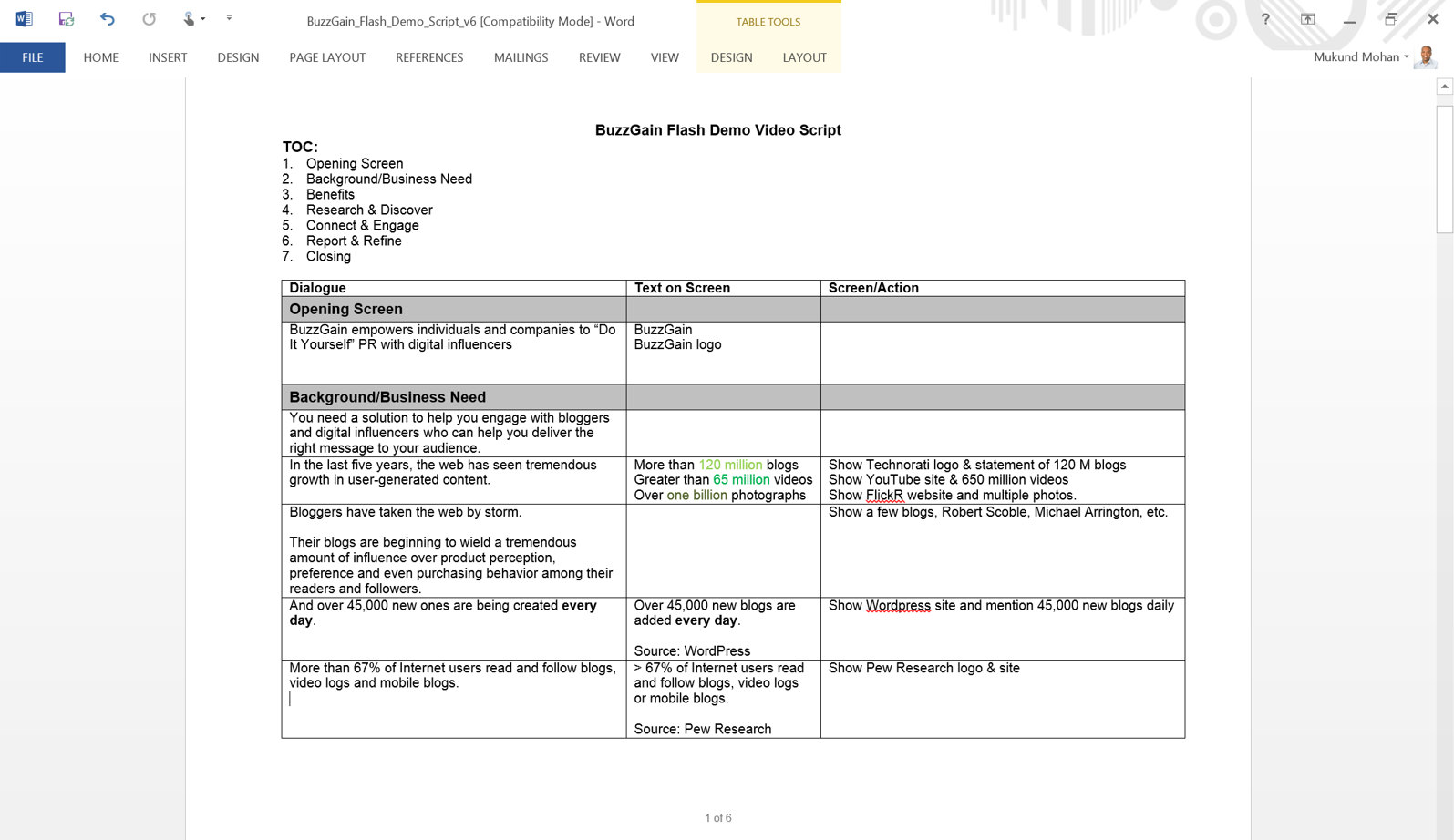
3. The best way to put an outline is to follow the Say this, Show this approach. In this approach, you have a 2 column word document where you will write exactly what you will say (audio) and on the right column what will be shown (visual) on the screen.

Overview Video Script

The alternative scrip format that I followed above uses a 3 column format with the optional 3rd column to show the text on the screen to go with the visual.

Here is the set of steps I took to write and produce the video:

1. Writing the goal: Time taken 15 minutes to write and 3 days to refine. I had to test the goal and understand who the real audience was for the video. There were 5 things I had to be absolutely clear about:

  • Who was the right audience for this overview video? – was it the PR Associate, the PR manager, the owner of the PR firm, or the communications manager at the large company?
  • What was the goal of this video? – to tell them about our product, to give them an overview so they know what it does
  • What was the desired outcome and my call to action? Did I want to have them sign up for BuzzGain? Did I want them to subscribe to the blog – since the production of the video happened before the product was ready or did I want them to take the next step – which was to view the next video on BuzzGain’s technology and how it worked.
  • What was the desired flow? What problem did I have to surface (based on my audience)? What pain point did I have to mention? How did I have to show the solution? Did I have to show the differentiation?
  • What were the assets I had to produce to make the video happen? Besides the flow what were the screen shots, the text, the logos, etc. that I needed to have ready?

Here is the original BuzzGain_Flash_Demo_Script_v6.

You will notice, that it has the 3 column format and actual screen shots.

2. Practicing the story telling (audio) and ensuring I hit the key points before the visuals

  • Speak into a microphone and record the entire script 3-4 times before you go and produce it with the video.
  • Play that to 10 people (without the visuals) to get feedback on the script and the voice, tone, key points etc.

The key reason for this step is to ensure that your story can be told even without the visuals. That way you can use the same script when you meet folks at networking events and dont have the visuals to go with it.

3. Going to the studio to actually record the audio in production quality.

4. Putting together the screen shots or PowerPoint slides that go along with the video.

5. Producing the video by mixing the audio and visuals. During that time (2009) I had Camtasia Studio and Jing project as tools to help produce this. I loved Jing project, but migrated to Studio since I found it more feature rich. There are many other tools you can use as well.

6. Uploading the video on YouTube after refining it multiple times and producing 7 useless videos which I did not like. Today I’d use a high quality HD video hosting site like Vimeo.

7. Embedding the video on our front page of the website using YouTube embed.

How much does it cost to get an overview video done? By type of video

When creating startup overview videos, “begin with an end in mind” is more true than anything else. I have noticed by reviewing over 30 company videos from the latest YC cohort, that the length of the videos is directly proportional to the level of commitment required for the call to action. If the level of commitment requires you to sign up for a 30 min demo, the video was longer (3 min) or if it required you to sign up for the laundry service (3.5 min) versus it required you to download a free app (2 min).

The call to action (what you expect your visitors to do next) determines the length of your overview video.

While we talked about format of videos yesterday, today I want to focus on the categories of videos.

There are 5 types of videos, with different goals and slightly different calls to action.

The overview video is an introduction to the company, the demo video would like you to sign up for a free trial, the tutorial video helps you get further along on the onboarding process, while the testimonial video is social proof, requesting you to explore pricing and finally the storytelling video urges you to get on a waiting list.

Most, if not all of the videos ask you to give them something in return for watching the video – that’s typically an email address.

1. Overview: Typically this video is the first a company creates because they have “finally” nailed what they do, for who and why it matters. This type of video might involve professional cameraman, producer and multiple shots and actors at times.

Cost – $5000 and above.

2. Demo: In this type of video there are 2 formats – one that’s professionally done and one that’s done by the founders. In the professional done video, the voice over is usually an actor and the script is written by them after input from the founders.

Cost – $0 (DIY – your time is precious though) to $3000

3. Tutorial: Most tutorial videos are made by the team – either a marketing person in your company or by the founders themselves. Since many tutorials are typically made for different aspects of the product, these tend to be self made and cost much less to produce and deliver.

Cost – $500 to $3000 – depending on the amount of time to produce. Expect every minute of video to take 1 to 2 hours of production.

4. Testimonial

5. Storytelling: These  are typically the most expensive videos to make, most being professionally produced, longer format and have actors or hired artists as well. They tell a story in the day in the life of a typical user.

Cost: From $5000 to $15000 depending on the number of hired artists, production quality and required animation.

Take a look at this storytelling video as well for a professionally done example. (Sorry Embeds were not permitted).

What I learned from looking at 30 startup videos of the recent YC batch

Video is the fastest growing medium on the mobile web. Turns out even if you are a B2B company these days, the word-of-mouth affiliation you need is often easier to achieve if you have a video more than text, audio or images. Of the 114 companies in the lastest YC cohort I looked at, most had a video on their website. I focused on the ones that had done a good job of explaining their overview using video.

Not surprisingly even CIO’s and traditional B2B buyers also prefer to view videos to reading whitepapers these days.

As a startup, if you are in the consumer space, I’d wager that you want to get your overview video faster than your “text website” which might be SEO friendly. Why?

Most of the early influencers and younger audiences are using YouTube as their search engine more than Google.

So, having reviewed 30+ videos from startups that graduated from YC last cohort, what did I learn about the types and kinds of videos you need for your startup?

I am going to assume that you are just launching your app / service or about to launch it soon. What you are trying to do in less than 2 min is give potential customers and prospects a chance to understand the problem you solve, how you solve it uniquely and how they benefit from the problem solved. I have noticed these 5 types of videos that startups have used so far.

Types of Overview Videos

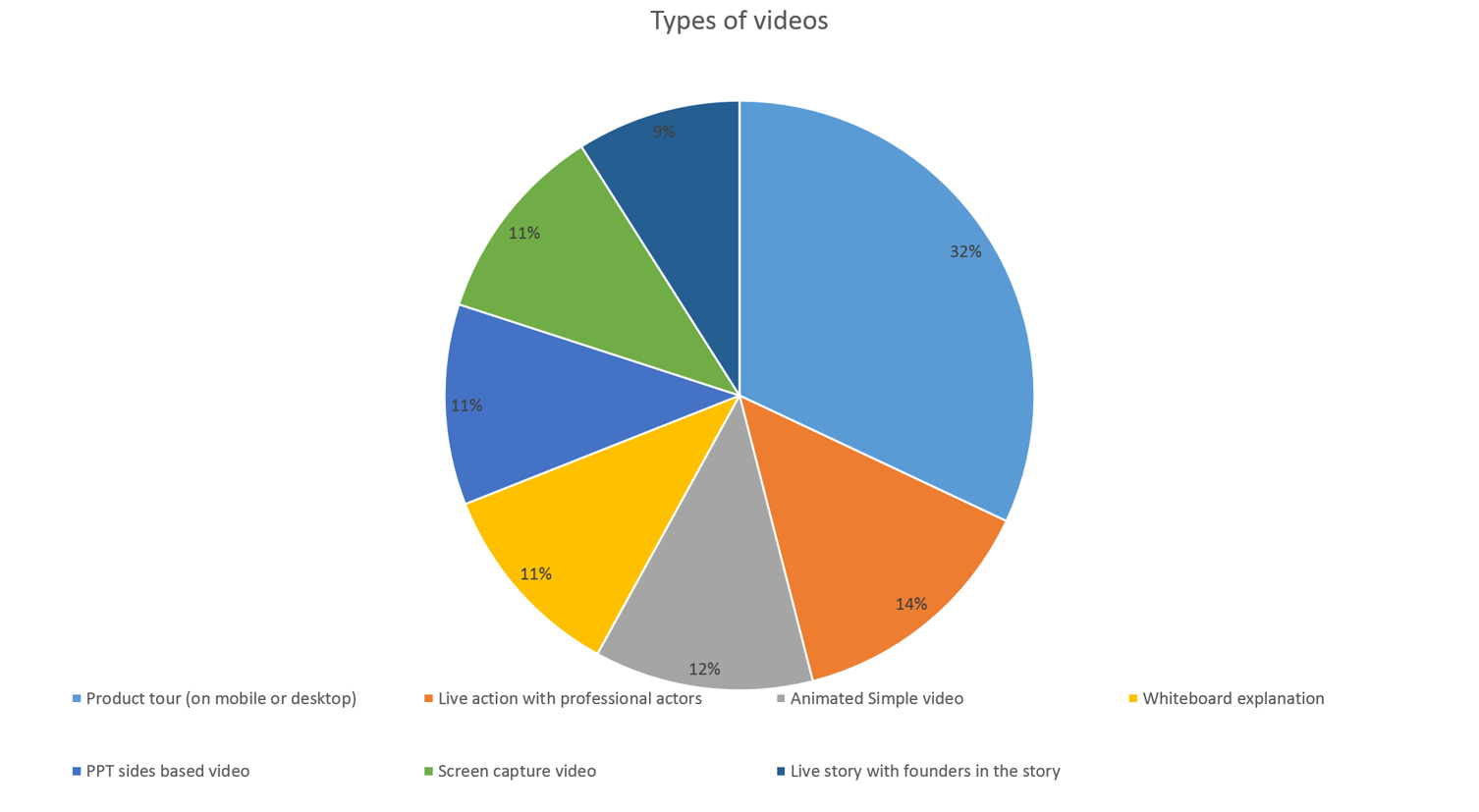
In most cases the “goldilocks” overview is less than 2 minutes and there are 7 popular formats for these videos:

1. Product tour on mobile or web: In this type of video, there is a person “showing” the app on their mobile with some upbeat background music. In many ways it is more a demo than necessarily a overview, but it serves the purpose well to get people to understand “what the product or company does”. It was hard to figure out which of these were actually using the product live versus screen captures, but slick production was the key.

2. Live action video with professional actors: As it suggest these are much more produced and directed, and will cost your more, but they tend to show “real” product users in “real” scenarios. I think these are pretty expensive if you are bootstrapped, costing upwards of $10K in most cases, but among consumer Internet (eCommerce especially) startups they seem to be pretty popular.


3. Animated Simple video: In this type of video, there are props used with simple cutouts and voice over. In most of these videos, I found that the startups used animation to to explain abstract complex, or non-intuitive problems, largely in B2B scenarios.


4. Whiteboard explanation: Fairly common as well, is two or sometimes just one person going to the whiteboard explaining what is it the startup does. In many cases, these are fairly technical products and companies, so Open Source product companies tend to use them the most.

5. PPT based slide videos. Used when the founders are not technical, bootstrapped and have strong B2B backgrounds in sales or operations. Since they are unable to put a professional looking video, these are used by folks who dont have a shipping product yet. They are not very effective, but I think they are better than text based pages.

6. Screen capture: Typical to the #2 type, these “show” product, but the screen capture videos are less professionally done. Authentic to a fault, they tend to be quickly done, rather poorly produced, but effective to “demo” the product more than give an overview.

7. Live story with founders: Rarely used, but common in Kickstarter campaigns, these are when the founder (s) are a key part of the sales pitch.


Over the next few days I will showcase a series of posts on the use of video, the types of video and some techniques I use to produce better startup showcase videos.

The “Goldilocks” overview presentation for #startups – not too technical, not too fluffy

Many #developer founders struggle with their pitch to anyone but their customers. Too technical and they end up losing 90% of their audience, like investors or potential employees not in the engineering team. Too high-level and everyone thinks they are hand waving.

The problem is fairly acute in B2B companies overall – if your product is aimed at a very technical audience – for example finance managers, statisticians, or climatologists, then you will end up getting “into the details”, in your overview pitch.

The right level of presentation is very hard to get right. It almost seems likes a “Goldilocks presentation” – not too technical, which most people wont get and neither too fluffy – which many dismiss as “does not get the problem right”.

The simple answer is to keep it on the right side of technical. From my experience it is better to be specific and articulate than come off as condescending or “hand wavy”.

The good thing is that this also will ensure that if some folks in the audience dont get it, they are probably not the right target for you.

So, the question is what is the right level of technical? The answer wont be easy, but the best thing to do is to A/B test your positioning with the soft audiences first.

The most important part to remember is that it is not only investors who are the audience you are initially trying to get on board. 

Sometimes senior executives in your potential customer base have a problem relating to very technical presentations, as well.

If your customers dont get your pitch – again either because it is too technical or too fluffy, then I’d recommend you revisit the lucidity of your presentation.

Let me give a specific example of one startup we are helping now. They target a very new and a developer audience. Most of what they end up doing is “Educating” their audience.

When they talk to potential customers at the right level in the organization, the bells toll, but in many cases when they describe their problem statement to folks higher in the org of their target customer base, things get difficult.

Here is what I recommend:

Most people understand the BEFORE and AFTER story the best for representing technical products.

If you have to explain a trend you might want to articulate that quickly, but I’d focus a lot on sharing what the “CURRENT” problem is – which is the BEFORE situation.

For example. The pitch they were using was to show code screen shots of deployment tools and how their product was much better. That went well with some developers, but they were unable to sell that to the managers who needed to understand how it will help developers.

Most managers, when they did not understand it clearly enough, dismissed the tool as “nice to have”.

Here is a better “framing” of the problem in my mind.

1) Your developers need to understand agile methodology since they are being asked to ship products quicker and in incremental fashion instead of once every 6 months.

2) Developers like the agile methodology but your systems are built for the waterfall approach

3) If you use the tools like abc and def which were built for the waterfall methodology, the compromises they will show up in more outages, more defects and slower release cycles.

This helps put a context to the person listening to the pitch even if they are not using the tool daily.

You will still have to tailor your “standard” pitch so it appeals to the audience, but this is at the “right level”. Again, you want to keep testing, until you can get head nods quickly, within the first 1-3 minutes.

That’s when you know you have the pitch “Just right”.

The first 30 seconds of your “demo day” pitch – sell to the heart, mind and wallet

There are 2 schools of thought that most people assume are contradictory.

First that, people buy from other people – so folks buy because they like the other person and if they like the person they will buy anything (or everything from that person).

The other school of thought is that people want to buy from a trusted brand, so even if the individual goes away the business remains to support what they bought.

Actually they are both true.

People dont just buy from other people, they buy from people they like.

Which brings me to the demo day pitch. If you dont create an emotional connect with your audience quickly enough (first 30 seconds) you are likely to be perceived as wooden, robotic or impersonal.

The best entrepreneurs realize they are saleswomen and show-women first and CEO’s next. That does not mean they are “watch your pocket near them”, sales people.

One of the things I learned very early in my sales career was that you need to appeal to the “heart, mind and the wallet”. That means, you have to emotionally connect with your buyer, then appeal to their brain, by solving the problem they have and finally ensuring they are willing to part with money to solve that problem.

Hopefully if you solve a problem that they have, then parting with money is an automatic, but if you dont appeal to them emotionally (or to their heart), then they will likely try and make the decision purely on the merits of your product, company, website, etc.

That’s not necessarily a bad thing for some people, but if the emotional connect does not exist, then they will look for reasons to not want to do the deal, if it does not meet any of their criteria (or “features”).

The first thing your audience at the demo day is trying to do is answer the question – “Is this worth my time, or should I go back to looking at my smartphone and get distracted for a few minutes”?

The best way to answer the question is to appeal to them with a problem they likely have themselves or ensure they know someone with this problem.

After that they are evaluating if the problem is large enough – market.

The last thing they try to assess is if you are the right team to solve it.

Surprisingly all this happens in seconds if not minutes.

I have seen many investors decide in the first 60 seconds if they want to “Work with the person” and then do their “due diligence” over the next few weeks, months or quarters to consummate the deal.

So the best thing you can do for yourself and your startup is to tell a personal story that appeals to your audience, with something they can relate to.

See to their heart first, then the mind and finally their wallet.