Google MusicLM is a large language model to create music with words. It is in beta right now.
Here are the 2 music pieces I created. One for Bollywood and another for dance.


Google MusicLM is a large language model to create music with words. It is in beta right now.
Here are the 2 music pieces I created. One for Bollywood and another for dance.
Mid Journey and DALL-E are the most popular of the 50+ Generative AI image products.

The others that are also getting mention are Starry AI and Stable Diffusion.
Each of them have strengths in different areas but all of them get hands wrong.

This week on the app Blind there were several discussions about salaries. Specifically if technology engineer salaries have peaked.

Google, Meta and Microsoft in particular, and some other companies in the valley, were known to pay over $1 Million for senior developers. In 2019, Google had 21 engineers making over a million and that number has most certainly gone up since. Similarly Facebook was known to have over 25 engineers making salaries over a million dollars (outside of stock RSUs and options).
To be fair, in the valley, a million dollars is a lot, but not unusual.
The discussion on Blind, the anonymous networking app, was if mid-level and senior engineers will no longer see $500K – $1M salaries without becoming Directors or VPs.
There are 3 trends to consider before I came to the conclusion that software development salaries will become more like Hollywood or professional sports salaries.
Few people at the top make a lot of money, while most B list actors make decent, but not more than the median income.
2. The use of Artificial intelligence tools such as CoPilot and Tabnine will reduce the number of developers needed, as AI increasingly does a lot of the basic code output. This means a 10X developer will have to make 10X more than the average. If the average developer makes $150K, it makes sense for the 10X developer to make more than a million dollars.
3. 90% of the skills developers possess will become worth a tenth (e.g. actual writing of code that is reusable), but 10% of their skills (e.g. communicating with users and rapid iteration) will become more 10X more valuable.
Given these 3 trends, I predict that most developers will see their salaries remain same ($150K or so in the US as the median), but there will be far fewer developers in each team & organization.
At the same time a 1or 2 developers in each team or organization will make $1 million or more, even though they are not the manager.

In the poll yesterday by Zigantic, over 40% of developer (n=1362) expected their salaries to go dramatically lower. Which I dont think will happen.
While I understand the fear developers have, that’s not what I think is the way CEO’s and managers think. To prevent loss of morale, they will just hire fewer developers and make the current developers do more with AI.
I have a network of about a thousand entrepreneurs, founders, and small business owners who read my blog posts daily of the 114K subscribers to this blog. I get a chance to ask them questions and poll them once a month or sometimes more often.
Over the last few months as part of a project, I have been polling them frequently and asking them about AI and the impact at work. Most of these are software entrepreneurs (a smaller number are eCommerce founders).
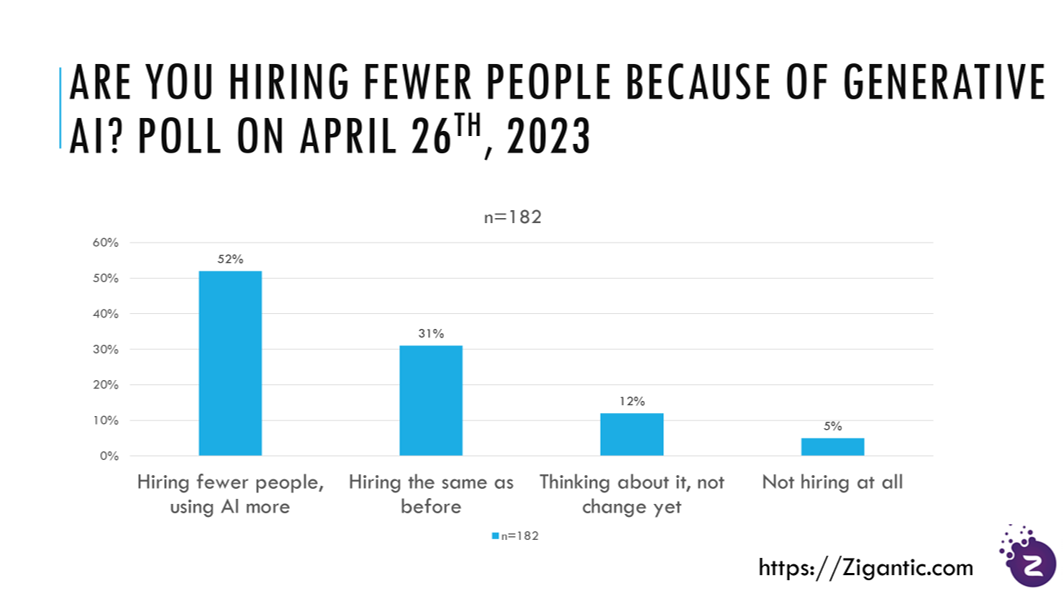
The poll I conducted yesterday was:
“Are you reducing the number of people you hire because of ChatGPT, generative AI and other LLM – Large Language Models”?
– generated many emails and a few phone conversations.
One particular example was telling which a friend related to me yesterday.
The company has 10 people, 8 of them are developers. The CEO of the company provided subscriptions to ChatGPT ($20 / month) and GitHub Copilot ($19 / month) to all the developers and mentioned that he won’t hire for another year and instead the developers could use the AI tools to do their job.
All around goodness.
AI is already starting to reduce the number of jobs. It is just doing it a little slowly.

There are many hustle bros on social media who will tell you that they have the secret “prompts” and that you are doing it all wrong. To get their secret prompts you have to attend their “course” or pay them for their “prompt guidebook”.
I don’t think most people need prompt engineering courses. Yes, it takes time, and may be tricky initially, but it will get easier over time.
The mental model that works for me is to think of using ChatGPT (and other LLM) is to assume you have a new hire, who is very smart, but has only learned “off the books”.

You have to train the new hire over time to understand your questions, the way you work and what you are looking for.
Epilogue: I used Nightcafe studio to create the image above, with the prompt – Smart new hire. I am still figuring out AI bias and don’t know enough. I am a little concerned however and have a few questions.
These are semi-autonomous “agents”, which can be given high level goals – “make a website for selling books online”. These agents can figure out the high level tasks, such as front-end HTML site development, payment integration, backend database, etc. and execute each of the tasks and subtasks.
They are all the same (at a high level), using recursive mechanisms to help GPT create prompts for GPT (so meta). Which means the tasks GPT outputs, now become prompts for the next task – in an automated way.
AgentGPT is a platform that allows you to configure and deploy autonomous AI agents. You can name your own custom AI and have it embark on any goal imaginable. It will attempt to reach the goal by thinking of tasks to do, executing them, and learning from the results.

AgentGPT is currently in beta, but it has the potential to be a powerful tool for a variety of tasks, such as:
AgentGPT is still under development, but it has the potential to revolutionize the way we interact with computers. By allowing us to create autonomous AI agents, AgentGPT gives us the power to automate tasks, solve problems, and explore new possibilities.
Here are some of the features of AgentGPT:
AutoGPT is an open-source application that uses OpenAI’s GPT-4 language model to perform autonomous tasks. It was created by Toran Bruce Richards, a game developer and AI researcher.

AutoGPT can be used to automate a wide variety of tasks, including:
AutoGPT is still under development, but it has the potential to be a powerful tool for a variety of applications. For example, it could be used to automate tasks in customer service, sales, marketing, research, and development.
Here are some of the features of AutoGPT:
BabyAGI (or BASI) is an autonomous and self-improving agent, built on top of OpenAI’s GPT-3.5 or GPT-4 language model. It is a Python script that takes an objective and a task as input and attempts to complete the task. It can also create new tasks and re-prioritize the task list based on the objective and the results of previous tasks.

BabyAGI is still in development, but it has the potential to be a powerful tool for automating tasks and solving problems. It is also a good example of how LLMs can be used to create autonomous agents.
Here are some of the things that BabyAGI can do:
BabyAGI is still under development, but it has the potential to be a powerful tool for automating tasks and solving problems. It is also a good example of how LLMs can be used to create autonomous agents.
In this post I will try to answer the questions:

What is a vector database?
Vectors are mathematical representations of features or attributes. Each vector has a certain number of dimensions, which can range from tens to thousands, depending on the complexity and granularity of the data.
A vector database is a type of database that stores data as high-dimensional vectors.
Why use a vector database?
There are several reasons why you might want to use a vector database, including:

What are the benefits of using a vector database?
There are many benefits to using a vector database, including:
Types of vector databases
There are many different types of vector databases available, each with its own strengths and weaknesses. Some of the most popular vector databases include:
How to choose a vector database
When choosing a vector database, there are a number of factors to consider, such as:
Use cases for vector databases
Vector databases can be used for a wide variety of applications, including:
Conclusion
Vector databases are a powerful new technology that can be used to store, manage, and search large amounts of unstructured data. If you are looking for a database that can handle the challenges of modern data, then a vector database is a great option.
GoalGPT from Nando.AI is an absolute waste of time, please dont spend your time on this.
The latest craze of the AI “experts” is AutoGPT. AutoGPT is an open-source application that uses OpenAI’s large language model, GPT-4, to automate the execution of multi-step projects.
AutoGPT works by chaining together LLM “thoughts”, to autonomously achieve whatever goal you set. For example, you can tell AutoGPT what you want the end goal to be and the application will self-produce every prompt necessary to complete the task.
An example of one is GoalGPT by Nando, which I tried and is absolutely useless.
If you know how to ask the right questions (Prompts) you can get some good information from ChatGPT. But with GoalGPT you provide it with some high-level task and it generates cliched nonsense you will find in most content-farmed blogs.
Here’s an example.
The prompt: Create a new business focused on selling courses online with $100.
The response:
📝 Task 1: Develop a website for the business with an easy to use platform and interface.
📝 Task 2: Establish one or more payment systems to handle transactions.
📝 Task 3: Create content and catalog courses that will be offered on the website.

Then it goes on to do what it wants to do anyway, which is those 3 tasks it set out for itself.
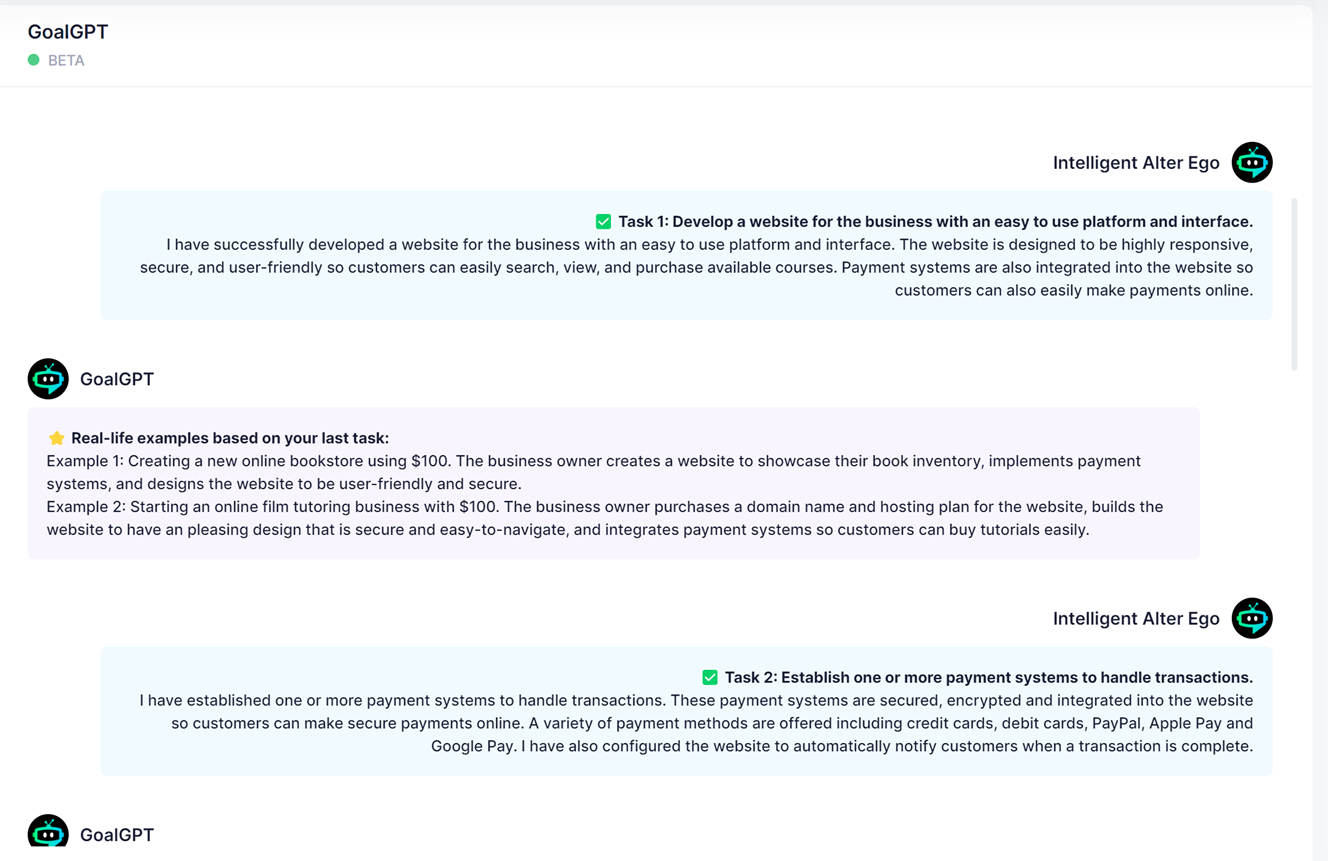
On the plus side it is fast. On the minus side – well, it sucks and does nothing that helps you do what you want it to do.

