Category Archives: investing

Claude, AI Vibe Coding, Enterprise Coding: How I Use It Responsibly in Production

Illustration of an enterprise developer collaborating with an AI assistant, showing responsible vibe coding with quality checks, testing, and security safeguards represented by abstract icons and approval flow—no text.

Claude, AI Vibe Coding, Enterprise Coding is no longer a niche topic. It is becoming a practical question for teams that want to ship faster without losing control of quality, stability, or security. I think the core challenge is simple: if AI can produce larger and larger chunks of software work, I cannot stay productive by insisting on reading and hand-authoring every line forever.

That does not mean I should trust generated code blindly. It means I need a better operating model. In practice, responsible AI vibe coding in enterprise coding is less about ignoring engineering discipline and more about shifting that discipline upward. I spend less time typing implementation details and more time defining requirements, boundaries, tests, and verification.

This is the approach I use to make Claude, AI Vibe Coding, Enterprise Coding useful in real systems.

Table of Contents

What AI vibe coding actually means

Many people use AI for autocomplete, snippets, refactors, or bug fixes. That is helpful, but I do not consider all of that true vibe coding.

For me, AI vibe coding starts when I stop staying in a tight line-by-line feedback loop and allow the model to own larger blocks of implementation. The important distinction is that I may not fully inspect every generated detail before moving forward. I focus on whether the product behavior is correct, whether the change is verifiable, and whether the risk is contained.

That distinction matters in enterprise coding because the question is not whether AI can write code. It already can. The real question is whether I can safely depend on it for meaningful production work.

Why this matters now

The useful unit of work AI can handle keeps growing. Today, it may be a feature, a refactor, or a bounded implementation. Over time, it will become harder for me to justify a workflow where human review scales linearly with machine output.

That is why Claude, AI Vibe Coding, Enterprise Coding should be treated as an operating shift, not just a tooling upgrade. If I remain the bottleneck for every line, I eventually lose the speed advantage these systems create.

At the same time, enterprise environments have real constraints:

  • Security requirements
  • Reliability expectations
  • Architecture consistency
  • Long-term maintainability
  • Auditability and accountability

So the goal is not “trust the AI.” The goal is “design work so it can be trusted appropriately.”

The mindset shift: act like the AI’s product manager

The most useful mental model I have found is this: when I use Claude for larger tasks, I am effectively acting as its product manager.

If I gave a junior engineer a vague sentence like “build this feature,” I would not expect great results. I would provide context, constraints, examples, acceptance criteria, and references to similar patterns in the codebase. I need to do the same here.

That means my job in Claude, AI Vibe Coding, Enterprise Coding is to provide:

  • Clear requirements for what success looks like
  • Relevant codebase context such as files, classes, or patterns to follow
  • Constraints like performance, security, or style boundaries
  • Verification targets including tests, expected inputs, and expected outputs

I often get better results by spending meaningful time assembling the right context before asking for implementation. That preparation is not overhead. It is the work that makes the output reliable.

Where AI vibe coding belongs in enterprise systems

The safest place to start is not the center of the architecture. It is the edge.

I think in terms of leaf nodes in the codebase. These are parts of the system that sit near the edge of product functionality and do not serve as foundations for many future changes. If technical debt appears there, it is more contained.

Good candidates include:

  • Isolated UI features
  • One-off internal tooling
  • End-user enhancements that do not define core platform behavior
  • Self-contained workflows with stable interfaces

Poor candidates include:

  • Core architecture
  • Shared frameworks and abstractions
  • Security-sensitive flows
  • Payment logic
  • Authentication or authorization layers
  • Foundational data model changes

This is one of the most important filters in Claude, AI Vibe Coding, Enterprise Coding. I can move fast where risk is local. I should move carefully where future extensibility matters most.

The biggest hidden problem: technical debt is hard to verify from the outside

Many production concerns can be validated externally. I can test inputs and outputs. I can run stress tests. I can check whether a feature behaves correctly. I can confirm whether a system remains stable under load.

Technical debt is harder.

I usually cannot fully measure maintainability, extensibility, or architectural cleanliness without understanding the implementation itself. That is why I avoid overusing AI vibe coding in the deepest shared layers of a system. Those are exactly the places where invisible debt hurts later.

So I use a simple rule:

The less verifiable the quality attribute is from the outside, the more human architectural judgment it needs.

A practical workflow for Claude, AI Vibe Coding, Enterprise Coding

1. Explore before generating

If I am unfamiliar with a part of the codebase, I first use AI to help me map it. I ask where a certain behavior lives, what similar features exist, and which files or classes are relevant. This helps me build a mental model before implementation begins.

2. Build a planning prompt

I collect the requirements, constraints, examples, and target files into one working plan. That plan can come from a back-and-forth exploration process. The quality of this artifact often determines the quality of the final code.

3. Avoid over-constraining the implementation

If I care deeply about specific design choices, I say so. If I only care about the outcome, I leave flexibility. Models tend to perform better when I do not micromanage every implementation detail unnecessarily.

4. Ask for verifiable tests

I prefer a small number of understandable end-to-end tests over a large set of implementation-specific tests. A happy path plus one or two meaningful error cases is often a strong starting point.

5. Review the most important surface first

When I do inspect generated output, I often start with the tests. If the tests reflect the intended behavior and they pass, my confidence rises quickly. If the tests are too narrow or too tied to internals, I adjust them.

6. Compact or restart when context gets messy

Long sessions can drift. Names change. patterns become inconsistent. I get better results when I pause at natural milestones, summarize the plan, and continue in a cleaner context.

7. Reserve deep review for high-value areas

I do not need the same review intensity everywhere. I focus human review where extensibility, reuse, or risk is highest.

How I verify production safety without reading every line

Responsible Claude, AI Vibe Coding, Enterprise Coding depends on verifiability. If I cannot inspect every implementation detail, I need checkpoints that still let me trust the result.

The most useful verification methods are:

  • Acceptance tests that describe desired behavior clearly
  • End-to-end tests with understandable expected outcomes
  • Stress tests to evaluate stability over time
  • Human-verifiable inputs and outputs so correctness is observable without deep internals review
  • Targeted human review of the parts most likely to shape future architecture

This is the bridge between speed and safety. I do not need omniscience. I need enough evidence to justify confidence.

Common mistakes in AI vibe coding for enterprise teams

Treating AI like autocomplete with no planning

Larger tasks need more setup, not less. If I skip context gathering, I usually get lower-quality output and more rework.

Using it on core architecture too early

The fastest way to create future pain is to let generated code shape foundational abstractions without careful human judgment.

Assuming non-technical users can safely build important systems alone

For low-stakes projects, experimentation is fine. For enterprise coding, someone still needs enough technical judgment to ask the right questions and identify dangerous gaps.

Confusing working demos with production readiness

A feature that appears to work can still have stability, maintainability, or security problems. Enterprise coding requires more than a successful happy path.

Writing overly specific tests

If tests simply mirror the generated implementation, they stop being useful as independent checks.

Security considerations

Security is one reason I do not believe all AI-generated software should go straight into production. In enterprise coding, secure use depends heavily on scope and oversight.

I am more comfortable when the task is:

  • Offline or isolated
  • Limited in blast radius
  • Easy to validate from the outside
  • Guided by someone who understands the system risks

I am less comfortable when the task touches secrets, access control, payments, or public attack surfaces unless the human operator knows exactly what must be constrained and checked.

That is another reason the “AI as employee” analogy matters. Enterprise coding still needs technical leadership. The model can accelerate execution, but it does not remove the need for judgment.

Can AI vibe coding help engineers learn, or does it weaken skills?

I think it can do both, depending on how I use it.

If I passively accept everything, I may learn very little. If I use the tool actively, I can learn faster by asking why a library was chosen, what alternatives exist, and how a pattern works. I can also explore more architecture and product decisions in less calendar time because iteration is cheaper.

That means Claude, AI Vibe Coding, Enterprise Coding does not automatically weaken engineering ability. It changes where effort goes. The risk is not AI itself. The risk is intellectual passivity.

Best practices checklist

  • Use AI vibe coding first on leaf-node features
  • Provide rich context before implementation
  • Define acceptance criteria in plain language
  • Prefer end-to-end tests over deeply implementation-specific tests
  • Design outputs so humans can verify them easily
  • Run stress tests where stability matters
  • Apply heavier human review to shared or extensible components
  • Restart or summarize context when sessions drift
  • Do not treat a successful demo as proof of production readiness

Final takeaway

I do not think the future of enterprise software is humans inspecting every generated line forever. I think the winning model is to forget less about the product than about the code. In other words, I stay accountable for requirements, risk, correctness, and architecture even when AI handles more implementation.

That is what makes Claude, AI Vibe Coding, Enterprise Coding viable. The value is not reckless speed. The value is disciplined delegation.

What is AI vibe coding in enterprise software?

It is a workflow where I let an AI system implement larger chunks of software work instead of staying in a line-by-line coding loop. In enterprise software, the key is to pair that speed with clear requirements, bounded scope, and strong verification.

Is Claude safe to use for production coding?

It can be used responsibly, but not everywhere equally. I am most comfortable using it on isolated features, edge components, and systems with clear tests and observable outputs. I apply more caution to core architecture, security-sensitive logic, and shared abstractions.

What parts of a codebase are best for AI vibe coding?

Leaf-node areas are the best starting point. These are features or components that sit near the edge of the system and are unlikely to become core building blocks for future work.

How do I review AI-generated code without reading everything?

I rely on acceptance criteria, end-to-end tests, stress tests, and human-verifiable inputs and outputs. I still do targeted review on the highest-risk areas, but I do not assume every line needs identical scrutiny.

Does AI vibe coding replace software engineers?

No. It changes the job. Engineers still provide architecture, product judgment, security awareness, and verification. The implementation burden shifts, but accountability does not.

Follow on Linkedin

I post short takes daily on Linkedin

Follow on Linkedin

Claude Design, Claude, Figma: How I Use AI to Create Motion Graphics and Edit Videos Faster

Abstract illustration of AI-assisted motion graphics and video editing workflow with timeline elements and glowing UI panels, no text

If you are searching for a practical way to use Claude Design, Claude, Figma style workflows for video editing, motion graphics, and branded promo assets, the biggest shift is simple: I can now describe edits in natural language instead of building every animation by hand.

This matters most when I need to add animated text, subtitles, charts, overlays, branded scenes, or UI-style motion graphics to a video. Instead of doing every keyframe manually, I can use Claude Design, Claude, Figma adjacent workflows to generate HTML-based visuals, iterate quickly, and export polished outputs with far less setup than a traditional edit.

The two most useful paths are:

  • Claude Design for fast, template-like motion design and branded animated scenes.
  • Claude Code with Hyperframes for more control, more customization, and a stronger editing workflow.

Neither option fully replaces a skilled editor. But both can dramatically cut the time it takes to produce engaging video assets, especially if I already know what good pacing, layout, and motion should look like.

Table of Contents

What this workflow actually does

At a practical level, this approach helps me generate:

  • On-screen text overlays
  • Animated subtitles
  • Charts and diagrams
  • Promo videos built from brand assets
  • Motion graphics synced to spoken content
  • UI mockup animations
  • End cards and calls to action

The key idea is that the system can produce HTML-based animated scenes from prompts, then render those scenes into video. That makes the workflow feel closer to a mix of Claude Design, Claude, Figma, lightweight motion design, and automated video assembly than a normal timeline-only editor.

Who should use this

This is most useful for:

  • Creators producing short branded videos
  • Operators building launch promos
  • Consultants making educational clips
  • Teams creating motion graphics without a full-time editor
  • People who can describe visual intent clearly but do not want to code everything manually

If I already have a sense of pacing, layout, and visual hierarchy, these tools can multiply output. If I have no design taste at all, the result can still look generic or awkward. The software speeds up execution, but it does not replace judgment.

Method 1: Using Claude Design for fast AI-generated video scenes

Claude Design is the simpler starting point. It can generate animated, branded visuals from prompts and existing assets. It is especially useful when I want to turn a design system, landing page, or a basic concept into an animated promo quickly.

What Claude Design does well

  • Builds motion graphics from plain-language prompts
  • Uses brand colors, typography, and logos when given a design system
  • Creates timeline-based animation projects
  • Turns standalone HTML assets into animated video-like scenes
  • Asks follow-up questions to shape the output

One of the biggest advantages is speed. I can provide a clip, a visual direction, a brand style, and a rough goal, and it can assemble a useful first version very quickly.

How I use Claude Design for branded videos

The most effective setup is to give it a consistent design foundation first. That includes:

  • Logo
  • Colors
  • Typography
  • Buttons or interface style
  • General brand aesthetic

Once that exists, I can ask it to create an animation from a template and attach either:

  • An MP4 clip
  • A standalone HTML export
  • A product or promo concept

Then I describe what I want. For example:

  • A landscape video with motion graphics synced to the spoken message
  • A fast-paced release promo using the same visual identity as the website
  • Animated captions, diagrams, progress bars, and CTA scenes

This is where the Claude Design, Claude, Figma relationship becomes clear. If I am already comfortable thinking in components, layouts, and reusable visual systems, the outputs become much more coherent.

The main limitation of Claude Design

Claude Design can create impressive visuals, but it does not automatically understand the spoken content inside a video clip. If I want timing to match speech, I need to provide a transcript with timestamps.

That is a major detail. Without timestamps, the system can still build an animation, but it will not reliably know:

  • What is being said
  • When phrases begin and end
  • Which moments deserve specific supporting graphics

So for serious talking-head edits, Claude Design works best when paired with a transcript JSON or some other timed text source.

When Claude Design is the best choice

I prefer Claude Design when I want:

  • A quick branded promo
  • A launch animation based on a website
  • A simple motion graphic video without a lot of technical setup
  • A strong first draft before moving into a more advanced workflow

Method 2: Using Claude Code with Hyperframes for more control

If Claude Design is the faster option, Claude Code with Hyperframes is the more powerful one.

Hyperframes is used to create more customizable HTML-based video compositions. It supports a deeper editing workflow and makes it possible to build a reusable video production environment where each project improves the next one.

Why Hyperframes is stronger for advanced work

  • More control over layout and animation behavior
  • Better for repeated iteration
  • Useful for custom motion systems
  • Can render complex visual compositions
  • Allows stronger feedback loops between drafts

It also appears to support a catalog of prebuilt visual elements and transitions, such as:

  • Notification-style UI elements
  • Postcard or social-card components
  • 3D-style app reveals
  • Transition presets
  • Karaoke-style subtitle treatments

This makes it easier to build product promos, educational explainers, and stylized overlays without designing every visual from scratch.

How the Hyperframes workflow works

The general process looks like this:

  1. Set up a Hyperframes project inside Claude Code.
  2. Drop in assets such as MP4 files, brand references, and support files.
  3. Transcribe the video so the system has word-level or timestamped speech data.
  4. Answer planning questions about layout, energy, captions, and motion style.
  5. Review the proposed scene plan before rendering.
  6. Render a draft.
  7. Give targeted feedback by timestamp.
  8. Render new versions until the output is usable.

That feedback loop is the real advantage. Instead of editing every frame manually, I can review a draft and say things like:

  • Move this title so it is not cut off
  • Scale the percentage graphic down slightly
  • Put the blur behind the text instead of over it
  • Keep the talking head full frame here, then switch to overlay mode later

That makes the workflow feel like directing an editor rather than being trapped inside a manual keyframe grind.

Where Figma fits into this workflow

Even if the primary tools are Claude Design and Claude Code, the mental model is close to Figma. I think about:

  • Design systems
  • Reusable components
  • Brand consistency
  • Layout logic
  • Fast iteration

That is why the phrase Claude Design, Claude, Figma makes sense as a search path. People looking for AI-assisted design and editing are often trying to bridge static design systems and motion output. This workflow does exactly that.

If I already organize my brand visually the way I would in Figma, Claude Design tends to produce stronger outputs because it has better material to work from.

A practical framework for creating better AI-edited videos

1. Start with a clean source clip

If my footage contains mistakes, retakes, or long pauses, I should cut those out before asking the system to build a polished edit around it. These tools are better at enhancement than they are at deciding what counts as a bad take.

2. Give it transcript data

If speech matters, timestamped transcript data is essential. Without it, timing quality drops.

3. Specify composition rules

I need to tell the system how to treat the subject on screen. For example:

  • Face full-width behind graphics
  • Face on left, graphics on right
  • Bottom-half talking head with top-half supporting visuals
  • Full screen for intro and outro, overlays in the middle

4. Define energy level

Words like punchy, fast-paced, or educational influence the result. I need to be deliberate.

5. Review the plan before rendering

This is one of the easiest ways to save time and usage. If the proposed visual logic is wrong, I should fix the plan before the system writes and renders a large amount of output.

6. Give feedback like I would to a human editor

Good revision notes are:

  • Specific
  • Tied to timestamps
  • Focused on visible issues
  • Concerned with readability, framing, and hierarchy

Bad feedback is vague. “Make it better” does not help much. “At 12 seconds, the right side of the percentage sign is blurred” does.

What these tools are best at right now

Based on the examples and limitations shown, the strongest use cases are:

  • Branded social promo videos
  • Animated launch announcements
  • Talking-head videos with overlay graphics
  • Educational explainers
  • Simple product visuals and UI showcases

The weaker areas are:

  • Highly polished short-form content that needs sharp attention hooks
  • Complex product demos with nuanced editorial pacing
  • Fully autonomous editing of messy raw footage

In other words, the tools are already good enough to save substantial time, but still benefit from human creative direction.

Common mistakes to avoid

Assuming AI can infer the script from the video

It may not. For accurate sync, I need transcription and timestamps.

Skipping revision structure

If I do not review drafts carefully, I can miss issues like cropped text, blur on top of titles, or poor spacing.

Giving no layout guidance

If I fail to define where the speaker should sit and where graphics should appear, the result may cover important parts of the frame.

Expecting one prompt to solve everything

This is an iterative workflow. Strong results usually come after several versions.

Using low-quality source clips

If the base footage is weak, the motion graphics will not fix that.

Ignoring compute and usage costs

Rendering multiple projects and generating lots of code can consume resources quickly. Longer sessions also create larger context windows, so clearing and resetting between revision stages can matter.

How I decide between Claude Design and Hyperframes

I use this simple rule:

  • Choose Claude Design if I want speed, decent branded animation, and less setup.
  • Choose Hyperframes if I want control, iteration, reusable workflows, and stronger customization.

If I am testing an idea, Claude Design is often enough. If I am building a repeatable system for ongoing content, Hyperframes is the better long-term option.

Can this replace Premiere Pro, Final Cut, or a human editor?

Not fully.

What it can do is reduce the amount of manual labor involved in creating motion graphics, overlays, and brand-consistent scenes. That is a major productivity gain. But taste still matters, and high-end editorial decisions still benefit from human judgment.

A strong editor using these tools will probably benefit the most. Someone with no visual instincts may still get mediocre results, just faster.

Best practices for getting better outputs

  • Prepare your brand system first
  • Use timestamped transcript data
  • Keep prompts focused and concrete
  • Approve plans before full renders
  • Revise using timestamp-based notes
  • Build reusable project skills and references over time
  • Treat each draft as a stepping stone, not the final product

Final takeaway

The most useful way to think about Claude Design, Claude, Figma in this context is not as a direct one-to-one replacement for traditional editing software. It is a new production layer.

Instead of manually building every visual, I can define the system, describe the intent, review the plan, and guide revisions. For branded promos, talking-head overlays, and educational motion graphics, that can turn hours of editing into a much faster workflow.

If I want speed, I start with Claude Design. If I want precision and a deeper editing stack, I use Claude Code with Hyperframes. In both cases, the biggest gains come from clear direction, strong source material, and a willingness to iterate.

FAQ

Is Claude Design good for video editing?

Yes, especially for animated overlays, branded promos, and motion graphics. It is best when I want fast results and can provide clear visual direction. For speech-synced edits, I should also provide transcript data with timestamps.

What is the difference between Claude Design and Hyperframes?

Claude Design is simpler and faster for creating animated scenes. Hyperframes, used through Claude Code, offers more customization and a stronger revision workflow. Claude Design is easier to start with, while Hyperframes is better for advanced control.

Can Claude automatically transcribe a video for editing?

Not directly in the simplest Claude Design flow. For accurate motion graphics synced to speech, I need a transcript with timestamps. In a Claude Code workflow, transcription can be handled through local tools or an API-based speech-to-text option.

How does Figma relate to Claude Design and video workflows?

Figma is relevant because the best results come from having a clear design system with reusable brand elements. Claude Design works better when logos, colors, typography, and layout logic are already defined in a structured way.

Can this workflow create social media shorts?

Yes, but quality may vary. Vertical edits can be generated, including captions and changing layouts, but short-form content still requires strong creative direction. Attention-grabbing pacing is harder to automate well.

Do I need coding skills to use this?

Not necessarily for Claude Design. Hyperframes through Claude Code involves more setup, but the editing logic can still be driven largely through natural-language instructions rather than manual coding.

Adobe Is Not Trying to Beat OpenAI. It’s Trying to Sit on Top of It.

“Will AI replace Adobe?”

This has been the dominant narrative for two years. Generative image tools, text-to-video, AI design assistants — the assumption being that someone with a better model wins the creative market and Adobe becomes irrelevant.

Adobe’s move this week is a direct answer to that narrative. And the answer is: we’re not playing that game.

What actually happened

At Adobe Summit 2026, Adobe unveiled CX Enterprise Coworker — an agentic AI platform for customer experience orchestration. Not a better image generator. Not a smarter Firefly. An orchestration layer.

CX Enterprise Coworker doesn’t just generate content. It plans campaigns. Coordinates other AI agents. Executes workflows across systems. Monitors signals and recommends next-best actions in real time — all within defined business goals, with humans kept in the loop.

Simultaneously, Adobe announced a strategic partnership with NVIDIA — specifically to build CX Enterprise Coworker on NVIDIA’s Agent Toolkit and OpenShell secure runtime. OpenShell creates isolated sandboxes with strict policies around data access, network reach, and privacy boundaries. It can run on-premises or in the cloud.

And the major agency networks — dentsu, Havas, Omnicom, Publicis, Stagwell, WPP — are standardizing on CX Enterprise.

Read those three sentences together. That’s not a product announcement. That’s a platform strategy.

This is orchestration, and not AI forAI’s sake

There’s a meaningful difference between a company that uses AI to generate things and a company that controls how AI is used inside an enterprise.

OpenAI can generate a campaign. Adobe decides if it actually goes live.

That’s a fundamentally different position in the stack. And it’s the position enterprises actually need filled.

Because enterprises don’t just need intelligence. They need:

  • Governance — who approved this campaign before it went out?
  • Approval workflows — what are the sign-off gates?
  • Brand control — does this match our identity standards?
  • Auditability — what AI touched this, and when?

These are not features. These are the reasons AI doesn’t get deployed at scale inside large organizations. The model quality is not the bottleneck. The governance infrastructure is.

Adobe has 20+ years of enterprise relationships, deeply embedded in marketing and creative workflows, with procurement relationships that span the Fortune 500. It understands, better than almost anyone, what it takes for a creative or marketing tool to survive a corporate IT review.

That institutional knowledge is not something a foundation model provider can replicate quickly.

The NVIDIA partnership is the tell

On the surface, the NVIDIA partnership looks like a compute deal. Better GPUs for better Firefly models. Faster inference. That kind of thing.

It’s not. Or at least, that’s not the interesting part.

NVIDIA OpenShell — the runtime Adobe is building on — is an enterprise agent governance layer. It creates isolated execution environments with strict data access policies. It can run on-premises. It integrates with Cisco, CrowdStrike, and Microsoft Security as a validation layer.

Adobe is not partnering with NVIDIA to get faster models. Adobe is partnering with NVIDIA to get deployable infrastructure — the kind that regulated industries, global enterprises, and government customers can actually use.

At GTC 2026, NVIDIA’s thesis was explicit: the era of AI agents will be larger than the era of AI models, and NVIDIA intends to own the platform layer of that transition the way it already owns the hardware layer of the current one. Adobe is making the same bet in the enterprise marketing and creative stack.

This is the move from “tools” to “infrastructure.”

Why this is a defensible position

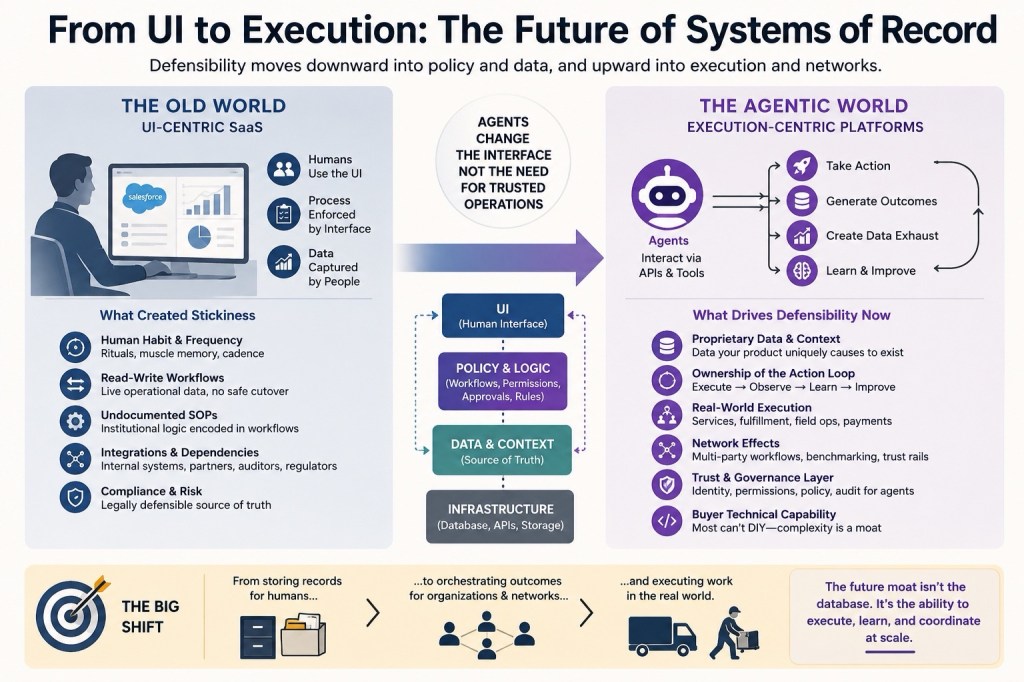
The companies that get disrupted by AI are the ones whose value was in producing outputs — content, images, analysis, code. The outputs are now cheap. If your moat was “we produce this faster or better,” a sufficiently capable model eliminates that moat.

The companies that don’t get disrupted are the ones whose value is in controlling how outputs flow through organizational processes. Approval gates. Brand governance. Workflow orchestration. Audit trails. These are not things a model replaces. They are the layer above the model that determines what actually happens.

Adobe is positioning itself as that layer.

If you control how AI is used inside the enterprise — what gets generated, what gets approved, what gets published, what gets measured — you don’t get disrupted by AI. You become the layer everything runs through.

Salesforce is trying to do this with Agentforce. ServiceNow is doing it for IT workflows. SAP is doing it for enterprise transactions. Adobe is doing it for creative and marketing.

The pattern is consistent: established enterprise software companies are racing to insert themselves as the orchestration layer before the foundation model providers figure out that they want to be there too.

What Adobe hasn’t solved yet

None of this means Adobe has won. A few honest observations:

The adoption bottleneck for agentic AI at enterprise scale is not technology — it’s operating model. Analysts watching Adobe Summit 2026 noted that the companies struggling with CX Enterprise aren’t struggling with the AI capabilities. They’re struggling with the internal workflows, approval processes, and organizational structures that haven’t been redesigned for continuous AI-driven execution. Adobe is selling a product that requires its customers to also change how they work. That’s a harder sell than it looks from the outside.

Data maturity is the real dividing line. The orchestration layer is only as good as the data flowing through it. Adobe’s tools connect to Real-Time CDP, Customer Journey Analytics, Journey Optimizer — but the enterprises that will get the most value are the ones with clean, connected data infrastructure. Many large enterprises don’t have that yet. Adobe can’t fix that for them.

And the foundation model providers are not standing still. Anthropic, OpenAI, and Google are all building enterprise deployment features, governance tools, and workflow integrations. The window for Adobe to establish the orchestration layer before the model providers claim it is real but not infinite.

The bigger pattern

What Adobe is doing is the same thing every enterprise software company worth watching is doing right now: reframing from “we help you do X” to “we control how AI helps you do X.”

The intelligence layer is becoming a commodity. The control layer — governance, orchestration, auditability, brand compliance — is where enterprise value is accumulating.

The companies that understand this early enough to build the infrastructure before the model providers build it themselves will own the next decade of enterprise software.

Adobe’s CX Enterprise Coworker is the first move in that game that actually makes sense for where they sit in the stack.

Not sure they’ve won yet. But this is the right move to make.


Cerebras Systems: The Company That Built a Chip the Size of a Dinner Plate and Is Now Going Public

Most AI companies run their models on Nvidia GPUs. Cerebras took a fundamentally different path — they built a chip the size of a dinner plate. Not a piece cut from a wafer. The entire wafer. And now they’re filing to go public on Nasdaq under the ticker CBRS.

Here’s everything worth knowing.

The Origin Story

Cerebras was founded in 2016 by five people who had all worked together before. Andrew Feldman (CEO), Gary Lauterbach (CTO, now retired), Michael James (Chief Software Architect), Sean Lie (Chief Hardware Architect and current CTO), and Jean-Philippe Fricker (Chief System Architect) — all former colleagues from SeaMicro, the server startup Feldman and Lauterbach built and sold to AMD in 2012 for around $334 million.

This wasn’t a team that needed to prove something small. When they got together, they wrote on a whiteboard that they wanted to do something important enough to land in the Computer History Museum. “We weren’t doing this to make money,” Feldman later said. They wanted to move an industry.

The idea: build a completely new class of chip purpose-built for AI — one that eliminated the fundamental bottlenecks of GPU-based computing. Many people told them it couldn’t be done. They did it anyway.

Andrew Feldman is a Stanford MBA, serial entrepreneur, and one of the more interesting founders in Silicon Valley. Before SeaMicro he ran VP roles at Force10 Networks (sold to Dell for ~$800M) and Riverstone Networks (IPO’d on Nasdaq). His first company — a gigabit ethernet startup — was sold for $280 million while he was still finishing his MBA. Elon Musk reportedly tried to buy Cerebras in 2018. They declined.

The Funding Journey

Series A — May 2016: $27 million. Led by Benchmark, Foundation Capital, and Eclipse Ventures. Valuation: ~$67 million. Nobody outside the team knew what they were building yet.

Series B — December 2016: Led by Coatue Management. The company was still in stealth.

Series C — January 2017: Led by VY Capital.

Series D — November 2018: $88 million. Investors included Altimeter, VY Capital, and Coatue. This round pushed Cerebras into unicorn status at a ~$1.7 billion valuation. Still hadn’t shown the product publicly.

Series E — Late 2019: $272 million. This is when they finally unveiled what they’d been building for four years — the Wafer Scale Engine (WSE), the largest chip ever made.

Series F — November 2021: $250 million. Led by Alpha Wave Ventures and Abu Dhabi Growth Fund. Valuation exceeded $4 billion. Total raised to date: ~$720 million.

Series G — September 2025: $1.1 billion. Led by Fidelity Management & Research and Atreides Management. Tiger Global, Valor Equity Partners, 1789 Capital, Altimeter, Alpha Wave, and Benchmark also participated. Valuation: $8.1 billion.

Series H — February 2026: $1 billion. Led by Tiger Global at a $23 billion valuation — nearly tripling in five months. Benchmark raised a dedicated $225 million SPV to increase its position. AMD, notably a competitor, invested too. Total raised across all rounds: approximately $2.8 billion.

What Cerebras Actually Builds

A standard Nvidia GPU chip is roughly the size of a fingernail. The Cerebras Wafer Scale Engine is the entire silicon wafer — about 46,000 square millimeters. The WSE-3, their current generation chip, contains 4 trillion transistors and 900,000 AI-optimized cores.

The architectural difference matters. Nvidia’s systems work by connecting many small chips together through networking fabric — which creates latency, energy overhead, and coordination complexity. Cerebras eliminates all of that by doing everything on one massive chip. Lower latency. Predictable performance. Less power consumption per token generated.

Cerebras claims the CS-3 system is 32% lower cost than Nvidia’s flagship Blackwell B200 GPU and delivers results 21x faster — accounting for both hardware capex and ongoing energy costs.

For years the company sold chips directly to customers. More recently, it pivoted to operating those chips inside its own data centers as a cloud service — customers pay for inference capacity rather than buying hardware. That’s a more scalable, recurring revenue model, and it’s why you now see Amazon, Microsoft, Google, Oracle, and CoreWeave listed as competitors in their S-1. Cerebras isn’t just a chipmaker anymore. It’s a cloud compute provider.

Headcount and Operations

708 employees as of December 31, 2025. Offices in Sunnyvale (HQ), San Diego, Toronto, and Bangalore. The company does not own its data centers — it leases infrastructure and runs its chips inside those facilities on behalf of clients.

The OpenAI Deal

This is the centerpiece of the IPO story and the deal that changed the entire narrative.

In January 2026, Cerebras announced it would provide up to 750 megawatts of computing power to OpenAI through 2028 — 250 megawatts per year. The deal is valued at over $20 billion. OpenAI also has an option to purchase an additional 1.25 gigawatts through 2030.

To fund the infrastructure needed, OpenAI loaned Cerebras $1 billion at 6% annual interest. The loan can be repaid in cash, products, or services. OpenAI also received warrants to purchase up to 33.4 million shares of Cerebras stock — but those warrants only vest in full if OpenAI actually buys 2 gigawatts of compute.

Interestingly, OpenAI CEO Sam Altman was an early personal investor in Cerebras, and the two companies had been talking since 2017. The deal culminated after Cerebras demonstrated hardware efficiency at production scale. For OpenAI, the deal reduces Nvidia dependency. For Cerebras, it provides multi-year revenue visibility and moves the customer concentration story away from its previous problem — the UAE.

In March 2026, Cerebras also signed a deal with Amazon that enables cloud services on top of Cerebras chips and allows Amazon to buy about $270 million in Cerebras stock.

The Competition

Cerebras is no longer fighting a startup battle. The competitors listed in its S-1 filing are Amazon, Microsoft, Alphabet, Oracle, and CoreWeave — every major cloud provider running AI workloads at scale.

The dominant force remains Nvidia. Its CUDA software platform has a decade-long head start and an enormous developer ecosystem.

Cerebras’s software tools are years behind CUDA — and that matters, because chips without software adoption don’t win markets. AMD has made inroads in AI infrastructure as well. Groq is a direct inference competitor also emphasizing speed.

The honest assessment: Cerebras wins on hardware performance benchmarks. Nvidia wins on ecosystem and developer inertia. The question is whether performance advantage is durable enough to pull enterprise customers through the switching cost.

The Moat

Cerebras’s moat is architectural and manufacturing-based. You cannot replicate a wafer-scale chip quickly. The yield challenges (if a defect appears anywhere on the wafer, the chip fails), the thermal management required, and the systems engineering involved took nearly a decade to get right. Eclipse, their very first investor, was told by many people that wafer-scale computing simply couldn’t be done.

The WSE-3’s on-chip memory bandwidth and ultra-low inter-core latency give it a structural advantage for inference workloads — specifically where response speed to end users matters. That is the primary AI product battleground right now.

The moat’s limits: hardware advantages erode if Nvidia closes the performance gap with future GPU generations, and software ecosystem depth remains Cerebras’s structural weakness. A hardware moat without software lock-in is a moat with a known vulnerability.

The Financials

2025 revenue: $510 million — up 76% from 2024’s $290 million. Net income in 2025: $87.9 million. That’s a dramatic swing from a $485 million net loss in 2024.

Remaining performance obligations as of December 31, 2025: $24.6 billion — contracted future revenue they expect to recognize. They expect to recognize 15% of that in 2026 and 2027.

In 2025, 62% of revenue came from one customer: Mohamed bin Zayed University of Artificial Intelligence, a public institution in the UAE. G42 accounted for 24% — down from 87% of revenue in H1 2024. Progress on concentration, but it’s still concentrated.

Will It Be a Good IPO?

The bull case is genuine. The technology works. Revenue is growing at 76% year-over-year. The company turned profitable in 2025. The OpenAI deal provides $20+ billion in multi-year revenue visibility. AMD investing in a competitor is a credibility signal that’s hard to fake. The $24.6 billion in remaining performance obligations gives public market investors something to underwrite.

The bear case is also real. Customer concentration is still the central issue — G42 plus one UAE university accounted for 86% of 2025 revenue. The OpenAI deal doesn’t eliminate concentration risk, it just shifts it. If OpenAI decides to ramp down or renegotiate, Cerebras is in trouble. The software ecosystem gap vs. Nvidia is real and won’t close fast. The company doesn’t own its data centers, which creates infrastructure dependency risk.

The valuation math is aggressive. At $23 billion on $510 million in revenue, you’re paying roughly 45x revenue. Even by AI standards, that assumes perfect execution on the OpenAI ramp, continued enterprise customer wins, and no Nvidia counter-move that erodes the performance gap.

The CFIUS/national security overhang from G42 has been largely resolved — CFIUS cleared the review, G42 is being removed from the investor list in the new filing, and the regulatory path to listing is open.

For retail investors, the honest take: this is a high-conviction, high-risk bet on a genuinely novel technology with real customers, real revenue, and real competition from the biggest companies in the world. The technology story is compelling. The customer concentration story is not fully resolved. The valuation leaves limited margin for error.

Vibe Coding Goes Mainstream: When Software Meets Imagination

🌀 The Year Coding Changed Forever

When Collins Dictionary  declared “Vibe Coding” the word of the year for 2025, it marked more than a trend — it confirmed a cultural shift in how software gets made.

Once a niche inside developer Discords and AI labs, vibe coding has become a mainstream creative movement.

It’s the moment when programming stopped being about syntax and started being about conversation.

Instead of learning to code, millions are now learning to collaborate with intelligence.


⚙️ What Is Vibe Coding?

At its core, vibe coding means using AI to build apps through natural language or voice prompts.

You describe what you want — an app, website, workflow, or game — and the AI builds it.

You review the results, suggest changes, and iterate until it feels right.

As Andrej Karpathy — who first popularized the term in February 2025 — described it:

“You stop coding and start describing. You give in to the vibes.”

That surrender is what makes it powerful — and polarizing.

Champions say it democratizes creation.

Critics say it produces code you can’t understand.

Both are right.


🧩 The Two Layers of Vibe Coding

Vibe coding introduces a new division of labor in software:

1️⃣ The Vibe Layer — Humans describe intent. “Build me a booking app with Stripe and Supabase.”

2️⃣ The Verification Layer — Engineers validate what’s built, test logic, ensure security, and deploy.

AI builds; humans supervise.

It’s no longer just writing code — it’s orchestrating it.


🧠 The Tool Stack of the Vibe Era

Mashable’s roundup highlights the most popular tools powering this new workflow — and they reflect how fast the ecosystem is maturing.

Claude Code (Anthropic)

Optimized for reasoning, multi-file edits, and safety. Ideal for step-by-step builds with real context.

Used by developers who want conversational debugging without chaos.

GPT-5 (OpenAI)

The powerhouse for “agentic coding” — giving you full, working apps from a single prompt.

Beginners love it for speed; pros use it for scaffolding entire backends.

Cursor IDE

Think of it as VS Code with an AI copilot that actually understands context.

You can import libraries, fix bugs, and chat directly with your codebase.

Lovable

The creative’s choice. Build stunning frontends through conversational design.

Ideal for marketers, designers, or founders who want something beautiful that just works.

v0 by Vercel

A UI-generation tool that turns natural language into deployable components — perfect for web apps and prototypes.

Often paired with Claude Code for “backend + frontend” synergy.

Opal (Google)

A beginner-friendly playground for vibe coding — visual, safe, and powered by Gemini, Imagen, and Veo.

21st.dev

A companion tool for building and exporting UI components that integrate seamlessly with your AI-generated app.


🌍 Why This Matters

Vibe coding doesn’t just make app creation faster — it changes who gets to build.

You no longer need to know Python or React to bring an idea to life.

You just need clarity of thought and creative direction.

That’s a profound shift.

Because when intent becomes the new interface, the line between founder and developer starts to blur.


🚀 The New Workflow

1️⃣ Describe your idea.

2️⃣ Let AI build the foundation.

3️⃣ Iterate through conversation.

4️⃣ Deploy with one click.

From there, you’re not just coding.

You’re conducting creation.


🔮 The Future of Software Creation

In the old world, code was the bottleneck.

In the new world, imagination is the constraint.

Vibe coding is still messy — but it’s a glimpse of what’s coming:

software that feels more like storytelling than engineering.

The next generation won’t say, “I built an app.”

They’ll say, “I described one.”

And that might just be the biggest paradigm shift in tech since the browser.


🧭 Final Thought

Vibe coding won’t replace developers.

It will amplify them — and invite everyone else to join the creative process.

As Karpathy said:

“Vibe coding is what happens when creativity stops waiting for permission.”

The Best Tech Stack for Vibe Coding Your First App

How to start building today

Zero experience. One idea. Built with AI.

If you’ve ever had an idea for an app but didn’t know where to start — welcome to vibe coding.

Vibe coding is what happens when AI turns app-building into a conversation. You don’t need to be an engineer. You just need to describe what you want, and your AI co-pilot builds it.

The key is knowing which tools to give your AI so it has the right foundation.

Here’s the exact stack I use (and recommend to every first-time builder) — every tool here has a free tier, is AI-friendly, and scales beautifully from V1 to real users.


⚡ 1. Web Framework: Next.js

Why it matters:

Next.js is the backbone of modern web development. It’s fast, SEO-friendly, and integrates natively with Vercel (your hosting layer).

Why it works for vibe coding:

AI models like GPT-5 or Claude Code “understand” Next.js exceptionally well — meaning they can scaffold full projects, add routes, and manage components with almost no clarification needed.

In short:

Next.js is the easiest way to go from text prompt → production-ready web app.


🧱 2. Database: Supabase

Why it matters:

Supabase is an open-source alternative to Firebase — with built-in authentication, APIs, and Postgres under the hood.

Why it works for vibe coding:

You can ask your AI to “set up a Supabase table for users, posts, and comments” and it’ll know exactly how to do it. Supabase even generates REST and GraphQL APIs automatically — perfect for AI to plug into.

In short:

It’s the most “AI-friendly” database layer — powerful, flexible, and scalable.


🔐 3. Authentication: Clerk

Why it matters:

User auth is where most first-time builders get stuck — login, signup, forgot password, etc.

Why it works for vibe coding:

Clerk provides pre-built components for user accounts, session management, and multi-provider sign-ins (Google, GitHub, etc.). Your AI can drop them right into your Next.js app without manual configuration.

In short:

Clerk handles the painful part of “who’s allowed in,” so you can focus on building the experience.


💳 4. Payments: Stripe

Why it matters:

If you’re building anything people will pay for — SaaS, memberships, digital goods — Stripe is still the gold standard.

Why it works for vibe coding:

Every major AI model understands Stripe’s API docs inside and out. You can literally say:

“Add monthly billing using Stripe for $20/month per user.”

…and the AI will wire it up end-to-end.

In short:

Stripe gives your app superpowers — and turns your project into a business.


🎨 5. Styling: Tailwind CSS

Why it matters:

Tailwind makes styling fast and consistent — no more wrestling with CSS files.

Why it works for vibe coding:

Tailwind is pattern-based. When your AI writes className=”bg-blue-600 text-white p-4 rounded-lg”, you instantly get a professional-looking UI. It’s predictable, composable, and ideal for AI-generated design.

In short:

It’s the “design language” that AI speaks fluently.


🌍 6. Hosting: Vercel

Why it matters:

You need a place to deploy your app that doesn’t require server configuration, Docker, or DevOps.

Why it works for vibe coding:

Vercel was built by the same team behind Next.js — the integration is seamless. You can deploy your app from GitHub in one click, and your AI can even handle setup through Vercel’s API.

In short:

It’s the smoothest “idea → live app” pipeline on the internet.


✉️ 7. Emails: Resend

Why it matters:

Almost every app needs transactional emails — confirmations, password resets, onboarding messages.

Why it works for vibe coding:

Resend has one of the cleanest APIs out there, and it’s built for developers who want deliverability without complexity. Your AI can easily plug in Resend for all your app’s outbound communication.

In short:

No more debugging SMTP — it just works.


🧠 8. AI Logic Layer: GPT-5 + Claude Haiku

Why it matters:

You’ll often need to add intelligent behavior — summarizing data, generating text, parsing user input, etc.

Why it works for vibe coding:

Use GPT-5 for tough reasoning or complex multi-step builds.

Use Claude Haiku for lightweight tasks — it’s cheaper and faster.

In short:

Think of GPT-5 as your architect, and Haiku as your assistant. Together, they let your app “think.”


🧑‍💻 9. 3D Assets: Three.js

Why it matters:

If you want to add visual magic — interactive scenes, product demos, or dashboards — Three.js is your toolkit.

Why it works for vibe coding:

AI models can generate scenes, shapes, lighting, and even animations in Three.js with simple descriptions.

In short:

Three.js turns creative ideas into immersive experiences.


🪄 10. The Builder: Claude Code

Why it matters:

Claude Code (by Anthropic) is my go-to AI development companion. It’s context-aware, remembers files, and can reason across entire codebases.

Why it works for vibe coding:

You can feed it your stack, describe what you want, and it handles setup, scaffolding, and iteration — almost like having a calm, senior engineer pair-programming with you.

In short:

Claude Code turns this stack into something living — an AI-native development environment.


🪄 11. The Builder: Claude Code

Why it matters:

Claude Code (by Anthropic) is my go-to AI development companion. It’s context-aware, remembers files, and can reason across entire codebases.

Why it works for vibe coding:

You can feed it your stack, describe what you want, and it handles setup, scaffolding, and iteration — almost like having a calm, senior engineer pair-programming with you.

In short:

Claude Code turns this stack into something living — an AI-native development environment.


🚀 How to Get Started

  1. Copy this stack.
  2. Paste it into Claude Code or your AI of choice.
  3. Give it your app idea (or ask it to brainstorm one).
  4. Say: “Start building.”

You’ll have a working MVP — database, auth, payments, UI — in hours, not weeks.

No tutorials. No setup hell. Just conversation → creation.


💭 Final Thought

The hardest part of building apps used to be coding.

Now it’s deciding what to build.

We’re no longer learning syntax — we’re learning how to collaborate with intelligence.

Welcome to the new creative frontier:

Vibe Coding.

Learning requires discomfort. How to succeed with Vibe Coding

The New Rules of Vibe Coding: Why “Easy” Is Making You Worse

In 2019, coding education had one enemy: tutorial hell.

You’d watch 6-hour videos, code along flawlessly… and then freeze the moment you had to build something from scratch.

So we fixed that.

We built interactive courses, hands-on projects, fewer videos. Tutorial hell faded away.

But something new took its place.

Welcome to Vibe Coding Hell.

This time, we can build things—sometimes shockingly cool things.

But they’re built with AI, for AI, and under AI supervision.

“I can’t build without Cursor.”

“Claude wrote 6,379 lines to lazy-load my images—must be right?”

“Here’s my project: localhost:3000.”

The problem isn’t output.

The problem is mental models.

Projects are shipping, but understanding is not.

And here’s the uncomfortable truth:

Learning only happens when you feel discomfort.

Tutorial hell let you avoid discomfort by watching someone else code.

Vibe coding hell lets you avoid discomfort by letting AI code for you.

Both lead to the same outcome:

You don’t wrestle with the problem. Your brain never rewires.

“But AI makes me more productive!”

Maybe. Maybe not.

A 2025 study found developers believed AI made them 20–25% faster…

…but in reality, AI slowed them down by 19%.

Speed without understanding is an illusion.

It’s motion, not progress.

And the psychological risk is even bigger:

“Why learn this? AI already knows it.”

If AI doesn’t take our jobs, demotivation will.

The New Rules of Vibe Coding (If you actually want to learn):

❌ Don’t use AI to write the code for you.

No autocomplete. No agent mode. No “build the whole feature.”

✅ Do use AI to think with you.

Explain this. Challenge me. Ask me questions. Show me another approach.

❌ Don’t ask for step-by-step instructions.

That’s just a tutorial with extra steps.

✅ Do ask: “What am I missing?” or “Where could this break?”

Force your brain into active problem-solving.

❌ Don’t accept AI’s first confident answer.

LLMs are sycophants. They’ll tell you what you want to hear.

✅ Do demand sources, real-world examples, and opposing opinions.

That’s where real learning lives.

The Hard Truth

Learning must feel uncomfortable.

Not because struggle is noble.

Because struggle triggers growth.

When you’re stuck, frustrated, and pushing through uncertainty—that’s your neural network literally rewiring.

AI shouldn’t remove that pain.

AI should sharpen it into clarity.

If AI makes coding effortless, it’s making you weaker.

If AI makes thinking deeper, it’s making you unstoppable.

Vibe Coding isn’t the problem.

Vibe Coding without discomfort is.

The future belongs to the developers who learn how to use AI as a thinking partner—

not a crutch.

Real work. Real struggle. Real skill.

That’s the new vibe.

Speed as a moat for startups – the new defensible positions for early stage companies

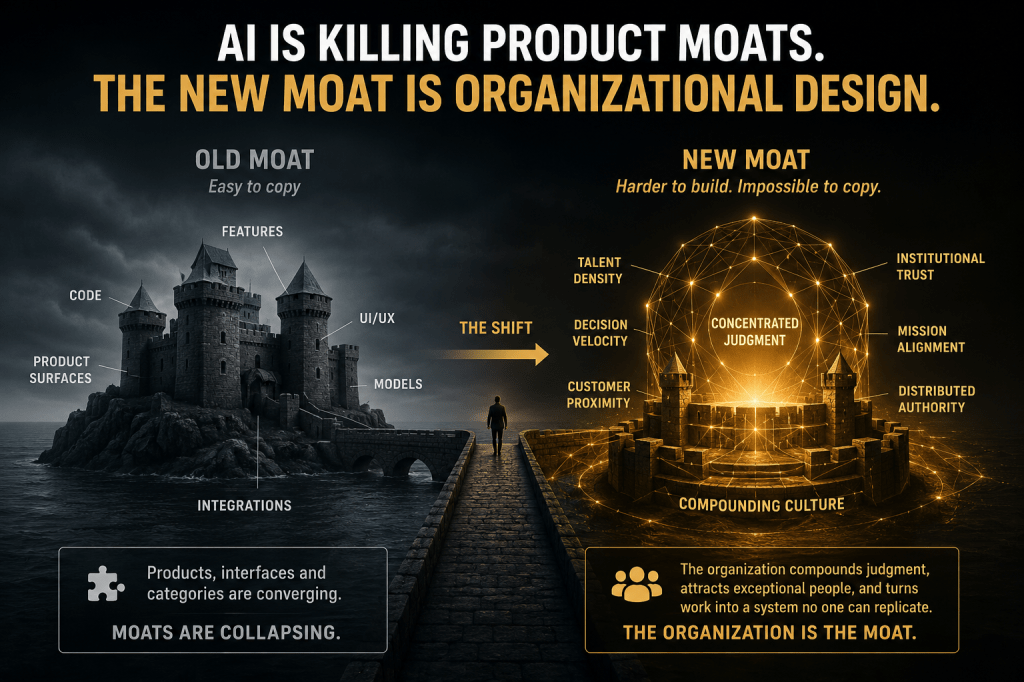
Founders are obsessed with moats right now—and for good reason. In a world of near-infinite competition, margins trend to zero unless you can defend something real. But here’s the uncomfortable truth: early on, the only moat you actually have is speed.

Not “we ship fast-ish.” I mean Cursor-level speed—one-day sprints in 2023–2024—while big companies take weeks, months, sometimes years to push features through PRDs and committee. In greenfield markets where nobody knows which products matter yet, the team that cycles daily and learns fastest wins the right to worry about moats later.

Speed is missing from Hamilton Helmer’s Seven Powers, but it shouldn’t be. It’s the gateway power. Ship relentlessly; make something people truly want; then stack the classic moats as you scale. That’s the actual sequence. If you’ve got nothing valuable yet, your “moat” is just a puddle.

Once you have traction, process power shows up first. Think of what banks demand from AI agents handling KYC or loan origination. A hackathon demo gets you 80% of the way with 20% of the effort; production-grade reliability on tens of thousands of decisions per day requires the last 1–5% to work almost all the time—and that last mile takes 10–100× the effort. That drudgery is a moat. Plaid-style surface area across thousands of financial endpoints, CI/CD that never breaks, evals that catch edge cases—this is why Stripe, Rippling, and Gusto are hard to copy. Better engineering, done repeatedly, compounds.

Cornered resources come next. Sure, in pharma that’s patents. In modern AI, it’s privileged access: regulated buyers, DoD environments, or proprietary customer workflows and data you collect by being a forward-deployed engineering team. That proprietary data lets you tune models and prompts so your unit economics improve—Character-AI-style 10× serving cost reductions are the blueprint. Having your own best-in-class model helps, but it’s not mandatory on day one; careful context engineering will get you 80–90% of what customers need for the first two years.

Switching costs are evolving, too. The old world was Oracle or Salesforce: migrating schemas and retraining a sales org could cost a year of productivity. LLMs will lower those data-migration costs, but AI startups are creating a new lock-in: months-long onboarding that encodes custom logic and compliance into agents. Six- to twelve-month pilots that convert to seven-figure contracts make a second bake-off irrational. On the consumer side, memory is becoming sticky—tools that actually remember you raise the pain of leaving.

Counter-positioning is quietly lethal. Incumbent SaaS sells per seat; good agents reduce seats. The better their AI, the more revenue they cannibalize. Startups price on work delivered or tasks completed—and then they actually deliver. That culture shift is nontrivial for late-stage incumbents. Second movers who out-execute often win: legal AI teams focusing on application quality over fine-tuning aesthetics; customer support agents like Giga ML that “just work” faster in onboarding. Agents also have superhuman edges: instantly handle 200 languages, infinite patience on bad connections. In vertical SaaS, this flips wallet share: from ~1% “software” take to 4–10% when you absorb operations (AOKA’s HVAC support example). That’s not a feature; that’s a business model moat.

Network effects in AI look like data flywheels and eval pipelines, not just “more friends = more fun.” The more usage you have, the more ground-truth failures you capture, the better your prompts, tools, and models get. Cursor’s telemetry—every keystroke improving autocomplete—compounds quality. Brand still matters (ask Google how it feels to chase ChatGPT), but the durable edge is usage → data → better product → more usage.

Finally, scale economies mostly live at the foundation layer. Training frontier models and crawling large slices of the web (think EXA’s “search for agents”) are capital-intensive, with low marginal costs at scale. Even with DeepSeek-style RL efficiencies, the base models remain expensive—another reason application-layer speed matters early.

So here’s the playbook. Find existential pain—work that’s so broken someone’s promotion or business is on the line. Ship daily until you own that pain. Use the speed moat to earn time, users, and cash. Then layer in process power, cornered resources, switching costs, counter-positioning, network/data effects, and—when relevant—scale. Think five years out, sure, but execute like you only have five days. Because in the beginning, you do.

Is ChatGPT sending more customers or Google for B2B customers?

Overview

Recent analysis of client web traffic compared traditional Google organic search sessions with attributable traffic from AI tools (primarily ChatGPT, with smaller volumes from Perplexity and others). The goal was to understand the ratio of SEO-driven traffic to AI-driven traffic and identify implications for marketing strategy.

Key Findings

  1. SEO traffic remains strong and growing. Across clients, organic sessions from Google continue to trend upward. In multiple cases, traffic has scaled from under 100 sessions to several thousand per month. Publishing high-intent, bottom-funnel content continues to drive measurable growth.
  2. AI traffic is rising but remains small. AI referrals began appearing in mid-2024 and show steady growth. However, the volume remains modest:
    • On average, AI traffic is ~3% of SEO traffic.
    • Most accounts fall in the 2–5% range, with outliers as low as 0.2% and as high as 7%.
    • Nearly all AI traffic originates from ChatGPT, though conversions sometimes come from other platforms like Perplexity.
  3. Perceived SEO decline is often attributional. Slight declines in organic traffic have been observed in some mature accounts. However, these dips often coincide with increases in branded search traffic. This suggests users may discover companies through AI overviews or AI search results but then navigate via direct or branded searches rather than clicking organic links.
  4. Conversions do not align directly with traffic. While ChatGPT contributes the majority of measurable AI sessions, conversions are often driven by other tools. This highlights the need to evaluate AI channels on conversion performance, not traffic volume alone.
  5. Attribution challenges are intensifying. Cookie consent, privacy changes, and shifts in user click paths make it harder to tie conversions directly to SEO or AI sources. Many conversions appear as “direct/none,” despite being influenced by search or AI exposure.

Strategic Implications

  • SEO is not dead. Organic growth remains consistent, and claims of its demise are not supported by the data.
  • AI traffic is complementary, not a replacement. It is increasing but represents a single-digit share of SEO volume and conversions.
  • Brands should view SEO and AI as interconnected. Visibility in search engines feeds AI discovery, and vice versa. Both channels ultimately contribute to brand awareness and lead generation.
  • Conversion measurement must evolve. Teams should place greater emphasis on overall lead growth and blended attribution, rather than expecting precise channel-level credit.

Conclusion

Current evidence shows SEO continues to be a primary driver of traffic and conversions, while AI referrals are emerging but still limited in scale. The most effective strategy is not choosing between SEO and AI but understanding how the two reinforce each other in driving brand discovery and measurable outcomes.

How to Increase AI Visibility (Common Mistakes People Make)

Featured

I just watched a great episode from The Grow and Convert Marketing Show that breaks down the exact question many of us in marketing have been asking: what should we actually do to increase our AI visibility? The episode cuts through the noise and fearmongering from some of the AI visibility tools and gives a clear, practical framework you can use today. Here’s the short, friendly recap I’d share with a colleague—what I learned, what to avoid, and a simple plan you can implement this week.

Why marketers are suddenly anxious about AI visibility

First, the context: a bunch of CMOs, founders, and marketing leads are opening up AI visibility dashboards, seeing competitors “winning,” and getting understandably nervous. The common pattern is this: an SEO/AI tool runs a bunch of prompts, tallies how often your brand is mentioned in AI overviews, spits out a single percentage or “share of voice,” and then you look bad on paper.

That panic is often misplaced. The episode makes a core point I agree with: these tools tend to prioritize quantity over quality. They measure how frequently your brand appears across a wide net of prompts—but they don’t judge whether those prompts actually matter to your business. In other words, a high visibility score that’s driven by irrelevant, top-of-funnel, or non-buying-intent queries isn’t valuable.

The common traps: irrelevant prompts and false comparisons

Two client examples from the episode illustrate this well:

  • A B2B software client saw a competitor showing up in AI overviews for a bunch of queries like “things to do in Illinois,” “most visited cities,” and city-specific travel guides. That competitor publishes consumer-facing content, so they naturally appeared in those AI prompts. But our B2B client sells software to vacation-related businesses—not consumer travel guides—so those AI mentions are largely meaningless.
  • A look at SEMrush’s AI brand performance demo for Warby Parker showed a “share of voice” percentage and dozens of specific queries. Some prompts made total sense (e.g., “Which retailers have the best customer reviews for eyewear?”) and mattered to Warby Parker. Other prompts—like “Who offers in-app virtual try-on for glasses?”—might be irrelevant or of very low commercial value.

Both examples show the same problem: tools give a big-picture metric without filtering for intent or business relevance. That metric can make leaders panic even when the brand is doing the right things for its customers.

Two rules that will save you from unnecessary panic

If you remember only two things from this article (and the episode), let them be these:

  1. Intent matters. Not all prompts are equal. A mention in a “what are fun things to do in Springfield” overview is not the same as ranking in an AI overview for “best property management software for vacation rentals.” Pick queries aligned to buying intent.
  2. SEO fundamentals still matter most. From the data referenced in the episode and our own observations, there’s a strong correlation between ranking in Google search results and showing up in AI overviews (including ChatGPT and Google’s AI responses). So prioritize the core things that make you rank well on Google.

How AI overviews actually decide what to show

The episode summarizes this neatly into two inputs that influence LLM answers like ChatGPT and Google AI overviews:

  • Training data: The LLM’s broad knowledge built from public datasets, books, podcasts, and web content. Getting into that training data is a long-term brand effort—centuries of marketing activities add up here.
  • Live web search: Many LLMs “search the web” when they don’t have enough internal information, and they use Google or other web sources. That makes your presence in current Google search results a very direct lever to influence AI answers.

Practically: focusing on appearing in top Google results (your domain or reputable third-party pages that mention you) is the most tangible way to influence whether AI mentions your brand.

A simple, practical framework you can implement today

Stop staring at a single “AI visibility” percentage and start controlling what matters. Here’s a step-by-step playbook I’d use right now if I were advising a marketing team with limited budget:

  1. Pick 5–10 core topics (not a thousand prompts). These should be the queries that directly indicate buying intent and align with your product. Examples: “prescription glasses online,” “equipment rental software,” “best content marketing agency for SaaS.” Keep them tight and product-focused.
  2. Map intent for each topic. Decide whether each topic is TOFU (top of funnel), MOFU, or BOFU (bottom of funnel) and what a successful outcome looks like: visits, demo signups, trial starts, or direct conversions.
  3. Audit your current rankings. For those 5–10 topics, track where your pages currently appear in Google. Do this monthly. You can use a paid tool or a simple spreadsheet with manual checks.
  4. Fix and optimize your pages. Update content, clarify intent, add conversion opportunities, and ensure pages answer the user’s question better than competitors. This is classic SEO content work—do it well.
  5. Earn placements on other relevant pages/lists. If other sites produce “best of” lists or roundups for these topics, get on them. Traditional PR outreach and relationship building still work here—email editors, share case studies, provide data, and be helpful.
  6. Monitor AI overviews for those topics, not your overall percentage. If you want, use an AI-tracking tool and focus reporting on those 5–10 queries rather than a single share-of-voice metric.
  7. Be wary of short-term “hacks.” Commenting across many Reddit threads, paying for placement, or other manipulative tactics might give transient wins. They’re not a substitute for sustainable SEO and product-driven marketing.

Examples of good vs. bad AI visibility efforts

From the episode, here’s how to classify potential activities:

  • Good: Updating core product pages and buying-intent content. This improves organic rankings and is likely to increase AI mentions in meaningful ways.
  • Good: Earning placements on authoritative lists that already rank well. That amplifies signals without being spammy.
  • Less useful: Trying to rank for dozens of irrelevant prompts the tool suggests. This wastes effort on topics that won’t convert.
  • Risky: Paying for placements that violate policies or trying to game AI algorithms with low-quality tactics. Short-term gains can become long-term penalties.

What about expensive AI visibility tools?

There are helpful tools out there that can automate monitoring and give you a big dashboard. But if you can’t justify the budget, you don’t need them to make progress. The hosts suggested a pragmatic alternative:

  • Pick your 5–10 priorities, build a simple spreadsheet, and check them periodically.
  • Have your team discuss status and actions every month. This focuses your efforts on topics that matter.

If you do decide to invest in a tool later, you’ll have clarity on which queries you care about and can ask the tool to monitor those specifically—rather than relying on whatever list it auto-generates.

Final takeaways — what I’m telling my team

If you’re feeling that uneasiness after opening an AI visibility report, here’s the friend-to-friend advice I’d give:

  • Don’t panic over a single share-of-voice number. It’s easy to misinterpret. Ask: which prompts contribute to that number, and do those prompts matter?
  • Pick a handful of meaningful queries and own them. Monitoring and optimizing 5–10 buying-intent topics is far more productive than chasing hundreds of irrelevant prompts.
  • Double down on SEO basics. Strong organic ranking signals are the most reliable way to influence AI outputs today. Create great content, earn links, and fix UX/conversion issues.
  • Use PR and list placements strategically. Getting on trusted lists that already appear in search results is a sensible, scalable tactic to increase the chances AI tools reference you.
  • Avoid reliance on hacky short-term tactics. They might work momentarily, but long-term brand and product strength wins.

“Do the basics. If you’re not doing the basics right now, then you’re going to have a lot harder time showing up in AI.” — Summarized from The Grow and Convert Marketing Show

How to get started this week (quick checklist)

  1. Pick 5–10 product-related topics with clear buying intent.
  2. Search each topic on Google and note the top 3–5 results.
  3. Audit your content for those topics—are you answering the searcher’s question? Is there a clear conversion path?
  4. Update or create the highest-value pages first (optimize for intent and conversions).
  5. Identify 3 external sites/lists where your brand should appear and start outreach.
  6. Set a monthly review to check rankings and AI overview presence for your chosen topics.

Closing thought

AI visibility is real and worth thinking about, but it’s not a magic replacement for SEO or product-driven growth. Focus on the queries that drive value, do the SEO fundamentals well, and use PR/list placements to complement your efforts. If you do that, the AI mentions will follow—without the panic and without wasting resources on irrelevant metrics.

If you want to dive deeper, follow The Grow and Convert Marketing Show for more breakdowns like the one I summarized—it’s a great resource for practical, no-nonsense marketing advice.