India’s delivery ecosystem has transformed dramatically over the past decade. What began as restaurant delivery and scheduled grocery e-commerce has evolved into a competitive, fast-growing landscape encompassing instant commerce, bulk grocery delivery, and B2B supply chain platforms. In 2025, quick commerce and online food delivery have become habitual for urban consumers, while the B2B backend is still stabilizing.
📈 Historical Evolution
Food delivery took off around 2015, with Swiggy and Zomato emerging as the dominant players. Earlier competitors like Foodpanda and Uber Eats exited or were acquired. Grocery delivery experienced early failures in 2016–17 but recovered through companies like BigBasket and Grofers (now Blinkit). The COVID-19 pandemic catalyzed mass adoption across both segments.
Quick commerce (10–30 minute delivery) emerged around 2021–22, led by Blinkit’s rebranding and the arrival of Zepto, sparking a new wave of VC funding and dark store expansion. Meanwhile, the B2B space saw growth through players like Udaan, Jumbotail, and Ninjacart, but has since seen consolidation due to tight margins.
🏢 Major Players
Quick Commerce (B2C):
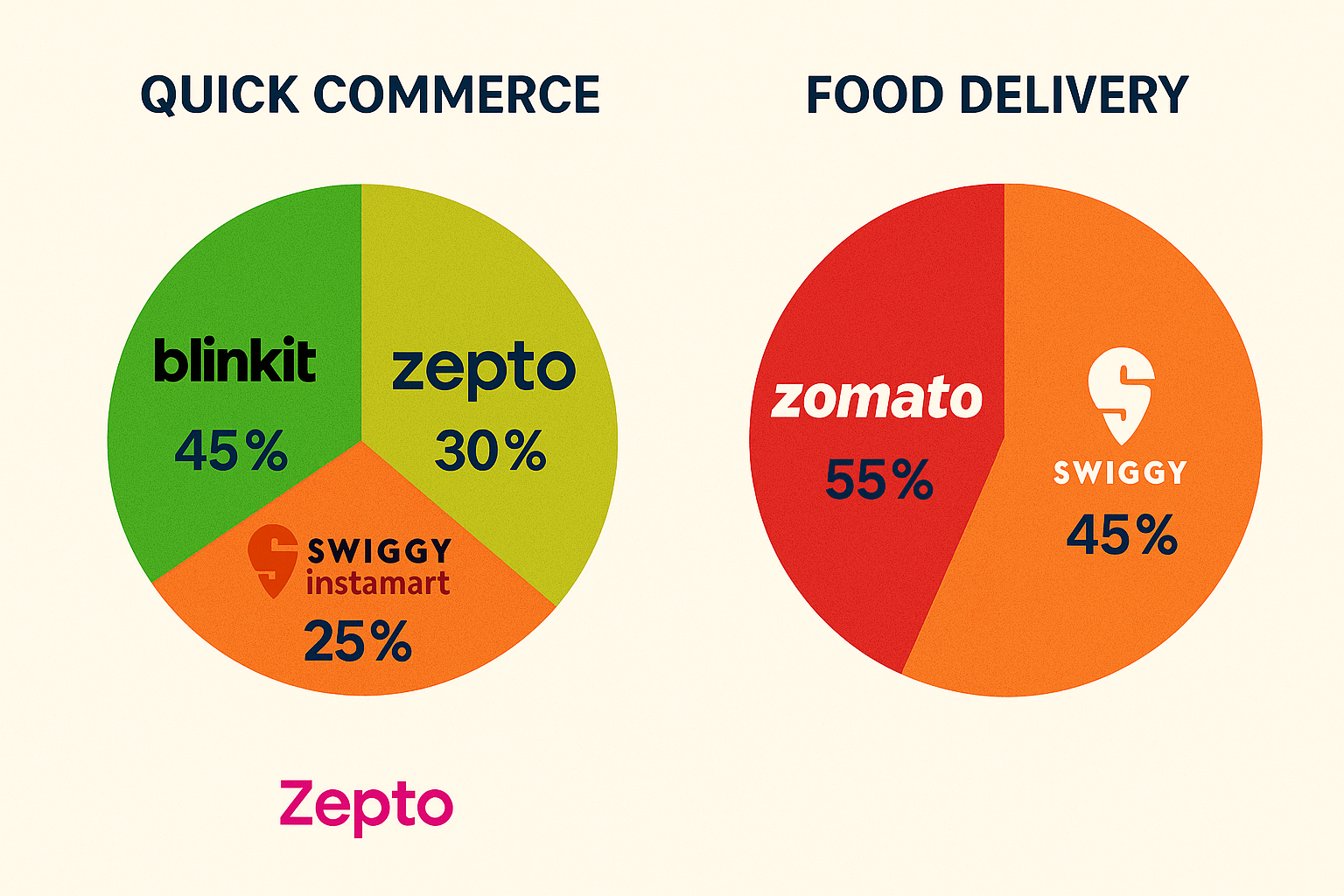
Blinkit (acquired by Zomato): Market leader with ~46% share.
Zepto: Startup sensation with ~29% share, focused on metros.
Swiggy Instamart: 25% share, integrated with Swiggy app.
BigBasket Now, Dunzo: Niche players, limited geography or scale.
Scheduled Grocery (B2C):
BigBasket (Tata): Full-stack inventory-led model; strong in staples.
ONDC, the government-backed open network, is emerging as a wildcard in food/grocery with lower commissions.
Companies are shifting from growth-at-any-cost to unit economics and profitability:
Blinkit became contribution margin positive in 2024.
Swiggy targets profitability for Instamart by 2025.
Food delivery profits fund grocery expansion.
The Indian quick commerce (q-commerce) market, characterized by ultra-fast delivery (typically within 10–30 minutes), is experiencing explosive growth, fundamentally reshaping the country’s retail landscape.
Market Size and Growth • The sector is currently valued at approximately $3.34 billion (2024) and is projected to reach between $5 billion and $5.38 billion by 2025, with forecasts extending to nearly $10 billion by 2029. • Annual growth rates are among the highest in retail, with estimates ranging from 40% to 100% year-on-year, far outpacing traditional retail and standard e-commerce channels. • Quick commerce already accounts for about half of all e-commerce grocery sales and nearly 7% of the total addressable market, indicating significant room for further expansion.
Key Trends • Urban Focus, Expanding Reach: Initially concentrated in major metros, q-commerce is now rapidly expanding into tier-2 and smaller cities, driven by rising urbanization, smartphone penetration, and a young, tech-savvy consumer base. • Beyond Groceries: While groceries and daily essentials remain core, platforms are diversifying into electronics, personal care, and premium categories to increase average order values and market share. • Technology-Driven Efficiency: The sector leverages AI, data analytics, and micro-fulfillment centers (dark stores) to optimize inventory and delivery, enabling the promise of 10–30 minute fulfillment. • Direct Sourcing and D2C Growth: Platforms increasingly partner directly with manufacturers and feature a growing mix of direct-to-consumer (D2C) and new-age brands, with over 30% of offerings on some platforms now D2C.
Major Players • The market is dominated by Swiggy Instamart, Blinkit (Zomato), Zepto, BigBasket, and Dunzo, who collectively hold more than 80% market share. • Traditional e-commerce giants like Amazon and Flipkart are entering the space, intensifying competition. • User engagement is high: for example, Blinkit reported 8.8 million visits in Q1 2024. Consumer Behavior • The core user base consists of urban millennials and Gen Z, who prioritize convenience, speed, and digital payment options. • The average order value is rising, with platforms pushing into higher-value categories to drive profitability. • Consumer loyalty is driven by delivery speed, product quality, ease of use, and competitive pricing
Challenges • Logistics and Infrastructure: India’s diverse geography and urban congestion present delivery challenges, though innovations like dark stores and AI-powered routing are mitigating these issues. • Profitability and Consolidation: As competition intensifies, differentiation and operational efficiency are critical. The market may see consolidation, with a few dominant players emerging, similar to other Indian digital sectors. • Consumer Trust: Ensuring product quality, data privacy, and consistent service is essential to maintain and grow the customer base.
Future Outlook • Quick commerce is expected to continue its rapid expansion, fueled by further penetration into smaller cities, new product categories, and ongoing investment in technology and logistics. • The sector’s unique strengths-speed, proximity, and convenience-position it to capture a substantial share of India’s $250 billion urban grocery market and beyond. • By 2029, the user base is expected to nearly triple, reaching over 60 million, with average revenue per user also rising sharply.
Conclusion
Quick commerce is not just a fast-growing retail channel in India-it is redefining how Indian consumers shop, setting new standards for convenience and speed. The next phase will see deeper market penetration, broader product offerings, and likely consolidation as the sector matures and competition intensifies
As SaaS and AI-native companies evolve, so do their monetization needs.
Gone are the days when simple subscription billing could handle the complexities of a modern B2B company. Today’s growth-stage businesses demand flexible usage-based billing, automated revenue workflows, and AI-enhanced pricing logic to remain competitive. A wave of startups—and some mature players—are rising to meet this demand, redefining the core of how software companies generate and optimize revenue.
In this post, we break down the emerging landscape of modern revenue infrastructure by analyzing 9 standout companies: Metronome, Orb, Maxio, Paid.ai, Solvimon, Zenskar, PostHog, Sequence, and Paddle.
The Shift from Legacy Billing to Composable Monetization
Traditional billing platforms like Zuora or Chargebee were built in the era of flat subscriptions and manual workflows. But the modern SaaS business is:
Product-led (PLG), requiring granular metering of user behavior
Global, with currency, tax, and compliance complexity
AI-driven, where dynamic pricing and renewals must be handled in real-time
Enter the new monetization stack—an ecosystem of tools built API-first, designed for developers and RevOps teams alike.
Segmenting the Landscape: Four Clusters
To make sense of this rapidly growing market, we segmented the companies into four distinct clusters:
1. Usage-Based Billing Platforms
These tools provide powerful metering, real-time billing, and pricing flexibility:
Metronome: Built for scale, Metronome is known for its developer-friendly APIs and real-time metering. Used by fast-growing SaaS businesses embracing usage-based pricing.
Orb: A strong choice for AI-native companies needing composable pricing logic and deep integrations.
Zenskar: Focuses on quote-to-cash and supporting hybrid pricing models.
Solvimon: Based in Europe, it supports sophisticated pricing rules for fintech and B2B software businesses.
Sequence: Positioned as a CPQ+Billing hybrid, with strong RevOps and approval workflows.
These platforms are ideal for high-growth SaaS teams that need precise control over how they bill based on real usage.
2. RevOps / FinOps Infrastructure
These platforms extend billing into revenue recognition, SaaS metrics, and compliance:
Maxio: A well-established name for financial operations, including deferred revenue and subscription analytics.
Paddle: Operates as a Merchant of Record, handling tax, fraud, payments, and compliance globally.
They’re especially suited for finance teams looking to unify monetization with compliance and reporting.
3. AI-Native Billing
This emerging category blends dynamic logic with automation:
Paid.ai: A newer player that acts as the brain of the revenue engine—handling renewals, pricing decisions, and billing using AI agents.
Perfect for experimental teams looking to future-proof their revenue stack.
4. Product Analytics Adjacent
These aren’t billing tools per se—but they inform monetization strategy:
PostHog: An open-source product analytics suite that helps companies understand usage patterns, retention, and conversion—crucial for pricing and packaging decisions.
Visualizing the Landscape
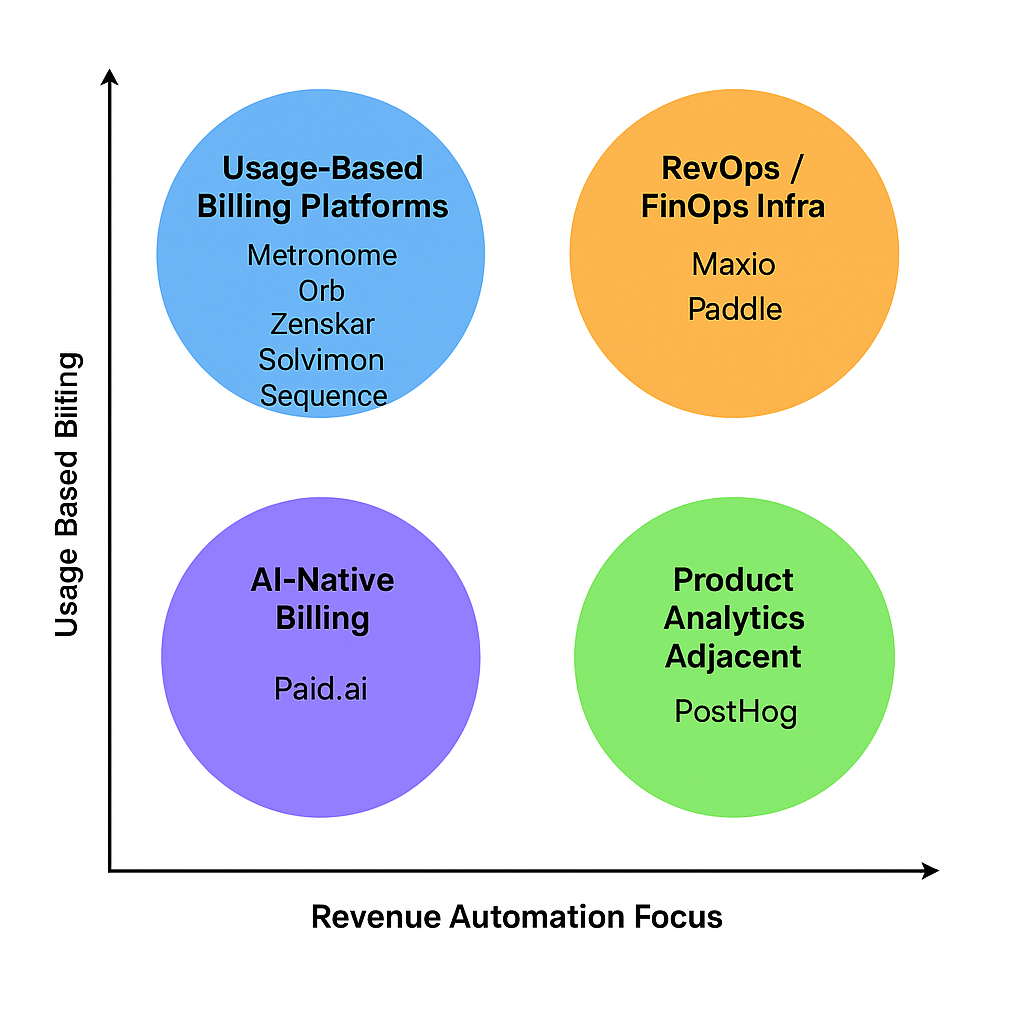
In our quadrant view, we plotted these companies along two axes:
X-axis: Revenue Automation Focus (manual vs automated workflows)
Y-axis: Usage-Based Billing Sophistication (flat rate vs dynamic pricing)
Each cluster reflects a different strategy for monetizing software:
Usage-billing companies dominate the top-left, prioritizing granular metering.
RevOps tools cluster top-right, integrating compliance and finance.
AI-native and analytics platforms fill in the bottom quadrants, each pushing innovation.
Who Should Use What?
Company Profile
Ideal Cluster
Early-stage PLG SaaS
PostHog, Metronome
Scaling SaaS with hybrid pricing
Orb, Zenskar, Sequence
Global SaaS needing tax/compliance
Paddle, Maxio
AI-native or dynamic pricing
Paid.ai
Looking Ahead
The lines between billing, finance, and product analytics are blurring. As GTM teams embrace more complex monetization strategies, the most successful platforms will be:
Composable: Integrating across CRM, data warehouse, and product systems
Real-time: Offering instant billing, pricing, and reporting
AI-native: Making predictive decisions on renewals, discounts, and pricing
These 9 companies are at the forefront of this transition. As the market matures, expect convergence—and consolidation—as businesses look for unified monetization platforms.
As B2B software moves from seat based or usage based pricing to outcome based pricing these companies are the new backbone behind many of the new AI startups.
They specialize in recurring revenue models, usage-based billing, or quote-to-cash processes. Their products go beyond billing to include features like revenue recognition, analytics, forecasting, and reporting.
Most platforms provide robust APIs or developer-centric tooling to integrate into existing SaaS stacks. They focus on infrastructure needed after a sale: invoicing, tax compliance, dunning, renewals, etc. These companies are part of an emerging wave disrupting legacy billing systems like Zuora, Aria, or Chargebee.
Company Name
Founding Year
Number of Employees
Key Products
Metronome
2019
130
Usage-based billing platform for SaaS companies.
Orb
2021
72
Modern billing infrastructure for AI and software companies.
Maxio
2009
235
Billing and financial operations platform for B2B SaaS, including subscription management and revenue recognition.
Paid.ai
2024
9
Business engine for AI agents handling pricing, subscriptions, margins, billing, and renewals.
Solvimon
2022
18
Monetization and billing automation platform for global fintech and B2B software businesses.
Zenskar
2022
64
Quote-to-cash platform automating complex subscription and usage-based billing with analytics.
PostHog
2020
85
Open-source product analytics and data toolkit used by over 70,000 teams.
Sequence
2021
30
Modern billing, CPQ, and revenue recognition platform for error-free revenue workflows.
Paddle
2012
360
Merchant of record solution for SaaS businesses, handling payments, tax, and subscription management.
I wanted to compare of AI-powered note-taking solutions Bee, Limitless, and Plaud, highlighting their key features, differences, and best use cases to help you choose the right tool.
In today’s fast-paced digital world, efficient note-taking is more important than ever. AI-powered note-taking solutions like Bee, Limitless, and Plaud are transforming how we capture, organize, and access information. Whether you’re a student, professional, or casual user, understanding the strengths and differences of these tools can help you pick the perfect fit for your needs. This comprehensive comparison dives into their features, usability, and ideal scenarios, so you can make an informed decision and boost your productivity with the right AI note-taking assistant.
Overview of AI-Powered Note-Taking Solutions What are AI-powered note-taking tools?
Imagine having a note-taking buddy who’s always alert, super organized, and ready to help you capture your ideas, meetings, or random thoughts with minimal effort. That’s essentially what AI-powered note-taking tools are all about. These are digital applications infused with artificial intelligence that go beyond simple typing and saving. They analyze, categorize, summarize, and even generate content based on your input, making your note-taking experience smarter and more efficient.
Traditional note apps like Evernote, OneNote, or Notion are great for storing and organizing information, but AI note-taking solutions add a layer of intelligence that can automatically transcribe spoken words, extract key points from lengthy texts, suggest related content, and help you find your notes faster. They leverage machine learning algorithms to understand context, recognize patterns, and adapt to your unique note-taking style, transforming a basic digital notebook into a proactive assistant.
In essence, AI note-taking tools are not just repositories—they’re active partners that enhance productivity, reduce manual effort, and help you focus on what truly matters: your ideas and creativity.
Why choose AI-driven solutions over traditional note apps?
So, why should you consider switching from classic note apps to AI-driven solutions? Well, here are some compelling reasons:
Automation and Efficiency: AI can transcribe meetings, lectures, or voice memos instantly, saving you time. It can also automatically organize notes based on topics, dates, or projects, reducing manual sorting. Smart Summarization: Long notes or articles can be condensed into bite-sized summaries, making it easier to review key points quickly. This is especially handy when revisiting large volumes of information. Enhanced Search Capabilities: Traditional apps rely on keyword searches, but AI can understand context and semantics, helping you find relevant notes even if you don’t remember exact words. Content Generation and Suggestions: Some AI note apps can suggest related notes, generate outlines, or even write drafts based on your input, sparking creativity and reducing writer’s block. Personalization: AI learns your habits, preferred formats, and frequently used tags, tailoring the experience to your workflow and making note management more intuitive.
Compared to note-taking comparison charts like Evernote comparison or Notion Evernote comparison, AI-powered solutions often stand out because they adapt and evolve with your needs, offering a more dynamic and responsive experience. They’re not just static repositories—they’re intelligent assistants designed to make your life easier and more productive.
Brief introduction to Bee, Limitless, and Plaud
Now, let’s get to know some of the exciting players in the AI note-taking solutions arena: Bee, Limitless, and Plaud. These platforms are gaining attention because they combine the power of AI with user-friendly interfaces, aiming to redefine how we take and manage notes.
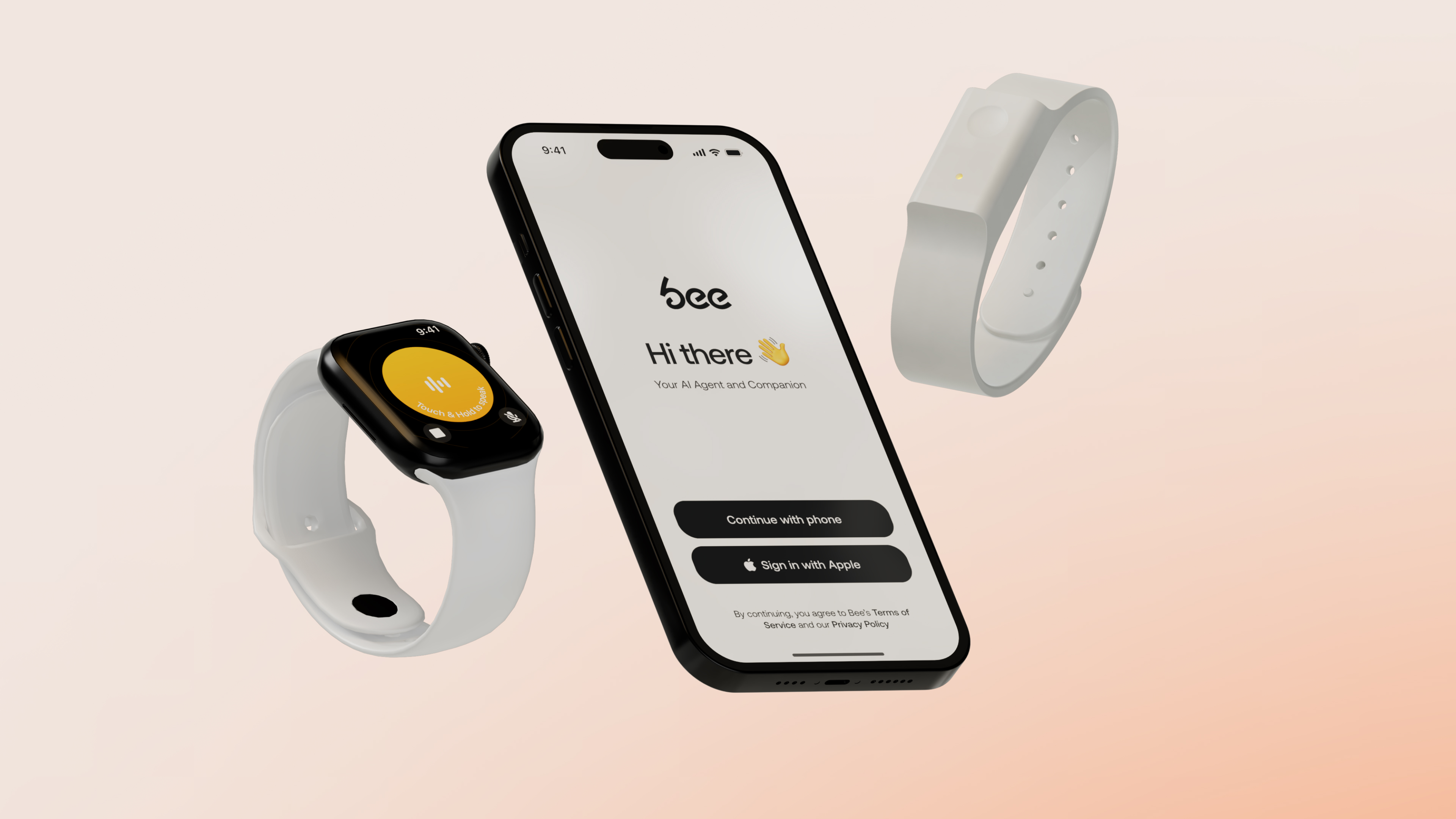
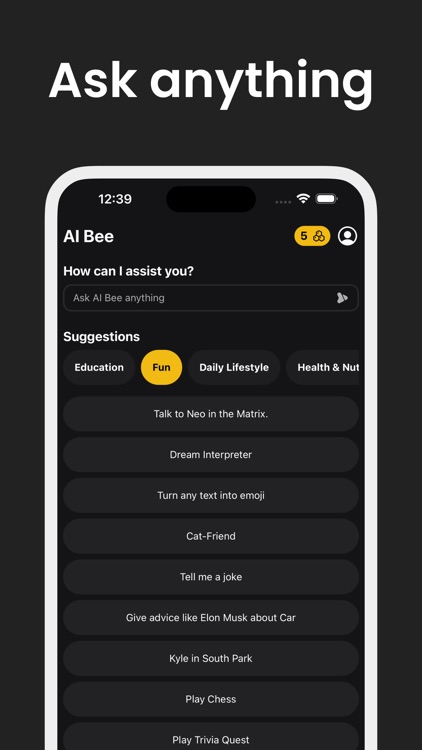
Bee is an innovative AI note app that emphasizes seamless voice-to-text capabilities and intelligent organization. It’s designed for users who want to capture ideas on the fly and have the app automatically categorize and summarize their notes. Bee’s standout feature is its ability to recognize different contexts—whether you’re jotting down a quick reminder or drafting a detailed project plan—and adapt accordingly.
Limitless takes a slightly different approach by focusing on integrating various content types—text, images, audio, and even video—into a unified AI-powered workspace. Its strength lies in its versatility and the way it leverages AI to connect related content, making note-taking not just about writing but about creating a rich, interconnected knowledge base.
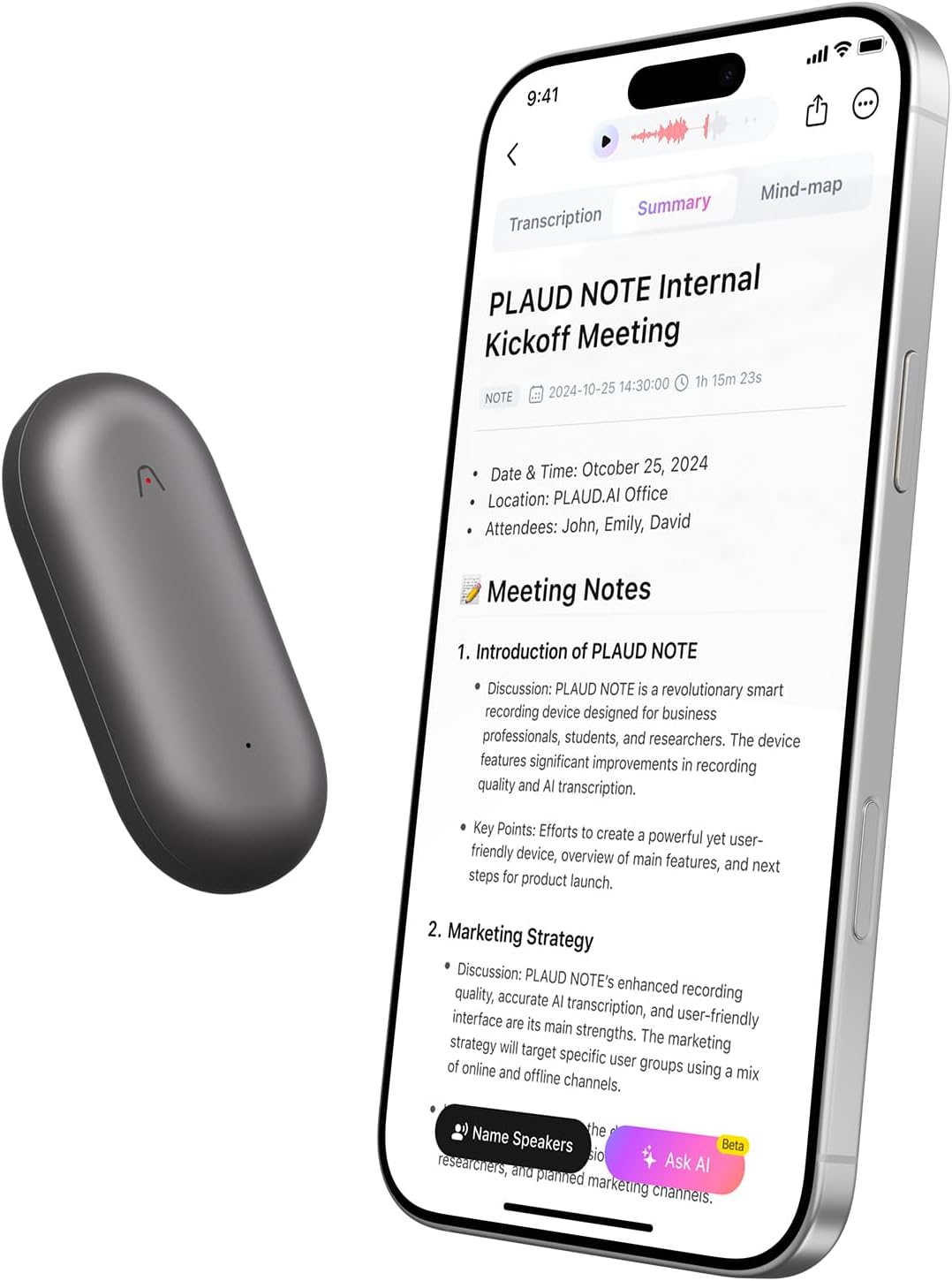
Plaud is tailored for collaborative environments, with AI features that facilitate team note sharing, real-time transcription, and automatic task extraction. It’s perfect for teams or study groups who want to keep everyone on the same page and ensure that no important detail slips through the cracks. Plaud’s AI-driven insights help teams prioritize and act on their notes more effectively.
These three platforms exemplify the trend toward smarter, more intuitive note-taking solutions powered by AI. Whether you’re a student, professional, or creative, exploring these options can open up new ways to capture and utilize your ideas with less hassle and more impact.
Key Features of Bee Core functionalities and AI capabilities
When diving into the world of AI note-taking solutions, Bee stands out as a versatile and intelligent tool designed to streamline your note-taking process. Its core functionalities are built around advanced AI capabilities that not only help you jot down ideas but also enhance your productivity through smart suggestions, automatic summarization, and contextual understanding. Unlike traditional note-taking apps, Bee leverages cutting-edge AI to transform the way you capture and organize information, making it one of the best AI note apps available today.
At the heart of Bee’s core functionalities is its ability to recognize and interpret natural language. Whether you’re dictating a quick reminder or drafting a detailed project plan, Bee’s AI can understand context, identify key points, and even suggest relevant tags or categories. This feature is especially useful when performing a note-taking comparison with other popular apps like Evernote or Notion, where AI-driven organization can make a significant difference.
Another standout feature is automatic summarization. If you’re reviewing lengthy meeting notes or research material, Bee can generate concise summaries, saving you time and helping you focus on what’s important. This is a game-changer compared to traditional note-taking apps that require manual highlighting or separate summarization tools. Additionally, Bee’s AI can detect patterns and relationships between notes, enabling smarter linking and cross-referencing, which is invaluable during a note taking app comparison or an Evernote comparison.
Furthermore, Bee incorporates intelligent search capabilities. Instead of sifting through endless notes, you can ask the AI questions or search with natural language queries, and it will retrieve relevant information instantly. This feature aligns with the trend of AI note-taking solutions aiming to make information retrieval more intuitive and efficient, surpassing many standard note-taking apps in speed and accuracy.
User interface and ease of use
One of the key aspects that make Bee appealing in the crowded market of note-taking apps is its user interface. Designed with a casual, user-friendly approach, Bee offers a clean and intuitive layout that minimizes clutter and maximizes usability. Whether you’re a tech novice or a seasoned note-taking pro, you’ll find navigating Bee straightforward and enjoyable.
The onboarding process is smooth, with guided tutorials that help you get started quickly. The interface emphasizes simplicity—think minimal buttons, easy drag-and-drop features, and smart organization options that automatically categorize your notes based on content. This makes Bee one of the best AI note apps for users who want powerful features without a steep learning curve.
For note creation, Bee offers multiple input methods—typing, voice dictation, or even attaching multimedia files. Its AI-powered suggestions appear contextually, helping you expand your notes or refine your ideas without interrupting your workflow. The editing tools are accessible yet unobtrusive, allowing you to focus on content rather than fiddling with complex menus.
Moreover, Bee’s interface adapts seamlessly across devices. Whether you’re on a desktop, tablet, or smartphone, the layout remains consistent, ensuring a smooth experience. This cross-platform compatibility is crucial, especially when performing a note-taking comparison with apps like OneNote or Notion, which also emphasize multi-device synchronization.
Ease of use extends to collaboration features as well. Sharing notes, commenting, and real-time editing are integrated smoothly, making Bee suitable for both personal and team projects. The casual design encourages frequent use, helping you develop a habit of capturing ideas effortlessly—something that sets it apart from more rigid note-taking solutions.
Integration options and compatibility
In today’s interconnected digital landscape, integration options can make or break a note-taking app. Bee recognizes this and offers a wide array of compatibility features to fit into your existing workflow. Whether you’re using productivity suites like Google Workspace, Microsoft Office, or other AI note-taking solutions, Bee plays well with many platforms.
One of the reasons Bee is considered among the best AI note apps is its ability to sync seamlessly with popular cloud storage services such as Google Drive, Dropbox, and OneDrive. This means your notes are accessible across devices and can be easily backed up or shared with collaborators.
Additionally, Bee integrates with calendar apps, email clients, and task management tools, allowing you to embed reminders, attach emails, or link notes to specific projects. This level of integration makes it a versatile tool that can serve as a central hub for your information management, comparable to or even surpassing the note taking app comparison with Notion or Evernote.
For developers and power users, Bee offers API access, enabling custom integrations and automation workflows. This flexibility ensures that Bee can adapt to various workflows, whether you’re automating note organization or connecting with other AI tools for enhanced productivity.
Compatibility with voice assistants and AI platforms is also a highlight. You can dictate notes via Siri, Google Assistant, or Alexa, and Bee will process and organize them accordingly. This feature aligns with the trend of AI note-taking solutions becoming more integrated into daily routines, making note capture effortless and natural.
Overall, Bee’s integration options and compatibility make it a robust choice for users seeking a flexible, interconnected note-taking environment. Whether you’re comparing it to OneNote or exploring AI note-taking solutions, Bee’s compatibility ensures it can be woven into your digital ecosystem seamlessly.
Key Features of Limitless Unique AI features and smart organization
When it comes to AI note-taking solutions, Limitless truly stands out from the crowd. Unlike some of the best AI note apps that rely solely on basic functionalities, Limitless integrates advanced AI capabilities that make note organization feel almost effortless. Imagine having a smart assistant that not only captures your ideas but also intelligently categorizes, tags, and summarizes your notes without you lifting a finger. This is the kind of innovation that sets Limitless apart in the note-taking comparison landscape.
One of the core features is its ability to understand context. Whether you’re jotting down meeting minutes, brainstorming ideas, or compiling research, the AI engine analyzes your input and suggests optimal organization methods. For example, it can automatically create folders or tags based on content themes, making future retrieval a breeze. This smart organization reduces clutter and ensures that your notes are always where you need them, when you need them.
Additionally, Limitless employs natural language processing (NLP) to enhance the note-taking experience. As you type or speak your ideas, the AI can generate summaries, highlight key points, or even suggest related notes. This transforms traditional note-taking into an interactive, dynamic process. Compared to other note-taking apps, where manual tagging and searching can be tedious, Limitless’s AI-driven approach makes finding information faster and more intuitive.
Another standout feature is its ability to learn from your habits. Over time, the AI adapts to your note-taking style, offering personalized suggestions that streamline your workflow. Whether you’re a student, professional, or creative, this adaptive intelligence ensures that Limitless remains a tailored tool that grows with your needs.
Collaboration and sharing features
In today’s interconnected world, collaboration is king. Limitless recognizes this and offers a suite of collaboration and sharing features that rival the best note apps on the market. Unlike some note-taking comparison tools that focus solely on individual use, Limitless makes teamwork seamless and intuitive.
One of its key strengths is real-time editing. Multiple users can work on the same note simultaneously, with changes syncing instantly across devices. This is perfect for team projects, brainstorming sessions, or classroom settings where instant feedback is essential. Plus, the platform supports comments and annotations, allowing collaborators to communicate directly within notes without switching to external apps.
Sharing is also a breeze. You can generate shareable links with customizable permissions—view-only, comment, or edit—giving you control over how your notes are accessed. Whether you want to share a project brief with a colleague or send a summarized report to a client, Limitless simplifies this process with its intuitive sharing options.
Furthermore, the app integrates with popular communication platforms like Slack, email, and even project management tools. This integration ensures that your notes can flow seamlessly into your existing workflow, making collaboration more efficient than ever. For teams that rely on note-taking comparison to decide on the best tools, Limitless’s collaborative features often tip the scales in its favor.
Platform support and accessibility
One of the biggest advantages of Limitless is its platform support and accessibility. Unlike some note-taking apps that are locked into specific ecosystems, Limitless is designed to work across multiple devices and operating systems, ensuring you’re never out of sync.
Whether you prefer Windows, macOS, Android, or iOS, Limitless offers dedicated apps that provide a consistent experience. Its web version is equally robust, allowing you to access your notes from any device with an internet connection. This cross-platform support is a major plus when doing a note-taking comparison, especially against platforms like OneNote compare or Notion Evernote comparison, which may have limitations or less seamless integration across different environments.
Accessibility features are also a priority. The app supports voice input, screen readers, and customizable display options, making it usable for people with diverse needs. For instance, if you’re on the go and can’t type easily, voice notes can be transcribed directly into your workspace, thanks to the AI note-taking solutions integrated into Limitless.
Moreover, the app’s cloud-based architecture ensures your data is synchronized securely and instantly across all your devices. This means you can start a note on your phone during a commute, continue editing on your tablet at home, and review it later on your desktop—all without missing a beat. Such flexibility and accessibility are crucial in today’s fast-paced, mobile-centric world, and they position Limitless as a top contender among note-taking comparison tools.
Key Features of Plaud Specialized AI tools and note enhancement
When it comes to AI note-taking solutions, Plaud stands out by integrating cutting-edge AI tools that truly elevate your note-taking game. Unlike traditional note apps, which often rely solely on manual input and basic organization, Plaud leverages artificial intelligence to make your notes smarter, more organized, and easier to access. Think of it as having a personal assistant that not only records your thoughts but also helps refine, categorize, and enhance them seamlessly.
One of the standout features in the best AI note apps is the ability to automatically summarize lengthy notes, extract key points, and even suggest related content. Plaud’s AI algorithms analyze your notes in real-time, highlighting important information and reducing clutter. This makes reviewing your notes faster and more efficient, especially when you’re juggling multiple projects or studying for exams.
Furthermore, Plaud’s AI tools facilitate note enhancement through smart tagging and contextual understanding. For example, if you jot down a meeting agenda or a lecture topic, the AI can recognize key themes and tag them accordingly, making future searches a breeze. This is a game-changer compared to traditional note-taking apps that require manual tagging or categorization, which can be time-consuming and prone to oversight.
Additionally, Plaud offers intelligent voice-to-text conversion, allowing you to dictate notes on the go. Its AI-driven transcription is highly accurate, capturing nuances and context that many other note-taking solutions struggle with. This feature is especially useful for busy professionals or students who prefer speaking over typing, making Plaud one of the best AI note apps for versatility and speed.
Customization options and user control
One of the reasons Plaud has gained popularity in the note-taking comparison is its extensive customization options. Unlike some note-taking apps that box you into rigid templates or limited layouts, Plaud gives you the freedom to tailor your workspace to suit your style. Whether you’re a visual learner who loves color-coded notes or someone who prefers minimalist design, Plaud accommodates your preferences.
Users can customize the interface, choose from various themes, and even set up personalized shortcuts for frequently used features. This level of control ensures that your note-taking environment feels intuitive and comfortable, encouraging consistent use and productivity.
Moreover, Plaud offers flexible organization tools. You can create nested notebooks, tags, and labels that suit your workflow. Want to organize notes by project, topic, or priority? No problem. The app’s drag-and-drop functionality makes restructuring your notes effortless. Compared to other note-taking apps like Evernote or Notion, which also boast customization, Plaud’s user control is praised for being straightforward yet powerful.
Another aspect worth mentioning is privacy and data control. Plaud allows you to decide how your data is stored and shared. You can opt for local storage, cloud syncing, or a hybrid approach, giving you peace of mind about your sensitive information. This level of user control over privacy settings is often overlooked in note-taking comparison but is vital for professionals handling confidential data.
Device compatibility and syncing
In today’s fast-paced world, seamless device compatibility and syncing are non-negotiable features in the best AI note apps. Plaud shines in this area by supporting a wide range of devices and platforms, including smartphones, tablets, laptops, and desktops. Whether you’re an Android user, an iOS enthusiast, or someone who prefers working on Windows or Mac, Plaud has got you covered.
What sets Plaud apart from other note-taking solutions is its real-time syncing capability. Your notes are automatically updated across all devices, ensuring you always have the latest version at your fingertips. This is particularly useful when comparing it to other note taking app comparisons like Evernote vs. Notion or OneNote compare, where syncing issues can sometimes hinder productivity.
Additionally, Plaud offers offline access, allowing you to view and edit your notes without an internet connection. Once reconnected, all changes are synchronized seamlessly. This feature is essential for users who travel frequently or have unreliable internet access, making Plaud one of the most versatile AI note-taking solutions available.
Furthermore, Plaud’s cloud infrastructure is designed for security and speed. The app employs encryption protocols to protect your data during transfer and storage, giving you confidence that your notes are safe. Its cross-platform compatibility and effortless syncing make it a top contender among note-taking comparison charts, especially for users who need reliable, quick access to their notes from multiple devices.
Comparing User Experience and Interface Design and navigation differences
When diving into the world of note-taking solutions, especially with the rise of AI note-taking solutions and the best AI note apps, the design and navigation aspects become crucial. If you’ve ever used a note-taking app comparison like Evernote comparison or Notion Evernote comparison, you’ll notice that each platform has its unique approach to layout and user flow. Some apps lean towards minimalism, focusing on a clean interface that minimizes distractions, while others pack in features with dense menus and complex hierarchies.
For instance, note taking apps comparison often highlights how Evernote’s interface is more traditional—think sidebar navigation and notebook stacks—making it familiar for long-time users. In contrast, Notion’s design is more modular, allowing users to customize their workspace with drag-and-drop blocks. The difference in design philosophy directly impacts how users navigate through their notes. Evernote’s straightforward notebook and note structure makes it easy to find what you need quickly, whereas Notion’s flexible pages and databases can feel overwhelming at first but offer more customization.
Moreover, AI note-taking solutions are pushing the envelope by integrating smart suggestions and contextual tools directly into the interface. These features can either streamline navigation or complicate it, depending on how well they’re integrated. The key takeaway is that design and navigation are deeply intertwined with user experience—an intuitive layout can make or break your productivity, especially when managing large volumes of notes or complex projects.
Learning curve and onboarding process
When comparing note-taking apps, one of the biggest differences often lies in the learning curve and onboarding process. Take the note taking comparison between Onenote compare and other apps—Onenote’s interface is familiar to many Windows users, which eases onboarding. However, for newcomers, especially those unfamiliar with Microsoft Office ecosystem, it might seem overwhelming at first glance.
On the flip side, apps like Notion or some of the best AI note apps tend to have a steeper initial learning curve. They offer a vast array of features and customization options, which can be intimidating for new users. That said, many of these platforms now include guided tutorials, onboarding checklists, and video walkthroughs to help users get started quickly. The onboarding process for AI note-taking solutions often emphasizes demonstrating how AI features can save time—like automatic note summarization or smart tagging—making the initial learning phase more engaging.
In the note-taking comparison, apps with a simpler, more streamlined onboarding process tend to retain new users better, especially those who just want a quick way to jot down ideas or organize notes without a steep learning curve. Conversely, apps that require more time to master can be more powerful in the long run but might deter casual users or those new to digital note-taking.
Mobile vs desktop usability
1.90.3-R6LBT6MTG6PDGHDGG4FQCS75IQ.0.1-6
When comparing user experience across platforms, mobile vs desktop usability is a hot topic. Many of the best AI note apps are designed to work seamlessly across devices, but their usability can differ significantly. For example, Evernote comparison often highlights how well the app adapts to mobile devices—offering quick note creation, voice memos, and photo attachments on the go. Its desktop version, meanwhile, provides a more comprehensive workspace with advanced formatting options and integrations.
Apps like OneNote excel in this area by providing a consistent experience across platforms. The mobile app is optimized for touch, with swipe gestures and simplified menus, while the desktop version offers more robust features for detailed editing and organization. This consistency is vital for users who rely on their notes throughout the day, switching between devices.
AI note-taking solutions are increasingly focusing on mobile usability, integrating features like voice commands and real-time AI assistance directly into mobile apps. This allows users to capture ideas quickly, no matter where they are, without sacrificing functionality. However, some complex features may still be better suited for desktop environments, where screen real estate and processing power support advanced workflows.
Ultimately, the best note-taking experience balances mobile convenience with desktop power. For users who need quick access and editing capabilities on the go, a mobile-optimized interface with intuitive navigation is essential. Meanwhile, power users working on detailed projects will appreciate a desktop interface that doesn’t compromise on features or usability.
Performance and Accuracy of AI Features Note recognition and transcription quality
When it comes to AI note-taking solutions, one of the biggest deal-breakers is how accurately they can recognize and transcribe your voice or handwritten notes. If you’ve ever tried using the best AI note apps, you know that even the most advanced tools sometimes stumble over accents, background noise, or messy handwriting. This is where the note taking app comparison really shines a light on which solutions excel and which need a bit more work.
In the realm of note recognition, AI-powered note-taking solutions have made huge strides. For example, some apps leverage deep learning models trained on vast datasets, enabling them to distinguish between similar-sounding words or interpret scribbled notes with surprising precision. When you compare Evernote versus Notion or OneNote, you’ll notice differences in how well they handle transcription tasks. Evernote, for instance, has long been praised for its reliable OCR (optical character recognition) capabilities, especially when dealing with scanned documents and images. Meanwhile, Notion’s focus on organization sometimes means its transcription isn’t as refined but still quite effective for digital notes.
Transcription quality isn’t just about getting the words right; it’s also about capturing context, punctuation, and formatting. Some AI note apps now incorporate natural language processing to improve contextual understanding, making the transcribed notes more readable and useful. For example, AI note-taking solutions like Otter.ai or Descript often outperform traditional note apps in this area, offering near-human accuracy, especially in clear audio recordings. However, even top-tier AI note apps can struggle with technical jargon, overlapping voices, or noisy environments, which can lead to errors or missed content.
Ultimately, the best AI note apps are those that strike a balance between high accuracy and ease of use. When doing a note taking app comparison, pay close attention to user reviews and testing results—some solutions might boast great features but falter in transcription accuracy. The key is to find a tool that reliably captures your notes without requiring constant manual correction, saving you time and frustration in your workflow.
AI suggestions and content organization
Another major factor in AI note-taking solutions’ performance is how well they can suggest relevant content and organize your notes. The best AI note apps don’t just transcribe—they actively help you make sense of your information. For instance, AI suggestions can include auto-tagging, smart categorization, or even recommending related notes based on your current content. This is where the note-taking comparison gets really interesting, especially when comparing giants like Evernote, Notion, and newer AI-powered apps.
In a typical note taking app comparison, you’ll find that some solutions excel at content organization thanks to advanced AI algorithms. Notion, for example, offers flexible templates and databases, but its AI features for suggestions are still evolving. Evernote, on the other hand, uses AI to automatically tag and categorize notes, making it easier to retrieve information later. Some of the best AI note apps like Obsidian or Roam Research focus heavily on linking notes contextually, and their AI integrations help surface relevant content based on your note history.
AI-driven content organization isn’t just about sorting; it’s also about enhancing your productivity. Features like intelligent search, automatic summaries, and contextual recommendations help you find what you need faster. For example, if you’re working on a project, these AI suggestions can surface related notes, previous research, or relevant files, turning your scattered notes into a cohesive knowledge base. When doing a note-taking comparison, look for solutions that incorporate these smart features—because they can significantly boost your efficiency and make your notes more valuable over time.
Speed and responsiveness
Last but definitely not least, speed and responsiveness are critical when evaluating AI note-taking solutions. No matter how accurate or feature-rich a tool is, if it lags or responds sluggishly, it can ruin your workflow. In the note taking app comparison, this aspect often tips the scales between good and great solutions.
Modern AI note apps leverage cloud computing and optimized algorithms to deliver near-instant results. For instance, apps like OneNote and Evernote are known for their quick syncing and real-time editing capabilities. When you compare them with newer AI note apps, you’ll notice that some may experience delays during transcription or content suggestions, especially if your internet connection isn’t optimal. The best AI note apps are designed with responsiveness in mind—offering seamless typing, quick search, and instant suggestions without noticeable lag.
Speed also encompasses how efficiently the app handles large volumes of notes. If you’re a power user with hundreds or thousands of notes, responsiveness becomes even more critical. AI features like auto-tagging or content organization should work smoothly without slowing down your device or app. When doing a note-taking comparison, consider not only the raw speed but also how well the app maintains performance as your note library grows. This ensures that your AI-powered note-taking solutions remain reliable and efficient, no matter the scale of your work.
Pricing Models and Subscription Plans Cost comparison of Bee, Limitless, and Plaud
📊 Pricing Comparison Table
Feature
Bee
Limitless
Plaud
Device Price
$49.99
$99 (preorder price)
$169
Free Plan
Yes
Yes (1,200 min/month transcription)
Yes (300 min/month transcription)
Paid Subscription
$12/month
$19/month (annually) or $27/month
$12.99/month or $79/year
Key Benefits
Personalized AI insights
Unlimited AI features and audio storage
Advanced transcription and AI features
When diving into the world of AI note-taking solutions, one of the first things that catches everyone’s eye is the pricing. With so many options out there—each promising to revolutionize your note-taking game—it’s essential to compare their costs and see which one offers the best bang for your buck. Let’s take a closer look at Bee, Limitless, and Plaud, three of the top contenders in the note-taking app comparison space, especially within the realm of best AI note apps.
Starting with Bee, this platform offers a straightforward subscription model. Its pricing tiers are designed to cater to different user needs, from casual note-takers to heavy-duty professionals. The basic plan is quite affordable, making it an attractive choice for students or those just exploring AI note-taking solutions. The premium plans, however, offer additional features like unlimited storage, advanced AI capabilities, and integrations with other productivity tools, which naturally come at a higher price point.
Limitless takes a slightly different approach. Its cost comparison reveals a focus on offering extensive features at a competitive rate. The platform’s entry-level plan is modest, but as you move up to the pro tier, you gain access to features like collaborative editing, enhanced AI note-taking solutions, and priority customer support. Interestingly, Limitless often bundles features that would typically be paid add-ons in other note-taking comparison charts, making it an appealing option for power users.
Finally, Plaud positions itself as a premium AI note app, with a pricing model that reflects its advanced capabilities. Its basic plan is comparable to the other two, but the real value lies in its high-tier subscriptions, which include AI-powered summarization, contextual note linking, and even voice-to-note features. While it might be pricier, many users find that the added value justifies the cost, especially if they rely heavily on AI note-taking solutions for their workflow.
In terms of actual numbers, here’s a rough comparison:
Bee: Starts at around $5/month for basic features, with premium plans ranging from $15 to $30/month. Limitless: Entry-level plans begin at approximately $7/month, with pro options costing between $20 and $40/month. Plaud: Basic plans are roughly $10/month, with premium tiers reaching up to $50/month for full feature access.
Of course, these prices are subject to change and often come with discounts or annual billing options that can significantly reduce the overall cost. When doing a note-taking comparison, it’s vital to consider not just the sticker price but also what features are included at each tier.
Free tiers and trial options
One of the biggest factors influencing the note-taking app comparison is the availability of free tiers and trial options. After all, trying out AI note-taking solutions without committing upfront is crucial for finding the best fit.
Bee offers a free plan that provides limited access to core features. It’s perfect for casual users or those who want to test the waters before diving into a paid subscription. The free tier usually includes a cap on storage, a limited number of notes, or restricted AI functionalities. This way, users can get a feel for the app’s interface and basic capabilities without any financial commitment.
Limitless also provides a free trial, often lasting 7 to 14 days, during which users can explore the full suite of features. This trial period is especially helpful for those doing a detailed note-taking comparison, as it allows hands-on experience with collaborative tools, AI note solutions, and integration options. After the trial, users can decide whether to stick with the free plan or upgrade to a paid tier.
Plaud tends to be a bit more generous with its free offerings. It usually provides a basic free plan with essential AI note-taking features, making it accessible for students or casual note-takers. Additionally, Plaud often offers free trials for its premium tiers, giving users a chance to test advanced features like AI summarization or voice-to-note before committing financially.
Overall, having access to free tiers and trial options is a game-changer in the note-taking app comparison. It allows users to evaluate the best AI note apps based on their workflow, usability, and feature set without risking money. Plus, it helps highlight which platform offers the most value for free, especially when considering the best AI note apps for different user needs.
Value for money and premium features
When comparing note-taking apps, especially in the realm of AI note-taking solutions, the question of value for money is paramount. It’s not just about how much a platform costs but what you get in return. Let’s break down what makes each of these platforms stand out in terms of premium features and overall value.
Bee’s premium plans unlock a suite of advanced AI note-taking solutions, such as contextual understanding, smart tagging, and seamless integration with tools like Notion or Evernote. For users who need a robust, versatile note-taking app comparison, Bee’s value lies in its user-friendly interface combined with powerful AI capabilities. The premium tier is often considered worth the investment for students, researchers, and professionals who want efficient, organized notes that leverage AI to boost productivity.
Limitless shines in its ability to offer extensive collaboration features, AI-powered insights, and customizable workflows. Its value for money is evident in its flexible tier system, which caters to both individual users and teams. For those seeking best AI note apps that support teamwork and real-time editing, Limitless provides a compelling package that balances cost and features effectively.
Plaud, with its focus on premium AI features, justifies its higher price point through capabilities like AI summarization, voice-to-note, and intelligent linking. For power users who rely on AI note apps to manage large volumes of information efficiently, Plaud’s value proposition is clear. Its premium features are designed to save time and enhance productivity, making it a worthwhile investment for those who need the best AI note apps on the market.
In a note-taking comparison, it’s essential to weigh the features against the costs. For instance, if you’re someone who values AI-driven insights and seamless integrations, investing in a premium plan from Plaud or Limitless might be justified. Conversely, if you’re just starting out or have light note-taking needs, a free tier or lower-cost plan from Bee could be more than sufficient.
Ultimately, the best AI note app for you depends on your specific needs, whether that’s simple note organization, collaboration, or advanced AI features. But understanding the value for money—what premium features you get at each tier—helps make an informed decision and ensures you’re investing in a platform that truly enhances your note-taking experience.
Ideal Use Cases for Each Solution Best scenarios for Bee
When it comes to AI note-taking solutions that excel at quick, efficient, and organized note capture, Bee stands out as a top contender. If you’re someone who often juggles multiple projects, attends a flurry of meetings, or needs to jot down ideas on the fly, Bee’s intuitive interface and smart features make it a perfect fit. Think of Bee as your digital sticky note that can grow into a comprehensive knowledge base without the hassle of traditional note apps.
For example, students and academics who need to capture lecture highlights, research snippets, or quick summaries will find Bee invaluable. Its ability to seamlessly organize notes into categories or tags means you can retrieve information effortlessly later. Similarly, professionals in fast-paced environments—like marketing teams brainstorming campaign ideas or software developers jotting down code snippets—will appreciate how Bee keeps their notes accessible and easy to search.
In the note-taking comparison landscape, Bee often shines brighter than some of the best AI note apps because of its focus on speed and simplicity. Unlike more complex tools like Notion or Evernote, Bee doesn’t overwhelm you with options but instead offers a streamlined experience. If your priority is capturing fleeting thoughts and turning them into structured notes with minimal effort, Bee is your go-to AI note-taking solution.
Optimal applications for Limitless
Limitless is designed for users who need a versatile, feature-rich AI note-taking app that adapts to a variety of workflows. If you’re someone who manages multiple projects, collaborates with teams, or requires integration with other productivity tools, Limitless is an ideal choice. Its strength lies in its ability to handle everything from detailed project planning to quick memos, all within a single platform.
Imagine a startup founder juggling product development, investor meetings, and team communications—Limitless can serve as the central hub for all these activities. Its AI capabilities can help generate summaries from lengthy meeting notes, suggest action items, or even draft emails based on your notes. For students, it can organize class notes, research data, and assignment deadlines in one place, making it easier to stay on top of everything.
In the note-taking comparison, Limitless often outperforms basic note apps because of its adaptability and AI-driven features. It’s especially useful for those who want a comprehensive note-taking app that can grow with their needs, rather than switching between multiple tools. Whether you’re using it for personal productivity or team collaboration, Limitless offers the flexibility and power that make it an optimal application for a wide range of users.
Ideal users for Plaud
Plaud is best suited for users who prioritize communication, social interaction, and community engagement within their note-taking environment. If you’re someone who loves sharing notes, collaborating in real-time, or building knowledge bases with others, Plaud’s social and collaborative features make it stand out. Think of it as a hybrid between a note-taking app and a social platform where ideas can flow freely.
Content creators, educators, and community managers will find Plaud particularly useful. For instance, teachers can create shared class notes, students can contribute to group projects, and teams can brainstorm and refine ideas collaboratively. Its AI features can assist in summarizing discussions, highlighting key points, or even suggesting related topics based on the conversation flow.
In the note-taking comparison, Plaud is often compared to platforms like Notion or Evernote but with a stronger emphasis on social interaction and real-time collaboration. If your goal is to foster a community around your notes or to facilitate dynamic discussions, Plaud is the ideal user for this solution. Its design encourages active participation and shared knowledge-building, making it perfect for educational settings, online communities, or any environment where collective input is valued.
Security and Privacy Considerations Data encryption and user privacy policies
When diving into the world of AI note-taking solutions, one of the first things to consider is how your data is protected. With the rise of the best AI note apps, users are increasingly concerned about privacy and security. Many popular note-taking comparison tools, like Evernote comparison and Notion Evernote comparison, emphasize their commitment to safeguarding user data. But what does that really mean in practice?
Data encryption is at the heart of most robust security strategies. In the context of note-taking apps comparison, you’ll find that leading platforms employ end-to-end encryption, which ensures that your notes are encrypted on your device and only decrypted on your authorized device. This means that even if someone intercepts the data during transmission or gains access to the servers, they won’t be able to read your notes without the decryption keys.
Beyond encryption, user privacy policies serve as the blueprint for how your data is handled. The best AI note apps typically have transparent privacy policies that clearly state what data they collect, how they use it, and with whom they share it. For instance, some platforms might collect usage data to improve their AI algorithms but assure users that personal notes are never sold or shared with third parties without explicit consent. When comparing note taking app comparison options, always scrutinize their privacy policies to ensure your data remains yours.
Cloud storage and local data control
One of the key decisions when choosing between note-taking solutions is whether to rely on cloud storage or local data control. Many of the top AI note apps, including those in the note taking apps comparison, leverage cloud storage to sync your notes seamlessly across devices. This convenience is great, but it also raises questions about data security and ownership.
Some users prefer local data control, especially when dealing with sensitive information. Apps like OneNote compare favorably here, offering options to store data locally on your device, giving you full control over your notes. Others, like Evernote comparison, primarily operate via cloud, which simplifies access but requires trust in their security measures.
If you opt for cloud-based solutions, look for platforms that offer encryption both in transit and at rest, along with features like two-factor authentication. Conversely, if local data control is your priority, ensure the app supports encrypted local storage and provides straightforward methods for backing up your notes securely.
Compliance with data protection standards
In the realm of AI note-taking solutions, compliance with data protection standards is more than just a checkbox; it’s a vital aspect of trust and security. Standards such as GDPR (General Data Protection Regulation) in Europe, CCPA (California Consumer Privacy Act) in the US, and others set strict guidelines on how user data should be handled, stored, and processed.
When comparing note taking apps comparison, especially in the context of AI note apps, look for platforms that explicitly state their compliance with these standards. For example, many of the best AI note apps are designed with GDPR compliance in mind, meaning they give users control over their data, including options to delete or export their information at any time.
Additionally, some platforms undergo regular security audits and certifications to demonstrate their commitment to data protection. For users evaluating note-taking comparison options, these certifications serve as a good indicator of a platform’s dedication to maintaining high security and privacy standards.
In the end, choosing an AI note-taking solution that prioritizes security and privacy isn’t just about protecting your notes; it’s about trusting the platform with your personal and professional information. Whether you’re comparing Evernote, Notion, OneNote, or other note taking apps comparison tools, always dig into their security features and privacy policies to find the best fit for your needs.
Customer Support and Community Resources Availability of help and tutorials
When diving into the world of AI note-taking solutions, having accessible and comprehensive support can make all the difference. Whether you’re comparing the best AI note apps or trying to decide between a note-taking comparison like Evernote comparison or Notion Evernote comparison, knowing where to turn for help is crucial. Most top-tier AI note-taking solutions understand this and have invested heavily in creating a robust support ecosystem. From detailed tutorials to quick-start guides, users can find resources tailored to their specific needs.
Many of the best AI note apps offer a variety of help options, including online tutorials, video walkthroughs, and interactive guides. For instance, if you’re exploring a note taking app comparison and want to understand how to maximize features, you might find step-by-step video tutorials that walk you through setting up your workspace, organizing notes efficiently, or integrating with other tools. These tutorials are often updated regularly to reflect the latest features, ensuring users stay current with the evolving landscape of AI note-taking solutions.
Additionally, some platforms provide in-app help features, such as tooltips, contextual help, or chatbots that can answer common questions instantly. This immediate assistance is especially useful for new users who might feel overwhelmed by the array of features available in note-taking apps comparison. The goal is to make onboarding as smooth as possible, reducing the learning curve and encouraging users to explore the full potential of their chosen AI note app.
Community engagement and user feedback
One of the standout aspects of the best AI note apps is their vibrant communities. These communities serve as a goldmine for user feedback, tips, and shared experiences. Whether you’re comparing note-taking apps or trying to decide between a note-taking comparison like OneNote compare or a more niche AI note-taking solution, engaging with other users can provide insights you won’t find in official documentation.
Many platforms host active forums, social media groups, or dedicated community pages where users exchange ideas, troubleshoot issues, and suggest feature improvements. For example, users might share how they optimized their workflow using AI note-taking solutions or discuss the pros and cons of different apps in a note taking app comparison. This peer-to-peer support fosters a sense of belonging and helps users get the most out of their tools.
Moreover, user feedback often influences the development roadmap of these apps. Developers actively monitor community discussions and surveys to identify pain points and feature requests. If a significant number of users express a desire for better integration or enhanced AI capabilities, the development team may prioritize these in future updates. This collaborative approach ensures that the evolution of these tools aligns closely with user needs.
Updates and future development plans
Staying ahead in the competitive world of AI note-taking solutions requires continuous innovation. Leading providers regularly roll out updates that introduce new features, improve existing functionalities, and enhance user experience. For instance, a note taking comparison might reveal that some apps are investing heavily in AI-driven automation, making note organization smarter and more intuitive.
Future development plans are often shared transparently through blogs, newsletters, or community updates. These communications keep users informed about upcoming features, improvements, and even long-term visions for the platform. For example, a company might announce plans to integrate more advanced AI note-taking solutions, such as voice-to-text capabilities or smarter search functions, which could revolutionize how users interact with their notes.
Additionally, many developers seek user input before launching major updates. Surveys and beta testing programs invite users to try out new features and provide feedback, ensuring that the final product truly meets user expectations. This collaborative process fosters trust and loyalty, as users see their suggestions reflected in the evolving ecosystem of note-taking apps.
In the end, the combination of accessible help resources, active community engagement, and transparent future plans creates a supportive environment for users. Whether you’re comparing the best AI note apps or exploring AI note-taking solutions tailored to your workflow, knowing that help is readily available and that the platform is continuously improving can significantly enhance your experience.
Conclusion Choosing the right AI-powered note-taking solution depends on your specific needs, workflow, and preferences. Bee offers a user-friendly interface with strong AI capabilities suitable for quick note organization, while Limitless excels in collaboration and smart content management, making it ideal for team projects. Plaud stands out with its specialized AI tools and customization options, perfect for users seeking tailored note enhancements. By understanding the key features, differences, and ideal use cases of each platform, you can select the tool that best aligns with your productivity goals. Exploring trial versions or free tiers can also help you get a feel for each solution’s workflow before committing. Embracing these advanced note-taking tools can significantly streamline your information management and boost your efficiency in both personal and professional contexts.
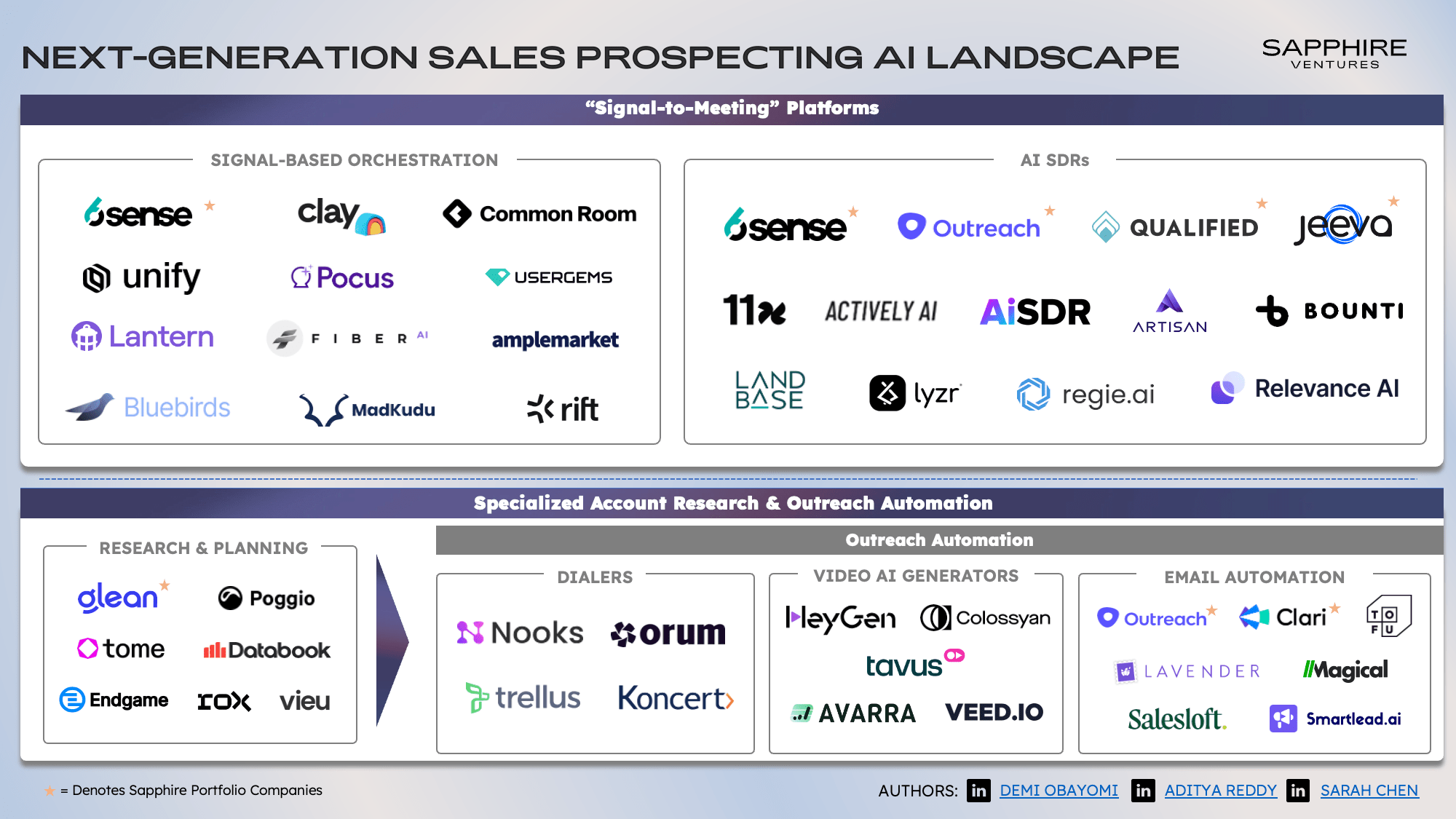
Discover the top AI tools for sales prospecting in 2025 that can boost your outreach, improve lead quality, and streamline your sales process with innovative technology.
In today’s competitive sales landscape, leveraging artificial intelligence has become essential for prospecting effectively. As we look ahead to 2025, a variety of AI-powered tools are transforming how sales teams identify and engage potential customers. From automating outreach to analyzing data for better targeting, these technologies help sales professionals work smarter, not harder. Whether you’re a seasoned sales veteran or just starting out, understanding the best AI tools available can give you a significant edge in building meaningful customer relationships and closing deals faster. Let’s explore the top AI solutions that are shaping the future of sales prospecting in 2025.
Understanding AI in Sales Prospecting
What is AI-powered sales prospecting?
Imagine having a super-smart assistant that not only helps you find potential clients but also predicts who’s most likely to buy, when they’re ready, and how to approach them. That’s essentially what AI-powered sales prospecting tools do. These tools leverage artificial intelligence to automate and optimize the process of identifying and qualifying leads, making sales efforts more targeted and efficient. Instead of sifting through endless lists or relying solely on gut feeling, sales teams can now use AI algorithms that analyze vast amounts of data—from social media activity and website visits to industry trends and company financials—to pinpoint prospects with the highest potential.
In simple terms, AI for sales in the US, and globally, transforms raw data into actionable insights. It’s like having a crystal ball that helps salespeople focus their energy on the right people at the right time. Whether it’s through machine learning models that recognize patterns or natural language processing that understands customer intent, AI sales prospecting tools are revolutionizing how businesses approach lead generation and qualification.
Benefits of using AI tools in sales
Efficiency Boost: Traditional prospecting can be a time-consuming game of trial and error. AI tools automate data collection, lead scoring, and outreach suggestions, freeing up sales reps to focus on closing deals rather than hunting for leads.
Better Lead Quality: AI algorithms analyze multiple data points to identify prospects who are genuinely interested and ready to buy, reducing wasted effort on cold leads.
Personalization at Scale: Using AI, sales teams can craft highly personalized messages based on a prospect’s behavior, preferences, and pain points, all at scale. This increases engagement and conversion rates.
Predictive Analytics: AI doesn’t just tell you who to target; it predicts future buying behaviors, helping sales teams prioritize leads most likely to convert soon.
Data-Driven Decisions: With AI, sales strategies are based on concrete data rather than intuition, leading to more consistent and successful outcomes.
Competitive Edge: Companies using the best sales prospecting software 2025 and AI sales prospecting tools stay ahead of the curve, adapting quickly to market changes and customer needs.
How AI is changing the sales game in 2025
Fast forward to 2025, and the landscape of sales prospecting has been completely reshaped by AI. The best sales prospecting software 2025 isn’t just about automation; it’s about intelligent automation that learns and evolves with your business. Here’s how AI is truly changing the sales game:
Hyper-Personalization: AI tools now craft individualized outreach messages that resonate deeply with prospects. They analyze social media activity, recent news, and even tone of voice to tailor communications that feel genuine and relevant.
Real-Time Insights: Sales teams have access to real-time data streams, allowing them to adjust their strategies on the fly. For example, if a prospect shows increased engagement, AI can suggest the perfect moment to follow up.
Automated Lead Qualification: AI-driven lead scoring models continuously update based on new data, ensuring sales reps focus on the most promising leads without second-guessing.
Enhanced Customer Understanding: AI tools synthesize customer data from multiple sources, providing a 360-degree view of prospects. This helps salespeople understand pain points, preferences, and buying triggers more deeply than ever before.
Predictive Sales Forecasting: Using historical data and machine learning, AI can forecast sales trends and individual deal probabilities, enabling smarter pipeline management.
Integration with Other Technologies: AI seamlessly integrates with CRM systems, marketing automation, and communication platforms, creating a unified ecosystem that boosts overall sales productivity.
Reduced Bias and Improved Diversity: AI can help eliminate unconscious biases in prospecting by focusing purely on data-driven signals, fostering more diverse and inclusive sales pipelines.
In the US and worldwide, businesses leveraging AI for sales are not just keeping up—they’re setting the pace. As AI continues to advance, the best sales prospecting software 2025 will become even more intuitive, proactive, and capable of turning raw data into revenue faster than ever before. If you’re looking to stay competitive, embracing AI in your sales strategy is no longer optional; it’s essential.
Top Features to Look for in Sales Prospecting AI Tools
Lead Scoring and Prioritization
When diving into the world of AI sales prospecting tools, one of the first things to consider is how effectively they can help you identify and prioritize your best leads. In the competitive landscape of the best sales prospecting software 2025, AI for sales in the US has become a game-changer, enabling sales teams to focus their efforts where it counts. Lead scoring and prioritization are at the heart of this transformation.
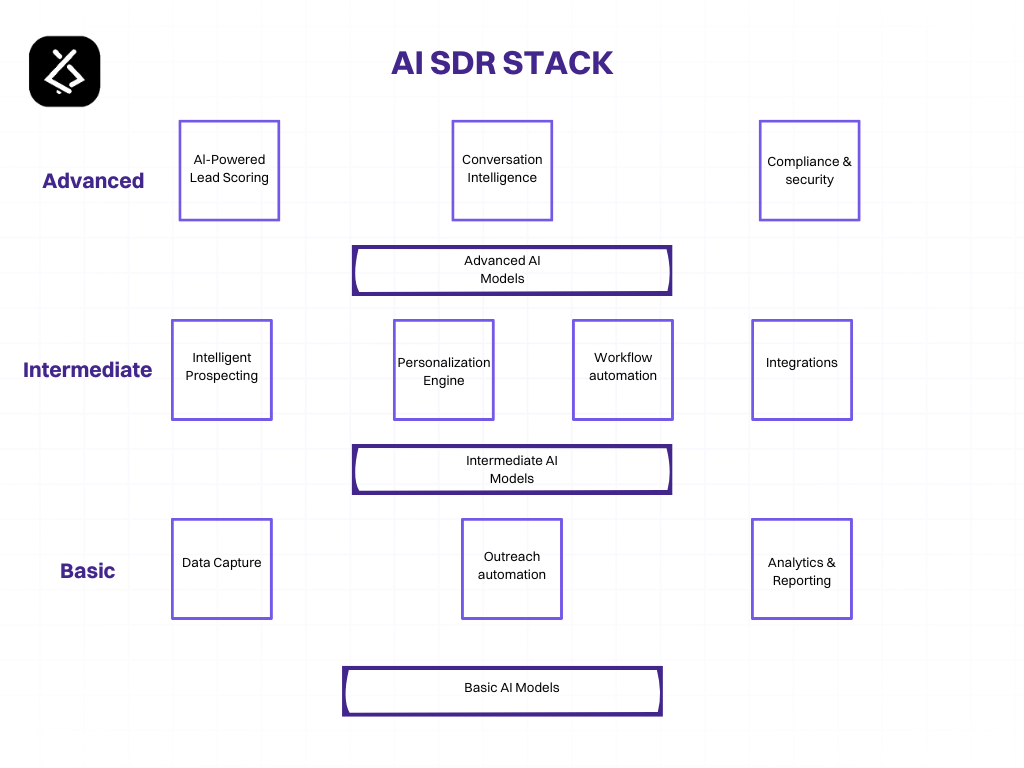
Imagine having a smart assistant that sifts through mountains of data—company size, industry, engagement history, website activity, social media interactions—and assigns a score to each prospect. This score indicates how likely they are to convert, allowing your team to focus on high-potential leads first. The best AI sales prospecting tools leverage machine learning algorithms that continuously learn from your sales outcomes, refining their scoring models over time.
For example, an AI tool might notice that prospects from a particular industry or company size tend to convert faster or generate higher revenue. It then adjusts its scoring criteria accordingly, giving you a dynamic, real-time view of your most promising opportunities. This not only saves time but also increases your chances of closing deals faster and more efficiently.
Moreover, lead prioritization isn’t just about numerical scores; it also involves contextual insights. Some AI tools can highlight why a certain lead is hot—perhaps because they’ve recently engaged with your content or shown intent signals. This layered understanding helps sales reps craft personalized outreach strategies, making every interaction more meaningful.
Automated Outreach and Follow-ups
Next up, let’s talk about automation—specifically, automated outreach and follow-ups. In the era of AI for sales in the US, automation is no longer a luxury; it’s a necessity. The best sales prospecting software 2025 offers features that can handle initial contact, follow-up emails, and even scheduling calls without your team lifting a finger.
Picture this: a prospect downloads a whitepaper or attends a webinar. An AI-powered system instantly recognizes this engagement, and within minutes, it sends a personalized follow-up email tailored to their interests. This kind of timely, relevant outreach increases the chances of conversion and keeps your brand top of mind.
Furthermore, AI tools excel at managing follow-up sequences. They can automatically send reminders, adjust messaging based on the prospect’s responses, and even suggest the best times to reach out. This ensures that no lead falls through the cracks due to oversight or busy schedules.
Some advanced AI sales prospecting tools also integrate with your CRM and email platforms, enabling seamless communication workflows. This integration means your sales reps can focus on high-value activities like closing deals, while the AI handles the repetitive, yet crucial, outreach tasks. As a result, your team becomes more productive, and your pipeline stays consistently active.
Data Enrichment and Contact Insights
Last but definitely not least, data enrichment and contact insights are vital features to look for in AI sales prospecting tools. In a landscape flooded with information, having access to comprehensive, up-to-date contact data can make all the difference.
AI for sales in the US has made it possible to automatically gather and update contact details, social profiles, company information, and recent news about prospects. This enriched data provides your team with a 360-degree view of each lead, enabling more personalized and relevant outreach.
For instance, if an AI tool detects that a prospect recently announced a new product launch or received funding, your sales team can tailor their messaging to align with these developments. This level of insight demonstrates genuine interest and understanding, which can significantly boost engagement rates.
Additionally, data enrichment helps fill in gaps where your existing CRM data might be incomplete or outdated. By continuously updating contact information and insights, AI tools ensure your outreach efforts are based on the most accurate and current data available.
Many AI sales prospecting tools also integrate with third-party data providers, expanding your reach and giving you access to a broader universe of potential leads. This expanded view can uncover hidden opportunities and help you build a more robust pipeline.
Best AI Tools for Sales Prospecting in 2025
Tool 1: Outreach AI
When it comes to AI sales prospecting tools, Outreach AI stands out as a real game-changer for sales teams in the US and beyond. As one of the best sales prospecting software 2025, it leverages artificial intelligence to streamline and personalize outreach efforts, making the entire process more efficient and effective. If you’re looking to harness AI for sales in the US, Outreach AI offers a suite of features that can help you identify, engage, and convert prospects faster than ever before.
One of the key strengths of Outreach AI is its ability to analyze vast amounts of data to predict which prospects are most likely to convert. This predictive analytics capability means your sales team can focus their efforts on high-potential leads, saving time and resources. Plus, the platform automates follow-up sequences, ensuring no opportunity slips through the cracks. The AI-driven insights also help in crafting personalized messages that resonate with prospects, boosting engagement rates.
Another aspect that makes Outreach AI a top contender among AI for sales in the US is its seamless integration with existing CRM systems and sales tools. This interoperability means your team can operate within familiar environments while benefiting from AI enhancements. Whether it’s automating email sequences, scheduling calls, or tracking engagement, Outreach AI simplifies complex workflows, allowing sales reps to focus on building relationships rather than managing data.
Tool 2: Apollo.io
Next up is Apollo.io, a powerhouse in the realm of AI sales prospecting tools. Recognized as one of the best sales prospecting software 2025, Apollo.io combines a comprehensive database with intelligent AI features to help sales teams find and connect with the right prospects. Its robust platform is especially popular among startups and SMBs in the US looking to scale their outreach efforts without breaking the bank.
What sets Apollo.io apart is its vast, constantly updated database of contacts and company information. This wealth of data, coupled with AI-driven algorithms, allows users to perform highly targeted searches based on industry, company size, location, and other criteria. The AI then suggests the most promising leads, enabling sales teams to prioritize their outreach efforts effectively.
Moreover, Apollo.io’s AI capabilities extend to email sequencing and engagement tracking. The platform can analyze open rates, click-throughs, and reply patterns to optimize messaging strategies. Its smart automation features help in nurturing leads over time, ensuring that prospects stay engaged throughout their buyer journey. For sales professionals in the US looking for a versatile, data-rich AI for sales in the US, Apollo.io offers an intuitive interface and powerful tools that make prospecting less of a chore and more of a strategic advantage.
Tool 3: InsideView
Finally, InsideView is a name that resonates with many sales teams seeking a comprehensive AI sales prospecting tool. Known for its deep market intelligence and real-time data updates, InsideView is often hailed as one of the best sales prospecting software 2025 for organizations that need accurate, up-to-date information to fuel their outreach efforts.
InsideView’s AI engine continuously scours the web and various data sources to provide sales teams with fresh insights about prospects and target markets. This real-time intelligence helps in crafting highly personalized and relevant outreach campaigns, which are crucial for success in a competitive landscape like the US market.
Beyond data, InsideView offers robust integration capabilities with popular CRM platforms, allowing sales reps to access insights directly within their workflow. Its AI-driven recommendations help identify cross-sell and upsell opportunities, as well as potential new markets. For sales teams in the US, especially those operating in complex or highly regulated industries, InsideView provides a layer of confidence and precision that can significantly boost prospecting success rates.
Emerging Trends in AI for Sales Prospecting
Predictive analytics and forecasting
When it comes to AI sales prospecting tools, predictive analytics and forecasting are truly game-changers. Imagine having a crystal ball that not only shows you who’s most likely to buy but also when they’re most receptive. That’s exactly what AI for sales in the US is beginning to deliver. These tools analyze vast amounts of historical data—think past interactions, purchase patterns, industry trends, and even social media activity—to identify signals that predict future behavior.
For sales teams aiming for the best sales prospecting software 2025, integrating predictive analytics means shifting from reactive to proactive strategies. Instead of cold calling a broad list of leads, AI helps prioritize prospects who are most likely to convert soon. This not only saves time but also boosts conversion rates significantly. For example, an AI-powered platform might flag a lead as “hot” because of recent website visits combined with increased engagement on social media, indicating high buying intent.
Moreover, these tools continuously learn and refine their predictions. As more data flows in, they become smarter, offering more accurate forecasts. This dynamic aspect of AI for sales in the US ensures that sales teams stay ahead of market shifts and customer needs, making their outreach more targeted and effective. In essence, predictive analytics turns raw data into actionable insights, empowering sales pros to focus their efforts where it counts most.
Integration with CRM systems
One of the most exciting trends in AI sales prospecting tools is seamless integration with CRM systems. Think of CRM as the nerve center of your sales operations—housing all your contacts, interactions, deals, and notes. Now, imagine AI working behind the scenes within that ecosystem, enhancing every touchpoint. This integration means that AI doesn’t just analyze data in isolation; it enriches your existing CRM data, providing real-time suggestions, lead scoring, and next-best actions.
For the best sales prospecting software 2025, integration is key. AI can automatically update lead profiles with new information gleaned from emails, social media, or website visits. It can also identify gaps in your data, prompting sales reps to gather missing details, ensuring your CRM remains a goldmine of accurate insights. This synergy reduces manual data entry and minimizes human error, freeing up your team to focus on building relationships rather than data management.
In the US, where sales cycles can be complex and competitive, AI-CRM integration helps teams stay organized and responsive. For instance, if a prospect shows increased engagement, the AI can alert the sales rep with recommended messaging or outreach timing. Plus, with AI-driven automation, repetitive tasks like follow-up emails or scheduling can be handled effortlessly, keeping the sales pipeline flowing smoothly. Ultimately, integrating AI with CRM systems transforms static data into a dynamic, intelligent sales engine.
Personalization at scale
Personalization has always been a cornerstone of successful sales, but doing it at scale has been a challenge—until now. Thanks to advances in AI for sales in the US, personalization at scale is becoming not just feasible but standard practice. AI sales prospecting tools can analyze individual customer data—preferences, behavior, purchase history—and craft tailored messages that resonate on a personal level.
Imagine sending a personalized email that references a recent webinar a prospect attended, their specific pain points, and how your solution can help—automatically generated by AI. This level of customization was once only possible for small segments or high-value clients, but now, AI allows sales teams to reach hundreds or thousands of prospects with personalized content in seconds.
For the best sales prospecting software 2025, this trend means leveraging natural language processing (NLP) and machine learning to create dynamic content that adapts to each recipient. AI can also predict the best communication channels and optimal times to reach prospects, increasing engagement rates. In the competitive landscape of AI for sales in the US, personalization at scale helps build trust and rapport faster, turning cold leads into warm opportunities without overwhelming your sales team.
Furthermore, AI-driven personalization extends beyond emails. It can tailor website experiences, recommend relevant content, and even customize sales pitches based on real-time data. This holistic approach ensures that every touchpoint feels relevant and human, even when scaled across large audiences. As AI continues to evolve, the ability to deliver hyper-personalized experiences at scale will be a defining factor for sales success in 2025 and beyond.
How to Choose the Right AI Tool for Your Sales Team
Assessing your sales needs
Before diving into the sea of AI sales prospecting tools, it’s crucial to understand what your sales team actually needs. Not all AI for sales in the US is created equal, and selecting the best sales prospecting software 2025 depends heavily on your specific goals. Are you looking to generate more leads, improve your outreach, or streamline your sales process? Pinpointing these needs will help you focus on tools that truly add value.
Start by asking yourself some key questions: What stages of the sales funnel are most challenging? Do you need better data insights, faster lead qualification, or more personalized outreach? For example, if your team struggles with identifying high-quality prospects, AI sales prospecting tools that excel at lead scoring and predictive analytics might be the way to go. If your challenge is nurturing cold leads, look for AI solutions that offer intelligent email sequencing and engagement tracking.
Remember, the goal isn’t to find the most hyped AI for sales in the US but to find the one that fits your unique sales process. Take time to analyze your current workflows, identify bottlenecks, and determine where AI can make the most impact. This clarity will serve as your compass in choosing the right AI sales prospecting tools that align with your sales objectives and help you stay ahead in the competitive landscape.
Budget considerations
When it comes to AI for sales in the US, budget is often a deciding factor. The best sales prospecting software 2025 spans a wide price range, from free or low-cost options to premium enterprise solutions. It’s tempting to go for the most advanced AI sales prospecting tools, but you need to balance features with your financial capacity.
Start by setting a clear budget range. Are you a small startup looking for affordable, easy-to-implement AI tools? Or are you a large enterprise willing to invest in comprehensive solutions that integrate deeply with your existing CRM and sales platforms? Remember, some AI tools charge per user, per lead, or have tiered pricing based on features. Be sure to understand what’s included in each plan and whether there are hidden costs like onboarding, training, or ongoing support.
Additionally, consider the ROI. Will investing in a more expensive AI for sales in the US significantly boost your conversion rates or shorten your sales cycle? Sometimes, spending a bit more upfront on a robust AI sales prospecting tool can pay off in the long run through increased efficiency and revenue. Don’t forget to explore free trials or demos to test whether the software aligns with your needs before making a commitment.
Ease of integration and user-friendliness
Even the most powerful AI sales prospecting tools won’t do much good if they’re a nightmare to integrate or use. When evaluating AI for sales in the US, prioritize solutions that seamlessly fit into your existing tech stack. Does the tool integrate smoothly with your CRM, email platforms, and marketing automation systems? Compatibility is key to avoiding data silos and ensuring a smooth workflow.
Look for AI sales prospecting tools that offer straightforward onboarding, clear user interfaces, and minimal learning curves. Sales teams are often busy, and complicated software can lead to frustration and underutilization. User-friendliness isn’t just about aesthetics; it’s about how intuitively your team can leverage the AI’s features to boost productivity.
Consider requesting a demo or trial period to assess how easily your team can adopt the new tool. Ask questions like: How much training is needed? Is there ongoing support? Will the AI suggestions and insights be understandable and actionable? The more intuitive the tool, the faster your team can start reaping the benefits, making it a worthwhile investment in the long run.
Implementing AI Tools Successfully in Sales Processes
Training Your Team
So, you’ve decided to bring AI sales prospecting tools into your sales process—great move! But the real magic happens when your team knows how to leverage these tools effectively. Think of AI for sales in the US as a shiny new gadget; without proper training, it’s just an expensive paperweight. To get the most out of the best sales prospecting software 2025, you need to invest in comprehensive training that demystifies AI and makes it accessible.
Start with foundational sessions that cover what AI is and how it fits into your sales strategy. Break down complex concepts into bite-sized, relatable examples—like how AI can identify high-potential leads faster than a human eye can scan a spreadsheet. Use real-world scenarios that resonate with your team’s daily routines, so they see immediate value.
Next, provide hands-on workshops where your salespeople can interact with AI sales prospecting tools firsthand. This could include simulated prospecting sessions, where they practice using AI to identify leads, prioritize outreach, or personalize messaging. Remember, familiarity breeds confidence. The more your team interacts with these tools, the more natural it will feel to incorporate them into their workflows.
Also, consider ongoing training programs. AI technology evolves rapidly, and staying updated is crucial. Regular refresher courses, webinars, or even quick tip sessions can keep your team sharp and eager to explore new features or best practices. Don’t forget to create a culture where questions are encouraged—sometimes, a quick chat about a hiccup can turn into a valuable learning opportunity.
Finally, champion a mindset shift. Encourage your team to see AI not as a replacement but as an assistant—an enabler that handles repetitive tasks, freeing them up for more strategic, high-value interactions. When your team understands that AI is there to augment their skills, adoption becomes smoother, and the benefits multiply.
Setting Clear Goals and KPIs
Before diving headfirst into AI sales prospecting tools, it’s essential to set clear, measurable goals. What exactly do you want to achieve with AI for sales in the US? Are you aiming to increase lead volume, improve lead quality, shorten sales cycles, or boost conversion rates? Clarifying these objectives helps you choose the right tools and tailor your approach accordingly.
Once your goals are in place, define specific KPIs that will help you track progress. For example, if your goal is to enhance prospecting efficiency, KPIs might include the number of qualified leads generated per week, the response rate to outreach, or the time spent per prospect. If you’re focusing on improving conversion rates, monitor the percentage of leads that move from initial contact to closed deals.
It’s also helpful to set benchmarks based on historical data. How did your team perform before implementing AI tools? Establishing a baseline allows you to measure the actual impact of AI sales prospecting tools against your previous performance. Remember, the goal isn’t just to use AI for the sake of it but to achieve tangible results that align with your overall sales strategy.
Communicate these goals and KPIs clearly to your team. Transparency ensures everyone understands what success looks like and how their efforts contribute to broader business objectives. Regular check-ins—weekly or monthly—are vital to assess progress, discuss challenges, and recalibrate strategies if needed.
And don’t forget to celebrate wins! Whether it’s hitting a target number of high-quality leads or reducing the time to close a deal, acknowledging progress boosts morale and encourages continued adoption of AI tools.
Monitoring and Optimizing AI Usage
Implementing AI sales prospecting tools isn’t a set-it-and-forget-it kind of deal. To truly harness their power, you need to keep a close eye on how they’re being used and continuously optimize their performance. Think of it as tending a garden—regular watering, pruning, and adjusting for growth.
Start by establishing dashboards that provide real-time insights into key metrics. These could include lead engagement rates, AI-generated lead quality scores, or the accuracy of AI predictions. Use these insights to identify patterns—are certain scripts or outreach times yielding better responses? Is the AI accurately identifying high-potential prospects?
Gather feedback directly from your sales team. They’re on the front lines and can provide invaluable insights into what’s working and what’s not. Maybe the AI is flagging leads that aren’t a good fit, or perhaps the messaging suggestions need tweaking. Regular feedback loops help you fine-tune the tools and ensure they’re aligned with your sales realities.
Furthermore, stay updated on the latest developments in AI for sales in the US. The landscape is evolving fast, and new features or integrations could significantly boost your results. Participate in webinars, industry forums, or vendor demos to stay ahead of the curve.
Optimize by experimenting with different settings, algorithms, or integrations. For example, if your AI prospecting tools allow for customization based on industry or buyer persona, adjust these parameters to better target your ideal clients. A/B testing different outreach sequences generated by AI can also reveal what resonates most with your prospects.
Lastly, set aside time for periodic reviews—monthly or quarterly—to evaluate overall AI performance. Are you meeting your KPIs? Are there bottlenecks or gaps? Use these reviews to recalibrate your approach, update training, or explore new AI features. Remember, the goal is to make your sales process smarter, faster, and more effective, and that requires ongoing attention and tweaking.
Challenges and Limitations of AI in Sales Prospecting
Data privacy concerns
One of the biggest hurdles when it comes to implementing AI sales prospecting tools is the ever-present issue of data privacy. As AI for sales in the US and beyond becomes more sophisticated, it relies heavily on vast amounts of customer data to generate insights and automate outreach. But with stricter regulations like GDPR in Europe, CCPA in California, and other privacy laws, companies need to tread carefully. If not managed properly, using AI for sales in the US can lead to legal complications, hefty fines, and damage to brand reputation.
Imagine deploying the best sales prospecting software 2025 without considering how it handles personal data—suddenly, you’re facing a data breach or a privacy lawsuit. This not only disrupts your sales pipeline but also erodes customer trust. Many organizations are now investing in secure data management systems and ensuring that their AI tools are compliant with privacy standards. Still, the challenge remains: how do you balance the power of AI in sales with the ethical and legal responsibilities of data privacy?
Another layer to this issue is the transparency of AI algorithms. Customers and prospects are increasingly aware of how their data is used. If AI sales prospecting tools operate as a “black box”—meaning users don’t understand how decisions are made—it can lead to skepticism and reluctance to engage. Transparency and consent are becoming non-negotiable, making data privacy concerns a critical limitation for AI in sales.
Over-reliance on automation
While AI for sales in the US and other regions offers incredible efficiency, there’s a fine line between leveraging automation and losing the human touch. Over-reliance on AI for sales can lead to a scenario where sales teams become too dependent on automated processes, losing the personal connection that often seals the deal.
Think about it: AI tools can generate leads, score prospects, and even send personalized emails. But can they truly replace the nuanced understanding and emotional intelligence of a seasoned salesperson? Probably not. Over-automating your sales prospecting efforts might result in prospects feeling like they’re just another number in the system, rather than valued individuals.
Moreover, excessive automation can cause a disconnect in communication. Automated messages might lack the warmth, empathy, or contextual understanding that a human can provide. This can lead to lower engagement rates and missed opportunities. The best sales prospecting software 2025 will need to strike a balance—using AI to augment human efforts rather than replace them entirely.
Another concern is that over-reliance on automation can lead to a kind of complacency. Sales teams might stop developing their skills, relying instead on AI-generated insights and outreach. This can be risky if the AI tools encounter errors or limitations, leaving teams unprepared to handle complex or unexpected situations.
Accuracy and bias issues
AI for sales in the US and elsewhere is only as good as the data it’s trained on. If the underlying data contains biases or inaccuracies, these issues can be amplified by AI sales prospecting tools. For example, biased data might lead to skewed targeting, where certain demographics are unfairly favored or ignored, resulting in missed opportunities or ethical dilemmas.
Accuracy is another major concern. AI models can sometimes generate false positives or overlook promising prospects due to flawed algorithms or incomplete data. This can lead to wasted time and resources chasing dead ends or missing out on high-potential leads.
Bias issues can be particularly tricky. If an AI sales prospecting tool has been trained on historical data that reflects existing prejudices, it might perpetuate those biases. For instance, it might favor certain industries, company sizes, or geographic regions over others, not because they are better targets, but because of skewed data patterns.
Addressing these issues requires continuous monitoring and updating of AI models, as well as diverse and representative training datasets. Companies need to be vigilant about the ethical implications of AI in sales and ensure that their tools promote fairness and accuracy. Otherwise, the limitations of AI in sales prospecting could undermine trust and effectiveness, no matter how advanced the technology becomes in the best sales prospecting software 2025.
Future Outlook: AI and Sales Prospecting Beyond 2025
Innovations on the horizon
As we look beyond 2025, the landscape of AI sales prospecting tools is poised for some seriously exciting innovations. The best sales prospecting software 2025 is already hinting at a future where AI isn’t just a helpful assistant but a core partner in the sales process. Imagine AI systems that can not only identify high-potential leads but also predict their future needs based on behavioral patterns, social media activity, and even subtle shifts in market trends. These AI for sales in the US, and globally, will leverage deep learning and natural language processing to craft hyper-personalized outreach that feels less like cold calling and more like a trusted conversation.
One of the coolest innovations on the horizon is the integration of AI with augmented reality (AR) and virtual reality (VR). Picture a sales rep donning AR glasses that overlay real-time data about a prospect during a face-to-face meeting or virtual pitch. These AI sales prospecting tools will analyze facial expressions, tone of voice, and even micro-expressions to gauge interest and adjust the pitch dynamically. Moreover, AI will become more proactive, suggesting next steps, content, or even scheduling follow-ups based on the prospect’s engagement level.
Another game-changer will be the evolution of AI-driven predictive analytics. These tools will go beyond simple lead scoring to forecast purchasing behavior months or even years in advance. AI for sales in the US and beyond will harness vast datasets, including economic indicators, industry shifts, and social sentiment analysis, to help sales teams prioritize efforts on prospects most likely to convert. This means less time wasted on cold leads and more focus on high-value opportunities, making sales cycles shorter and more efficient.
Impact on sales careers
With all these innovations, the role of sales professionals will undoubtedly evolve. The best sales prospecting software 2025 will empower reps with insights and automation, but it also raises questions about the future of traditional sales skills. Instead of spending hours cold calling or manually researching prospects, salespeople will need to become masters of interpreting AI-generated insights and building genuine relationships based on trust and value.
For many, this shift will mean a transition from transactional selling to consultative, solution-oriented approaches. Sales careers will increasingly require familiarity with AI tools, data analysis, and even basic coding or scripting skills to customize and optimize AI for sales in the US. The most successful reps will be those who can combine their emotional intelligence with technical savvy, turning AI insights into meaningful conversations and tailored solutions.
Additionally, the rise of AI will create new roles within sales teams, such as AI trainers, data analysts, and automation specialists. These roles will support the human side of sales, ensuring that AI tools are used ethically, effectively, and in ways that enhance the customer experience. Overall, sales careers will become more dynamic, tech-driven, and strategic, with a premium placed on adaptability and continuous learning.
Preparing for ongoing AI evolution
So, how can sales professionals and organizations prepare for this ongoing AI evolution? First off, embracing a mindset of continuous learning is crucial. Staying updated on the latest AI sales prospecting tools, understanding their capabilities, and experimenting with new software will give teams a competitive edge. Attending industry conferences, participating in webinars, and engaging with AI communities can help salespeople grasp emerging trends and best practices.
Investing in training is another key step. Companies should prioritize upskilling their teams in data literacy, AI ethics, and the effective use of AI for sales in the US. This not only boosts productivity but also fosters a culture of innovation and agility. Additionally, integrating AI tools seamlessly into existing CRM systems and workflows will maximize efficiency. The best sales prospecting software 2025 will be those that are user-friendly and adaptable to different sales processes.
Furthermore, organizations need to focus on ethical AI use, ensuring transparency and fairness in how AI influences sales decisions. Building trust with prospects by being transparent about AI-driven interactions and respecting privacy will be vital for long-term success.
Finally, fostering collaboration between sales, marketing, and data science teams will unlock the full potential of AI. When these departments work together, they can develop more sophisticated models, refine targeting strategies, and create personalized experiences that resonate deeply with prospects. The future of AI and sales prospecting beyond 2025 is bright, but it requires proactive preparation, a willingness to adapt, and a commitment to leveraging technology ethically and effectively.
Conclusion
As AI continues to advance, its role in sales prospecting becomes increasingly vital for businesses aiming to stay ahead in a competitive market. The best AI tools for 2025 offer capabilities that streamline lead generation, enhance personalization, and provide valuable insights that drive smarter sales strategies. By understanding the features and benefits of these technologies, sales teams can select solutions that align with their goals and integrate seamlessly into their workflows. Embracing AI not only improves efficiency but also opens new opportunities for building stronger customer relationships and closing more deals. Staying informed about emerging trends and continuously optimizing AI usage will ensure your sales efforts remain effective in the evolving digital landscape.
This week on the app Blind there were several discussions about salaries. Specifically if technology engineer salaries have peaked.
Blind App
Google, Meta and Microsoft in particular, and some other companies in the valley, were known to pay over $1 Million for senior developers. In 2019, Google had 21 engineers making over a million and that number has most certainly gone up since. Similarly Facebook was known to have over 25 engineers making salaries over a million dollars (outside of stock RSUs and options).
To be fair, in the valley, a million dollars is a lot, but not unusual.
The discussion on Blind, the anonymous networking app, was if mid-level and senior engineers will no longer see $500K – $1M salaries without becoming Directors or VPs.
There are 3 trends to consider before I came to the conclusion that software development salaries will become more like Hollywood or professional sports salaries.
Few people at the top make a lot of money, while most B list actors make decent, but not more than the median income.
With the flattening of the organization, Meta & others are seeking to be more like Amazon where there are certain metrics on span of control and ownership – minimum 6 people reporting to a manager and Directors should have at least 6-8 managers, which means their organization would be 50 – 100 people minimum. This means more developers per manager, and with AI, this will likely go higher, not lower (the number of developers reporting to an engineering manager will increase is my point).
2. The use of Artificial intelligence tools such as CoPilot and Tabnine will reduce the number of developers needed, as AI increasingly does a lot of the basic code output. This means a 10X developer will have to make 10X more than the average. If the average developer makes $150K, it makes sense for the 10X developer to make more than a million dollars.
3. 90% of the skills developers possess will become worth a tenth (e.g. actual writing of code that is reusable), but 10% of their skills (e.g. communicating with users and rapid iteration) will become more 10X more valuable.
Given these 3 trends, I predict that most developers will see their salaries remain same ($150K or so in the US as the median), but there will be far fewer developers in each team & organization.
At the same time a 1or 2 developers in each team or organization will make $1 million or more, even though they are not the manager.
In the poll yesterday by Zigantic, over 40% of developer (n=1362) expected their salaries to go dramatically lower. Which I dont think will happen.
While I understand the fear developers have, that’s not what I think is the way CEO’s and managers think. To prevent loss of morale, they will just hire fewer developers and make the current developers do more with AI.
“Zero to One” is a book that challenges entrepreneurs to think beyond incremental progress and instead aim to create something new and valuable, to go from “zero to one.”
Written by Peter Thiel, a Silicon Valley entrepreneur and venture capitalist who co-founded PayPal and was an early investor in Facebook, the book presents a contrarian view of business and innovation.
Zero to One Book
Thiel argues that competition is overrated and that startups should aim to create monopolies, as they provide the most value to both the company and society.
He also stresses the importance of having a clear vision for the future and the ability to execute on that vision, as well as the need for a strong team.
Created with Nighcafe AI
He argues that startups should focus on creating something new and unique, rather than simply competing in existing markets.
The Hollywood script summary!
If I were younger, created by Dall-E
FADE IN:
We open on PETER THIEL, a brilliant and eccentric entrepreneur, sitting in his office in Silicon Valley. He’s deep in thought, staring at a whiteboard covered in equations and diagrams.
PETER THIEL (V.O.) The world is changing faster than ever, but progress seems to have slowed down. We need to find a new path to innovation.
We see a montage of Silicon Valley tech companies, all working on incremental improvements to existing products. PETER THIEL shakes his head in disappointment.
PETER THIEL (V.O.) We’re stuck in a world of competition, where everyone is fighting over a slice of the same pie. What we need is a new philosophy of innovation. We need to go from zero to one.
PETER THIEL starts writing furiously on a notepad, scribbling down his ideas. We see glimpses of his past – co-founding PayPal, investing in Facebook – as he talks about the importance of building something new and revolutionary.
PETER THIEL (V.O.) We can’t just copy what’s already been done. We need to create something that’s never existed before.
We see PETER THIEL giving a lecture to a group of young entrepreneurs, urging them to take risks and think big. He talks about the power of monopoly, and how creating a unique product or service is the key to success.
PETER THIEL Competition is for losers. If you want to create something truly great, you need to find a way to be the only one doing it.
We see PETER THIEL mentoring a young startup founder, pushing her to think beyond the bounds of what’s possible. We see the company grow and succeed, thanks to PETER THIEL’s guidance.
PETER THIEL (V.O.) The world needs more innovation, more creativity, more boldness. It’s time to go from zero to one.
In 2018 I joined an eCommerce company as the CTO. The company had fired its founder and replaced him with a new CEO.
The company has about 250 people, but just before the founder was fired, they had about 400. So they lost over 35% of their staff.
Over the next three years revenue went up and stabilized after a tumultuous period of ups and downs. The company went from 250 to about 90 people during that period.
Revenue was up after 3 years. Website was better performing, conversions were up and staff morale was better. But, the number of employees was down 75% from the peak.
That is when I realized that although well meaning and intended, most companies overhire during their “growth phase”.
The rise of filler jobs
The problem is “filler jobs”. Instead of automating processes or eliminating features, executives add more people to attempt to “move faster”.
These jobs should have never been there in the first place. Instead, taking a little time to remove under-utilized features that don’t deliver for customers is one approach. Or automating a task using a temporary developer or contractor.
I don’t know the exact number of people companies have in excess, doing “filler jobs”. My estimate is 33%.
Most companies have 33% extra staff
I say 33% since you can safely cut a third of your staff if you are over 50 or so people and the business will still run. You may grow the same or more than you did before. You might have a slight dip in morale but that recovers.
As AI starts to proliferate in the workplace I see companies starting to have rolling layoffs. That will become the norm.
The reason is now CEOs realize many jobs are filler jobs. Second, Elon Musk with Twitter has shown that it’s okay to reduce staff and still have a functioning site. Third, AI will force people to leverage technology to do more in their job or be eliminated.
While the best approach to be ahead of the curve is to invent a trend, many people dont have the luxury of time from their day job to invent or keep on top of trends within their industry or overall.
While many people are good at observing and keeping their eyes wide open, most people would like “another pair of eyes”.
I interviewed 5 people who spot trends within B2B, Marketing, eCommerce and consumer internet to understand their process. 4 of them now pay for a trend spotting SaaS product.
My initial thesis was that Venture Capitalists and seed investors are more likely to spot trends because they get so much inbound interest.
Turns out, most VC friends were asking me for trends in Platform Engineering, SaaS Control plane and headless eCommerce engines.
If you have the time, the process for following trends is simple:
a) Follow influencers & analysts in the space you are interested in,
b) track Google Trends, Trendsmap (Twitter Trends), Join many Facebook groups, etc. and
c)Subscribe to newsletters, blogs and YouTube content creators.
Unfortunately that takes time as well.
In the last 3-4 years several Trend spotting SaaS websites have started as well.
I wanted to share the 5 most useful trend websites, since each of them focus on specific niches and have their own pros and cons.
Exploding Topics: The site has over 15K topics and trends. They do have a few newsletter for 1-3 trends and charge $39 to $299 per month for their Pro Version.
2. Trends.vc: Is a curated newsletter with top topics within a specific niche but is also a community of people (1000+) interested in trends. You can join the community ($299 annual or $99/month).
3. Treendly is similar to Exploding topics, and bills itself as Google trends “on steroids. Pricing starts at $99 per year, but the free version is a good place to start.
4. Trend Hunter is focused on ideas, trends and captures early kickstarter campaigns as well. Pricing starts at $24K per year, so this is focused on the enterprise segment.
5. Trend Watching has a self service tool, called Trend platform, that costs $900+ per month, so it is aimed at the corporate market as well.
Of the 5, I personally like Exploding topics the most. For personal use to track specific topics and areas for our business, the tool does a good job and has sufficient coverage in technology and developer trends.
In an interview Jim was asked if he would start an entrepreneurial venture now and what his advice to a young entrepreneur would be.
Understand if you’re an entrepreneur or a business person. Business people are more likely to be successful and make money because they’re doing something that’s already been done before. So a business person would copy another successful business, and that’s how business is done and money is made. If you’re an entrepreneur, then you’re doing something that hasn’t been done and might not work. So it’s a lot riskier, and the rules almost totally change in that world. Understand which world you’re in.
While I understand the sentiment, I would characterize it a little differently. Entrepreneurs are doing something new and exciting but they are also trying to build a business. No entrepreneur starts off thinking “This is a venture that I dont want to be successful or make money”.
In fact, I think most entrepreneurs are looking to innovate and make money. Business people on the other hand are arbitrageurs.
An arbitrageur attempts to profit from market inefficiencies.
Both entrepreneurs and business people are trying to solve a problem. While the entrepreneur might be looking to solve a problem with a new solution, the business person might look at solutions that exist already.
There is an ongoing meme that keeps popping up ever so often among tech entrepreneurs and gurus. That the “business plan” is dead and there is actually no sense in planning at all.
After all they say “Hands-on Entrepreneurial Action is all that is required to create a Business”.
I have enough curiosity to keep finding out which of these truisms are valid and which are not. Fortunately I also have a position that allows me to try these experiments given that I run an accelerator program.
TLDR: This is absolutely false. Poor or any planning is better than no plan at all for over 80% of startups. In fact, the earlier the stage of the startup, the more is the value of that planning.
Here is the data:
Over the last 3 years, I had the opportunity to identify, select, coach and help 87 entrepreneurs for over 4 months each. I spent about 1.3 hours per week with each entrepreneurial team. In the last 3 years, and in 6 cohorts, there have been a total of 4834 applications we have received and reviewed. Of these my team and I have talked to about 450+ (about 10%) and have met with (for atleast 15-30 min) about 250 of these entrepreneurial teams. A total of 87 of them made it into our accelerator and that’s the sample size. Of these, 89% were from India, and 11% from the US.
There are between 10-12 sprints we run at each of our 4 month acceleration programs. Customer development, technology, product management, design, go-to-market, sales, partnerships, and others. One of the sprints we also run is called the “Operating plan” sprint. I instituted this after the first cohort, when I learned that most investors did not care so much about the “demo day pitch” as much as what the company was going to do with their investment for the next 12-18 months.
So, I put together an operating plan template. Think of this as your blueprint for execution. It would spell out what you were going to do to hire, sell, develop, fund and grow your startup. I put together a template as well to help the companies think through the plan.
It stems from your top level goal first, which depending on your stage could be – get product shipped, get customers to use it, increase usage, drive sales, increase revenue, etc. The only constraint I put was to ensure that you had one goal only. Not 3 or 5, just one.
Then you want to tie in various parts of your company to achieve that one goal.
If you had to hire engineers to build product, then that needed to be spelled out. If that then requires funding, you need to spell that out as well and so on.
So each operating plan will end up having 7-9 sub “plans” for product, development, hiring, sales, marketing, funding, etc.
This planning cycle begins in the 3rd month of our program and lasts 2-3 weeks for the entrepreneurs. During this time, many entrepreneurs are busy trying to get funding and meet investors, which means they tend to have little time for “all this other planning stuff”.
Which makes for a perfect experiment with a control group and a treatment group.
In the last 5 cohorts, I have asked and then politely urged all the entrepreneurs to participate actively in the operating plan sprint. But 50% of the cohort would get another 30 min pep talk from me on its importance.
I’d urge them over a lunch or coffee the importance of doing the plan.
I would not discourage the others from doing it, but the other group I did not spend the 30 minutes with on taking the operating plan seriously. Some of them took it seriously without my urging and cajoling and most ignored it.
Now that I have the data for 3 years, I can confidently tell you that just the act of putting together an operating plan – however poor it is, increases your chances of funding and raises valuation.
I went back to the data to look for my own biases and see if the ones that I urged were “somehow better suited to raise funding and be successful regardless of my urging” anyway, and I think I have no way to really check that at all, but I am confident that the sampling error, if any, was minimal.
Of the companies that I did the extra selling to, 69% of them raised funding within 6 months of the accelerator, compared to 31% who did not.
Even the companies that took the operating plan seriously and put what I consider a poor plan, beat the ones that did not take the operating plan seriously at all by a margin of 20 basis points.