
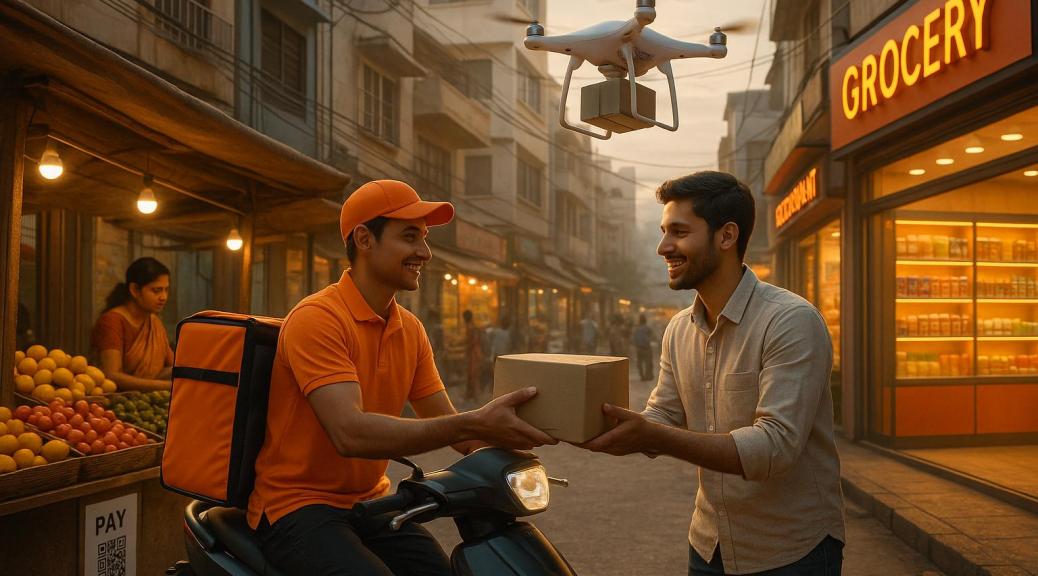
- Market Growth: Quick commerce grew from $300M in 2022 to $7.1B in 2025 and is projected to hit $40B by 2030.
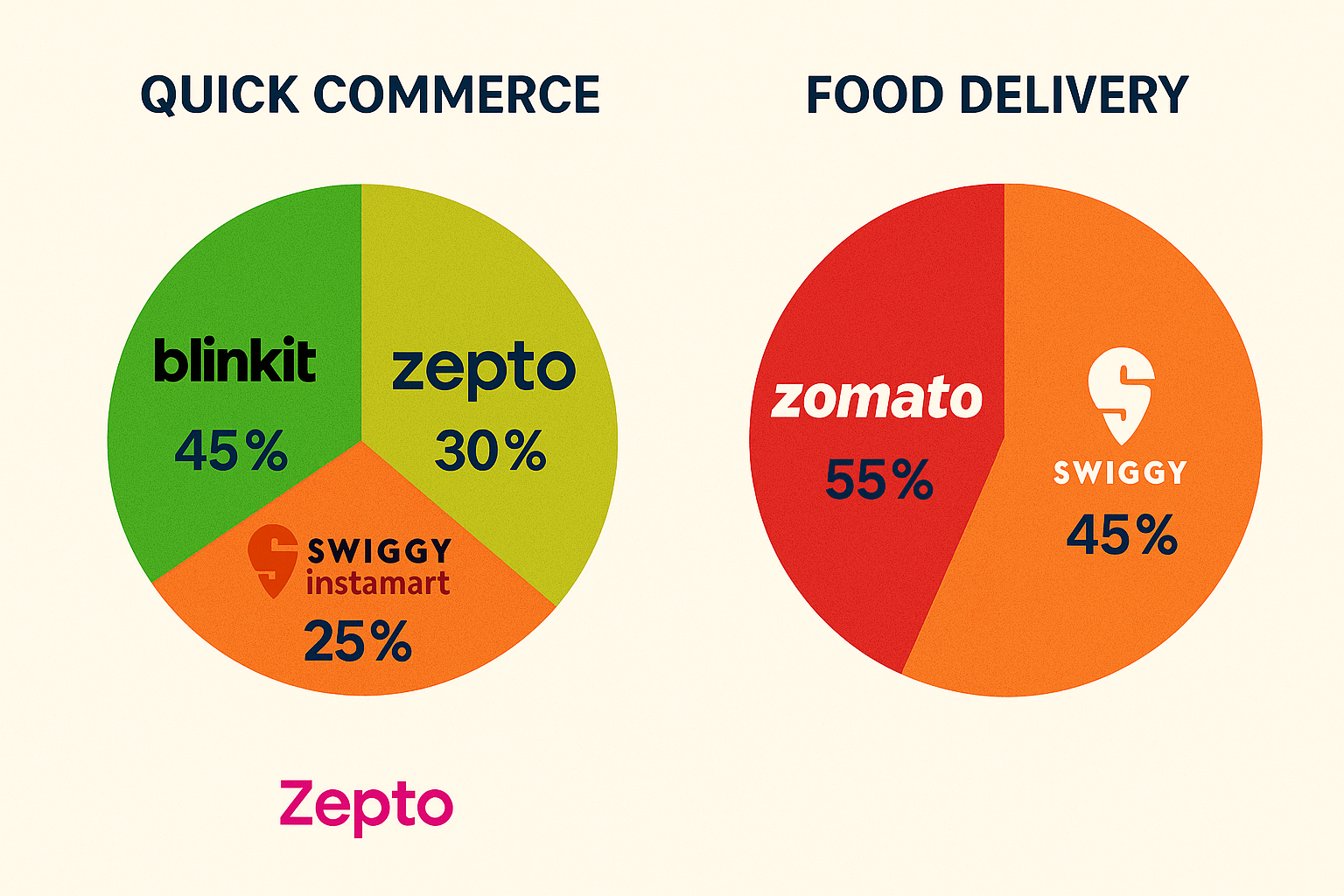
- Top Players: Blinkit leads with 45–46% market share, followed by Swiggy Instamart (25–27%) and Zepto (21–30%).
- Expanding Reach: Tier 2 and 3 cities are driving growth, contributing 60% of new e-retail customers since 2020.
- New Categories: Beyond groceries, quick commerce now includes electronics, personal care, and apparel.
- Dark Stores: Specialized hubs cut costs by 40% and enable 15–30 minute deliveries, with 1,000+ stores planned by 2027.
- AI & Automation: AI-driven inventory systems improve efficiency by 30–50%, while drones and robots are reducing delivery times.
- Sustainability: Companies are adopting green delivery methods, like electric bikes and eco-friendly packaging.
- Payment Innovations: UPI dominates, with 90% of Gen Z preferring it, alongside advanced tools like voice commands and BNPL.
- D2C Partnerships: Direct-to-consumer brands now account for 30% of sales, with 24× growth in order value since FY22.
- Market Consolidation: Mergers and new regulations are reshaping the competitive landscape, with fewer players expected by 2030.
Key takeaway: Quick commerce is not just about speed – it’s about innovation, efficiency, and meeting changing consumer demands.
Quick Commerce in 2025: Boom or Bust? |Air India + Vistara: The Business Class Battle |EV Revolution
1. Growth in Tier 2 and 3 Cities
Quick commerce is making waves beyond India’s big cities, with smaller towns and rural areas becoming key players in this transformation. Since 2020, nearly 60% of new e-retail customers have come from Tier 3 and smaller cities, showcasing spending habits that rival those in metro areas.
By 2026, these regions are expected to account for up to 50% of India’s e-commerce activity, signaling a major shift in the retail landscape.
| Market Indicator | Current State | 2026 Projection |
|---|---|---|
| E-commerce Contribution | 35% | 50% |
| Facility Cost Savings | 25–40% lower than metro areas | – |
| New Seller Origin | >60% from Tier 2+ | – |
This growth is fueled by cost advantages and changing consumer behaviors. The government is also stepping in with initiatives like the Urban Infrastructure Development Fund (UIDF), which invests INR 100 billion (about $1.3 billion) annually to support quick commerce in smaller cities.
"2025 will see rapid expansion of quick commerce as new categories (beyond Grocery) & new cities (Tier2+) drive stronger growth. We estimate 75% YoY growth in QC driving share gains." – Bernstein report
While affordability is still a priority, there’s a growing appetite for premium brands and high-quality products. The success of hyper-value platforms in these areas highlights the need for retailers to strike a balance between cost and quality.
Interestingly, over 60% of new e-retail sellers since 2021 have come from Tier 2 and smaller cities. This rise in local entrepreneurs is adding diversity to marketplaces, with logistics improvements expected to handle 45% of India’s total e-commerce volume by 2025.
Other factors driving this growth include:
- Increased trust in peer reviews and influencer recommendations
- Wider adoption of online payment systems
- Localized services catering to neighborhoods within a 3-mile radius
These developments paint a promising picture of how smaller cities are reshaping India’s e-commerce story.
2. High-End and Time-Based Products
As quick commerce spreads to new regions, it’s also diving into premium product categories – marking a shift that aligns with changing consumer preferences. By 2025, premium and non-essential orders are expected to make up 20–30% of this market’s share. This evolution, from basic necessities to high-end goods, reflects the broader transformation of retail through advanced technology, with the sector projected to grow by 73–76% in FY 2024.
| Premium Category | Growth Drivers | Market Impact |
|---|---|---|
| Electronics | Smartphones, accessories | Higher AOV, tech-savvy consumers |
| Fashion & Beauty | Trend-driven styles, personal care | $8–10B market by 2028 |
| Jewelry | High-quality ornaments | Boost during festive seasons |
| Home Appliances | Smart devices, premium gadgets | Expanded customer base |
A standout example of this premium shift is Blinkit’s collaboration with Apple Premium Reseller Unicorn Infosolutions. Together, they launched the iPhone 16 series for quick delivery, offering credit card EMI options. This move boosted Blinkit’s average order value to INR 625 (around $7.60) in Q2 2024.
Platforms are also tapping into seasonal and curated collections. Paul Hylla, founder and CEO of Besser im Glas Tee, emphasizes the importance of starting small and scaling thoughtfully:
"The key lessons would be the importance of starting small and testing the market. It’s crucial to understand your production capabilities and customer demand before scaling up".
To maintain premium quality, platforms rely on:
- Temperature-controlled logistics to handle perishables
- Real-time tracking systems to monitor premium shipments
- Specialized packaging designed for high-value items
Deepak Batra, Founder of Webdaksha, highlights the importance of precision when handling perishable goods:
"When shipping perishable goods internationally in e-commerce, ensuring timely delivery is all about precision and planning."
This trend is especially prominent in mature markets, where average selling prices are 10–25% higher than in emerging markets. Platforms are capitalizing on festive demand, with items like gold jewelry seeing a surge during major Indian celebrations.
The focus on premium products is driving rapid growth, with projections of 75–85% by 2025. To meet these demands, platforms are heavily investing in storage and delivery infrastructure to ensure both quality and timely service. This expansion continues to redefine the retail landscape.
3. Local Delivery Network Updates
Local delivery networks are transforming at a fast pace, driven by changing consumer expectations and the push for premium services. The hyperlocal delivery market is on track to grow at an impressive 14.4% CAGR, potentially hitting a massive $5.18 trillion valuation by 2030.
Leading platforms like Zepto, with its 250 hyperlocal dark stores, and Blinkit, operating 1,007 ghost stores, are adopting micro-fulfillment strategies to streamline inventory management in densely populated areas. Meanwhile, Delhivery’s 2021 partnership with FedEx Express has significantly improved cross-border logistics and delivery efficiency.
Interestingly, rural markets are becoming a key focus, as 60–65% of new internet users are emerging from these regions. To cater to this demographic, companies are rolling out localized solutions like regional warehousing, mobile tracking, interfaces in local languages, and specially trained delivery teams. ElasticRun, for example, has bridged the gap between local Kirana stores and suppliers, solving last-mile delivery challenges in areas that are hard to reach. These initiatives, powered by advanced technology, are setting new benchmarks in delivery efficiency.
Artificial intelligence is also playing a pivotal role in reshaping delivery operations. AI tools have reduced delivery times by 31% and fuel consumption by 14%. Real-time tracking has increased customer satisfaction by 28%, while predictive analytics now help forecast demand and identify potential supply chain issues.
This growing infrastructure aligns perfectly with the rise of omnichannel retailing, where 73% of shoppers use multiple platforms before making a purchase. The focus on smarter and more sustainable delivery methods not only cuts shipping costs but also supports the industry’s commitment to eco-friendly practices. This is particularly crucial, as last-mile delivery alone accounts for 53% of total shipping costs.
4. Smart Inventory Systems
AI-driven inventory management is transforming quick commerce, improving demand forecasting accuracy by an impressive 30–50%. This leap in efficiency has led to real-world success stories that highlight its potential.
For instance, White House in Hyderabad managed to cut slow-moving stock surplus by 15% and boost the availability of fast-moving products by 28% within just six months. Similarly, Being Human saw a 10% increase in full-price sell-through while reducing store inventory by 23% after adopting AI-powered inventory systems.
The impact of AI on key performance metrics is undeniable:
| Metric | Improvement |
|---|---|
| Supply Chain Errors | Reduced by 20–50% |
| Operational Efficiency | Increased by 65% |
| Workforce Management Tasks | 50% automation |
| Cost Reduction | 10–15% decrease |
Since 2020, the adoption of AI in retail has grown by 25% annually, with 90% of retailers now actively pursuing AI projects. The results speak for themselves: 87% of retailers report a positive impact on revenue, while 94% have seen operating costs drop.
"Retailers need AI tools that gather demand signals, identify products based on demand behavior, and cluster them together. AI must help determine which stores can sell a product and which cannot, with high certainty. More importantly, AI must optimize decisions."
- Chinmay Nayak, Head of Sales India at Onebeat
Smart inventory systems take the guesswork out of stock management by analyzing historical sales data, market trends, and customer behavior. These systems automatically reorder products when stock levels dip below set thresholds, significantly reducing manual effort. This seamless stock control also opens the door to adaptive pricing strategies.
But these systems go beyond just inventory management. They enable dynamic pricing, adjusting prices in real time based on demand and market conditions. This level of sophistication is becoming increasingly vital as the Indian quick commerce market edges closer to its projected $5.5 billion valuation by 2025.
One standout example is Incu, a Shopify merchant that saw a staggering 300% year-over-year sales growth after automating its inventory management with AI.
5. Rise of Dark Stores
Dark stores are specialized fulfillment hubs designed exclusively for processing online orders. Unlike traditional retail spaces, they aren’t open to walk-in customers. Positioned strategically in urban areas, these facilities aim to deliver orders within a tight 2-3 km radius, often within minutes. This setup is fueling a massive shift in the retail landscape, with the market poised for substantial growth.
Projections indicate that the total dark retail space will expand from 24 million to 37.6 million square feet between 2023 and 2027, tapping into a $150 billion opportunity across grocery and non-grocery categories .
| Aspect | Current State (2025) | Future Target (2027-28) |
|---|---|---|
| Market Valuation | $5.5 billion | $35-40 billion |
| Active Dark Stores (Blinkit) | 526 stores | 1,000 stores |
| Active Dark Stores (Swiggy) | 523 stores | 1,061 stores |
| Rental Rates (Delhi) | $1.80-2.40/sq ft/month | – |
| Rental Rates (Bangalore) | $0.60-9.40/sq ft/month | – |
Blinkit, which holds a 40% share of this market, reported an impressive 122% year-over-year growth, adding 149 new dark stores in FY24. Swiggy Instamart has also been scaling aggressively, expanding its operations from 27 cities in March 2024 to 43 cities. This rapid expansion reflects the sector’s focus on reducing costs and improving operational efficiency.
"Consumer habits are shaped in a way that they expect quicker delivery and are more used to online shopping. Dark stores are located in a way that the q-commerce platforms can deliver in 15 to 30 minutes." – Vimal Nadar, Senior Director and Head of Research, Colliers India
The cost savings are striking – fulfilling orders through dark stores cuts costs by 40% compared to traditional methods. These savings, combined with their urban locations, allow companies to offer ultra-fast deliveries while staying profitable.
Amazon is also testing the waters with its "Amazon Tez" pilot program in Bangalore. This initiative promises 10-15 minute deliveries for groceries and daily essentials, with plans to branch into beauty, home, and kitchen products.
However, the sector isn’t without challenges. Hygiene standards and property accessibility remain significant hurdles. As Ajay Rao, CEO of Emiza, explains:
"There is also a challenge in terms of the hygiene levels and the accessibility of properties. Many properties do not meet regulatory norms".
Despite these obstacles, dark stores are creating a wave of employment opportunities, with an estimated 400,000 new jobs expected by the end of 2025. In Tier 1 and Tier 2 cities, they are quickly becoming the backbone of the quick commerce ecosystem.
6. Direct-to-Consumer Brand Teams
By 2025, the fusion of quick commerce with direct-to-consumer (D2C) brands has expanded far beyond groceries, making waves in categories like electronics, fashion, and personal care. This shift is projected to fuel a sector growth of 75–85%, pushing the market’s value to approximately $5.5 billion.
The numbers speak volumes. Since FY22, partnerships between quick commerce platforms and D2C brands have resulted in a staggering 24× increase in order value. D2C brands now contribute to over 30% of total sales, with smaller cities outperforming metros by achieving 2–3 times higher sales.
| Performance Metric | Current State (2025) |
|---|---|
| Market Size | $5.5 billion |
| Order Value Growth | 24× since FY22 |
| D2C Brand Share | >30% of total sales |
| New Dark Stores (FY24) | ~2,000 stores |
| Average Sales Growth | 45% year-over-year |
These figures highlight the success stories of emerging D2C brands. Take Earth Rhythm, for instance – a beauty brand that skyrocketed its monthly sales from $6,000 to $180,000 within just 18 months on Blinkit. Another standout, 4700BC, a gourmet popcorn brand, now generates a whopping 87% of its total sales through quick commerce platforms, maintaining a 45% year-over-year growth rate.
"Among online sales from traditional e-commerce platforms like Amazon and Flipkart, and direct website sales, it’s in quick commerce that we see the highest consumer engagement. It’s now integral to our overall digital strategy", says Chirag Gupta, Founder & CEO of 4700BC.
Fashion brands are also riding this wave of innovation. For example, NEWME introduced a 90-minute delivery service in Gurugram, which received over 100 orders in just 30 minutes. Today, they cater to 18 areas across Delhi-NCR. Similarly, Decathlon and Zepto have rolled out 10-minute delivery services in 16 cities, setting a new benchmark for speed and convenience.
To thrive in this fast-paced environment, D2C brands are adopting specific strategies:
- SKU Optimization: Focus on identifying and maintaining a steady supply of high-demand products.
- Supply Chain Adaptation: Build systems capable of managing frequent, smaller dispatches efficiently.
- Margin Management: Fine-tune pricing to balance platform commissions while ensuring profitability.
- Data Analytics: Use platform data to sharpen marketing efforts and streamline inventory management.
An extensive network of dark stores plays a pivotal role in enabling these achievements. By ensuring rapid local inventory management and near-instant deliveries, these stores help meet consumers’ growing appetite for on-demand fulfillment. The result? Faster service and happier customers.
sbb-itb-6f7682a
7. New Payment Methods
Quick commerce is evolving rapidly, thanks to advancements in digital payment systems. By 2025, payment technologies are expected to play a crucial role in driving growth, with the market projected to surge from $5 billion in 2024 to $40 billion by 2030.
Among these methods, UPI (Unified Payments Interface) stands out, especially with Gen Z, as over 90% of them prefer it for transactions. In October 2024 alone, UPI handled an impressive 16.6 billion transactions, with monthly person-to-merchant transaction volumes reaching $80 billion.
| Payment Method | Transaction Fee Range |
|---|---|
| UPI | 0% – 0.25% |
| Debit Cards | 0.4% – 0.9% |
| Net Banking | 1.0% – 1.5% |
| Credit Cards | 1.5% – 2.2% |
| Digital Wallets | 1.5% – 2.5% |
| BNPL (Buy Now Pay Later) | 3.5% – 5.0% |
| International Cards | 3.0% – 4.5% |
These figures highlight the growing importance of digital payment options and pave the way for innovations aimed at improving accessibility and security.
The National Payments Corporation of India (NPCI) has taken significant steps to make digital payments more inclusive. Their UPI123Pay and Hello!UPI services enable instant transactions on feature phones using voice commands in regional languages.
"Consumers demand speed, convenience, and integration across shopping channels. To meet these demands, businesses must invest in flexible, advanced payment solutions – from digital wallets and contactless payments to embedded finance systems – that facilitate frictionless commerce."
- Rahul Kothari, Chief Operating Officer at Razorpay
The embedded finance sector is also experiencing remarkable growth, with expected revenues climbing from $4.8 billion in 2022 to $21.1 billion by 2029. For instance, Razorpay’s DigiPOS has increased customer conversion rates by 17% at Apple Premium Resellers. Similarly, their AI-powered assistant, RAY, offers businesses real-time payment insights and has cut infrastructure costs by 30%.
Recent policy changes by the Reserve Bank of India (RBI) are further enhancing the payment landscape. Interoperability across prepaid payment instruments (PPIs) via UPI now allows fully KYC-compliant PPIs to process payments through third-party apps. Upcoming features in UPI 3.0 promise to streamline transactions even more with:
- Offline payment capabilities
- International payment options
- Voice-assisted transactions
- Auto-split payment functionality
- Enhanced recurring payment features
These advancements not only improve the efficiency and security of transactions but also reinforce UPI’s position as one of the most cost-effective payment solutions available. With such developments, the payment ecosystem is perfectly aligned to support the fast-paced demands of quick commerce.
8. Automated Delivery Tests
India’s fast-growing quick commerce sector is leaning heavily on automated delivery systems. Take Skye Air in Gurugram, for example – they managed 1.2 million deliveries in 2024, averaging an impressive 150,000 packages per month.
In February 2025, Apollo Hospitals and TechEagle launched India’s first 10-Minute Diagnostic Drone Delivery (D3) service. These AI-powered drones transport liquid biopsy samples from collection centers to labs in just 10 minutes.
At Aero India 2025, ideaForge unveiled four new UAVs, including the SWITCH V2, which boasts a 25% boost in performance.
"Every minute counts in healthcare. While food and e-commerce deliveries happen in minutes, critical medical samples still take hours. That delay can be the difference between life and death. With TechEagle’s AI-powered drones, Apollo Hospitals ensures that liquid biopsy samples – essential for early cancer detection – reach labs in just 10 minutes. The healthcare industry deserves the same speed and efficiency as consumer logistics, and we’re making that a reality."
– Vikram Singh Meena, Founder & CEO, TechEagle
This shift toward automation highlights a broader trend: automated systems are poised to transform urban delivery. Experts predict that by 2030, 70% of urban deliveries will rely on automated systems. These advancements bring several benefits to the table:
- Cost Savings: Automated robots can reduce delivery costs by 25% through better route planning and traffic monitoring.
- Round-the-Clock Operations: AI systems don’t tire, ensuring consistent service at all hours.
- Faster Deliveries: Drones and robots can bypass congestion, dramatically cutting delivery times.
"At ideaForge, we innovate with purpose, creating UAVs that address the unique challenges faced by defense forces and industries. Our latest lineup – NETRA 5, SWITCH V2, Tactical UAV, and Logistics UAV – embodies our commitment to enhancing national security, operational efficiency, and industrial capability."
– Ankit Mehta, CEO, ideaForge
That said, India’s automated delivery systems still face hurdles. For instance, human delivery services remain relatively inexpensive, costing around ₹40–50 per parcel, compared to $5–6 in the U.S.. However, as technology becomes more affordable and efficiency gains grow, the scales are expected to tip increasingly in favor of automation.
9. Green Delivery Methods
Quick commerce companies in India are embracing greener delivery methods, aiming to combine fast service with a focus on sustainability. This change is driven by the fact that nearly 80% of Indian consumers are deeply concerned about sustainability and climate change.
Leading the charge in this movement are companies like Blinkit and Zepto. Blinkit has committed to cutting its carbon emissions by 30% by 2025, introducing electric delivery bikes and eco-friendly packaging in select cities. Meanwhile, Zepto has rolled out a pilot program using electric vehicles, targeting lower fuel costs and reduced emissions. These efforts are paving the way for more environmentally conscious innovations in the industry.
"Decarbonization results in cost savings, new revenue streams, and brand loyalty, in addition to ecological and social benefits." – Chandrajit Banerjee, Director General, Confederation of Indian Industry
Companies like Zypp Electric and eBikeGo are also reshaping last-mile logistics with their electric fleets and battery-swapping models. This approach minimizes charging downtime, making electric vehicles a more practical option for quick commerce operations.
Sustainability efforts extend beyond just vehicles. Swiggy Instamart, for instance, is leveraging AI-driven stock prediction and energy-efficient hubs to cut waste, aligning with the preferences of 90% of customers who favor eco-friendly packaging.
Here are some of the key green initiatives shaping the quick commerce sector in India:
| Initiative | Impact |
|---|---|
| Electric Vehicle Fleet | Cuts fuel costs and lowers emissions |
| AI-Powered Stock Management | Reduces food waste and excess inventory |
| Eco-Friendly Packaging | Replaces millions of plastic containers |
| Micro-Fulfillment Centers | Lowers energy use and shortens delivery distances |
"Consumers in India care about the environment – but it’s not the only thing on their minds. Brands can encourage more sustainable purchasing and living in India by addressing shoppers’ desires for health, quality, and cost." – Ravi Swarup, Partner, Bain & Company
Packaging innovation has been particularly impactful. Pepcom India’s shift to eco-friendly packaging has eliminated more than 6 million plastic containers. Additionally, 83% of Indian consumers rate the environmental impact of packaging as ‘important’ or ‘very important,’ significantly higher than the global average of 61%.
As India’s quick commerce market heads toward a projected value of $5 billion by 2025, environmentally responsible delivery methods are becoming essential. With over 70% of consumers considering sustainability in their buying decisions, these green initiatives are not just a trend – they’re shaping the future of the industry.
10. Market Rules and Mergers
India’s quick commerce sector is undergoing a transformation, shaped by regulatory changes and market consolidation. In 2025, new rules and mergers are redefining how companies compete. The Competition Commission of India (CCI) has rolled out regulations aimed at tackling predatory pricing and deep discounting. One key update, the 2025 Cost Regulations, introduces a pricing framework that applies across industries, including the digital economy.
"The Cost Regulations 2025 establish a sector-agnostic, cost-based framework that is flexible and adaptable to various industries, including the digital economy."
– Competition Commission of India
The market is consolidating rapidly. With 61 quick commerce startups currently operating, many are feeling the pressure to merge or exit. Meanwhile, the top three players – Zepto, Blinkit, and Instamart – have each surpassed $1 billion in revenue for FY24. By 2030, the sector is expected to claim 15% of India’s $250 billion grocery market.
| Market Aspect | Current Status | 2025 Projection |
|---|---|---|
| Major Players | 6–7 companies | Reduced number due to consolidation |
| Market Share | Top 3 players > $1B revenue | 15% of a $250B grocery market by 2030 |
| Regulatory Focus | Predatory pricing | Cost-based pricing assessment |
| Startup Count | 61 active companies | Fewer startups due to exits and mergers |
Companies are now required to review their contractual terms, adhere to stricter storage and handling rules, and ensure transparency in seller and product information.
"There are six to seven players today. That number won’t hold. Some will exit, while others will merge."
– Sumat Chopra, Partner & India Head, Kearney
Recent moves highlight this trend. Walmart has expanded its quick commerce operations to 20 cities, and Reliance Retail has successfully acquired Metro AG. As the industry shifts, businesses are adapting to updated rules around storage, labeling, and transportation while focusing on profitability rather than rapid expansion.
These developments underscore a clear shift in the market: a move toward sustainable and efficient operations. This evolution is setting the tone for the future of India’s quick commerce industry.
Market Leaders Performance Data
Data from early 2025 highlights advancements in delivery speed, fulfillment efficiency, and inventory management. These improvements showcase the strides market leaders are making in shaping the quick commerce landscape.
Companies at the forefront have significantly enhanced delivery speeds by strategically positioning dark stores and using AI-driven routing systems. For instance, Amazon’s ultra-fast delivery pilot, Amazon Tez, operating in Bangalore, consistently achieves grocery and essentials deliveries within 10–15 minutes. Alongside speed, expanding into new geographic regions has been a key growth driver.
Growth in Tier 2 and Tier 3 markets has also played a pivotal role, supported by advanced inventory systems designed to maintain optimal stock levels across varied regions. Investments in technology have further strengthened the market position of major players. Walmart, for example, has integrated AI-powered inventory systems to create a seamless network connecting its stores and fulfillment centers.
Additionally, the adoption of cloud-based inventory systems has accelerated the quick commerce sector’s evolution. This shift has fueled growth in the retail cloud market, which is projected to rise from $28.3 billion in 2024 to $81.3 billion by 2030.
These advancements reflect a market that is maturing rapidly, where sustained success hinges on balancing ultra-fast delivery, efficient inventory systems, and strategic expansion efforts.
Conclusion
Quick commerce, trend-first commerce, and hyper-value commerce are reshaping the retail landscape in India. With the market projected to grow to $5.5 billion by 2025, this shift highlights how technology and changing consumer habits are driving adoption across the country’s varied regions.
In the digital retail space, quick commerce has taken center stage, redefining how people shop and what they expect from delivery services.
"Quick commerce is uniquely positioned across Proximity, Pricing & Selection & will continue to grow at 75-100 per cent YoY vs retail at low teens" – Bernstein Report
Looking ahead, the sector is expected to maintain strong momentum, with a projected CAGR of 16.07% from 2025 to 2029, potentially reaching $9.77 billion. To keep pace with this growth, retailers need to enhance supply chains, adopt advanced inventory management technologies, and broaden their service offerings to cater to diverse customer demands.
Quick commerce is not just changing how people shop – it’s reshaping the entire retail ecosystem. With speed, efficiency, and technology at its core, this evolution marks the beginning of a new chapter in Indian retail.
FAQs
What role are Tier 2 and 3 cities playing in the growth of quick commerce in India?
Tier 2 and 3 cities in India are emerging as major players in the growth of quick commerce. With rising disposable incomes, rapid urban development, and improved internet connectivity, these regions are driving a noticeable shift in consumer behavior. People in these areas are increasingly seeking faster delivery options for a wide range of products. While groceries remain popular, the demand now extends to essentials, electronics, and more.
Improved logistics networks in these cities are helping businesses expand their reach and keep up with the growing expectations of consumers. By tailoring their strategies to meet the specific demands of these markets, companies are not only boosting their presence but also shaping the future of retail and quick commerce in India.
How do AI and automation improve the speed and efficiency of quick commerce deliveries?
AI and automation have become game-changers for speeding up quick commerce deliveries and making them more efficient. By leveraging predictive analytics, these technologies can forecast demand with impressive accuracy. This helps businesses manage inventory better, ensuring products are stocked and ready where and when customers need them. On top of that, AI enhances route planning for delivery drivers, cutting down delays and shaving valuable time off delivery schedules.
Automation takes things a step further by accelerating order processing and enabling real-time tracking of shipments. For instance, automated systems are particularly effective in handling last-mile deliveries, ensuring packages arrive on time while keeping operational costs in check. Together, AI and automation empower retailers to meet the growing demand for speed and reliability in the fast-paced world of quick commerce.
What steps are quick commerce companies in India taking to make their delivery operations more sustainable?
Eco-Friendly Practices in Quick Commerce Delivery Operations
In India, quick commerce companies are making strides toward greener delivery operations by embracing eco-friendly practices. A major shift is happening as many of these businesses are switching to electric vehicles (EVs) for their fleets. This transition significantly cuts down on carbon emissions, offering a cleaner alternative to traditional fuel-powered vehicles.
Another area of focus is reducing packaging waste. Companies are increasingly using recyclable and biodegradable materials to package their products, which helps curb the environmental impact of single-use plastics. On top of that, they’re leveraging advanced technologies to optimize delivery routes. By streamlining routes, they not only improve delivery efficiency but also reduce fuel consumption.
These changes reflect a broader movement toward sustainability, driven by the growing awareness of environmental issues among both businesses and consumers.
Related posts
https://app.seobotai.com/banner/banner.js?id=6827e57c5642a17d106c6f53






 Introduction: The Geopolitical Stakes of Semiconductors